Best AI Clothes Changers in 2026: What Actually Works
Published March 17, 2026 · OutfitGen Team
Last updated July 27, 2026
An AI clothes changer is a photo editor that changes the clothing in a picture while trying to preserve the person's face, body, pose, and background. We rechecked this comparison on July 27, 2026 across OutfitGen, Google's AI try-on flow, Kolors Virtual Try-On, Kling Try On, FASHN, and the open-source options, looking at free access, web usability, identity preservation, and whether the tool works for real people instead of only technical demos.
The quality gap is still enormous. Some tools produce realistic fabric, shadows, and necklines. Others produce a loose fashion concept that no longer looks like the original person. We tested the major options to help you figure out which ones are worth using.
Updated July 27, 2026. Three things changed since the June refresh. Google's Virtual Try-On is no longer US-only: it now runs in 18 regions and covers shoes as well as clothing. FASHN is added as a sixth pick, because a hosted try-on tool with a free no-card tier is now a real option alongside the research demos. And the open-source section is rewritten: IDM-VTON has had no code changes since July 2024 and is non-commercially licensed, so FASHN VTON 1.5 is the permissive baseline to start from in 2026.
Visual Proof
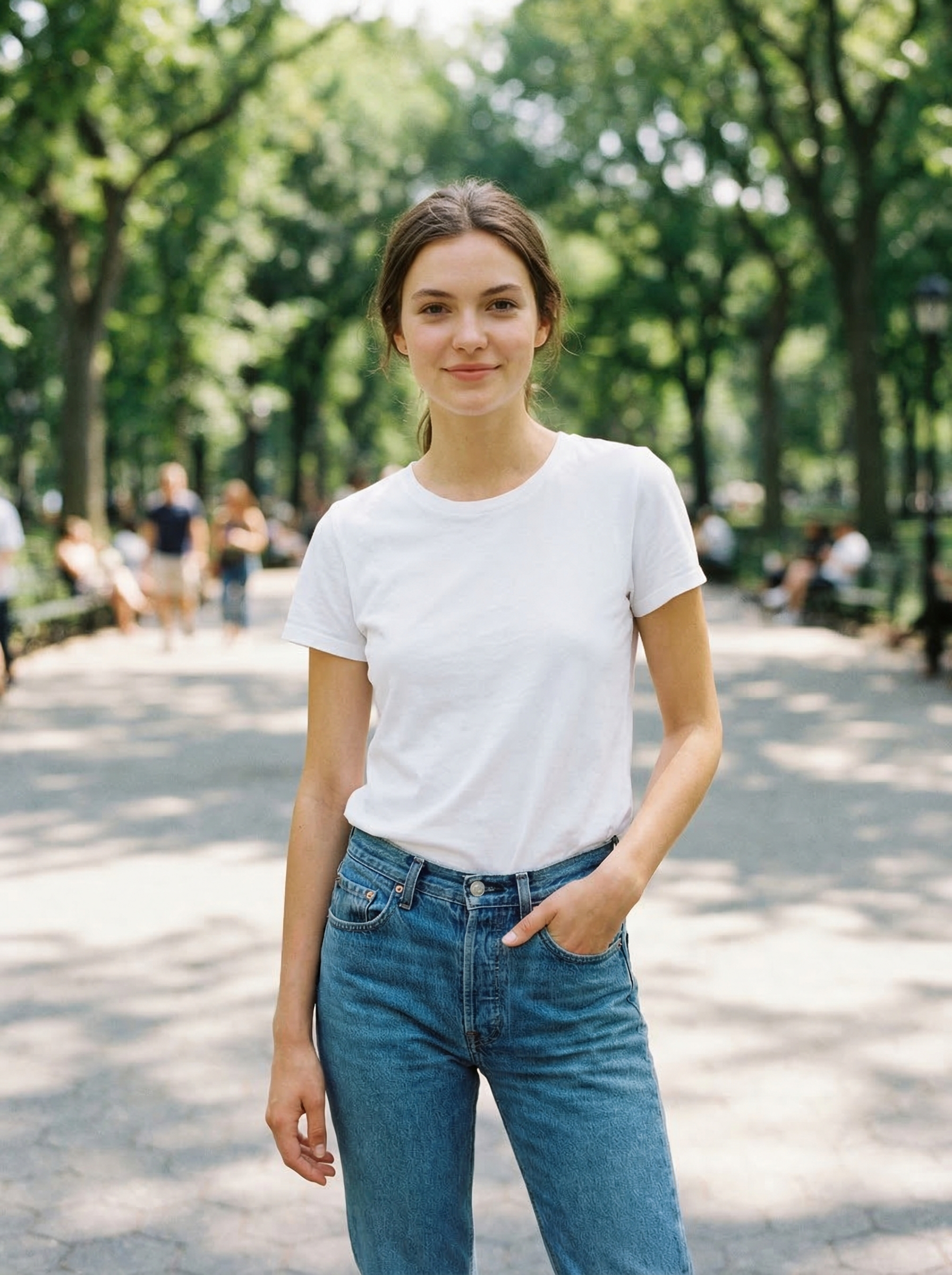
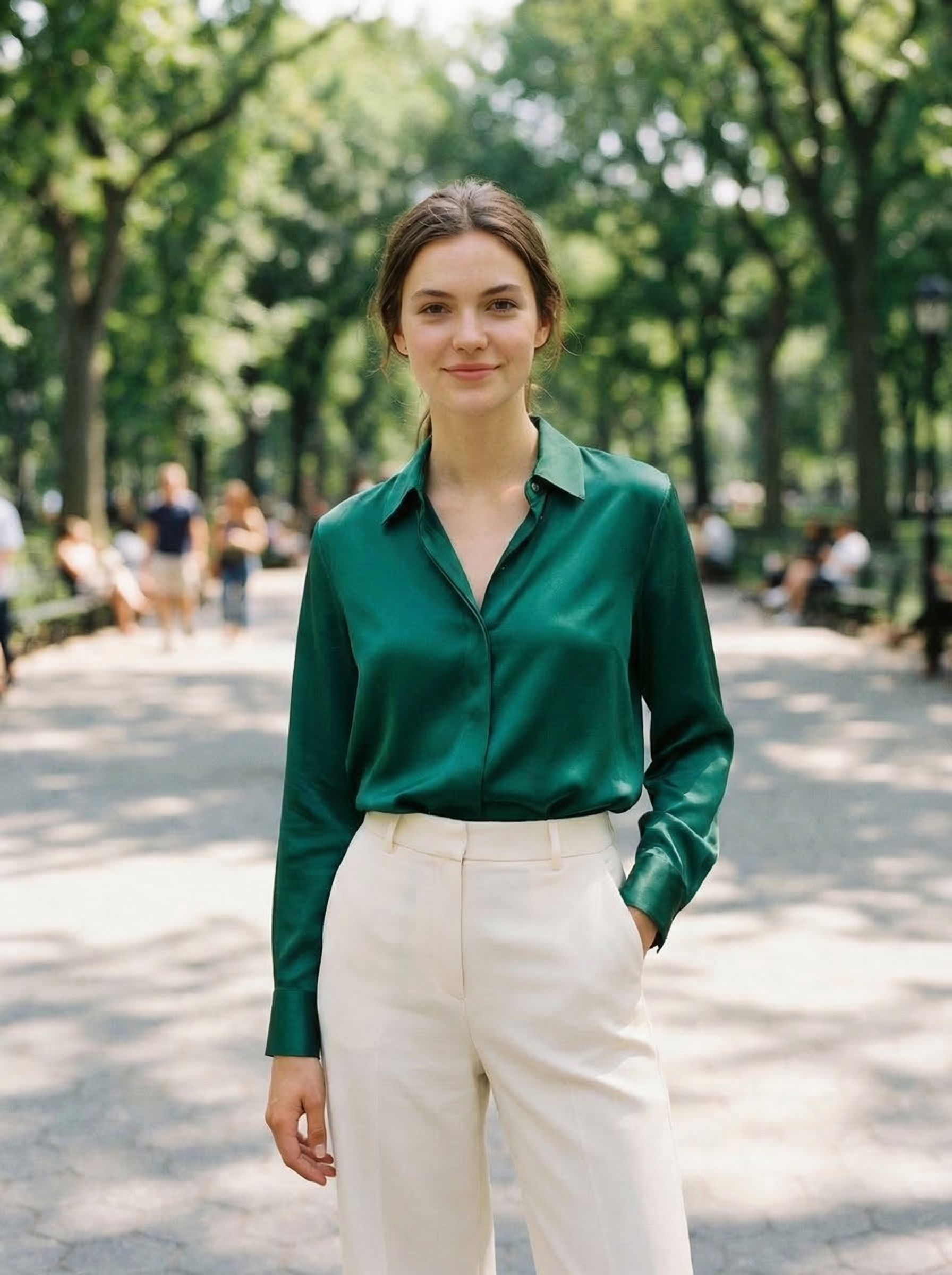
Same source photo, changed with OutfitGen from a plain white t-shirt into a green satin shirt with cream trousers:
Comparison Table
| Tool | Best for | Free access | Main strength | Main limitation |
|---|---|---|---|---|
| OutfitGen | Personal outfit changes | 3 generations, no signup | Fast browser workflow, describe any outfit in words | No batch catalog workflow yet |
| Google's Virtual Try-On | Shopping inside Google results | Yes | Real product context, 18 regions, clothing and shoes | Only works on supported shopping surfaces |
| FASHN | Garment-reference try-on with an API | Free tier, no card | Same tool for manual and programmatic use | Built around a garment image, not a text prompt |
| Kolors Virtual Try-On | Developer testing | Yes / demo | Person plus garment reference workflow | Shared Hugging Face Space, frequently queue-limited |
| Kling Try On | AI fashion and character workflows | 66 daily credits | Identity-aware fashion generation | Less focused on simple web try-on |
| FASHN VTON 1.5 | Open-source experimentation | Yes / open | Apache-2.0, maskless inference, runs in about 8GB VRAM | No published benchmarks yet |
What We Looked For
We evaluated each tool on the criteria that actually matter:
- Output quality: Does the clothing look realistic? Does it follow the body's pose naturally?
- Identity preservation: Does the person still look like themselves after the outfit change?
- Speed: How long does generation take?
- Ease of use: Can you get a good result without a learning curve?
- Pricing: What do you get for free, and what does it cost to use regularly?
- Privacy: How is your photo data handled?
We uploaded the same set of test photos to each tool and described the same outfits, so the comparison is as apples-to-apples as possible.
Best AI Clothes Changer Apps With Free Trials
If your goal is "try this before I pay," separate the tools into three groups:
| Need | Best first tool | Why |
|---|---|---|
| Change an outfit from text | OutfitGen | Browser workflow, no app install, no signup required for the first generations |
| Try on a real store product | Google's Virtual Try-On | Works inside shopping results for supported items and lets shoppers use their own photo, in 18 regions |
| Try on a garment image, with an API | FASHN | Free tier without a credit card, and the same model behind a per-image API |
| Test a garment-reference research model | Kolors Virtual Try-On | Free demo when you already have a garment image, if you can wait out the queue |
| Build your own try-on system | FASHN VTON 1.5 | Apache-2.0 open weights, so commercial use is allowed |
| Make fashion concepts for video | Kling Try On | Better fit when the end goal is stylized fashion content rather than one static edit |
Most people looking for an AI clothes changer should start with a browser tool. Installing a mobile app, creating an account, or setting up a GPU makes sense only after you know the output quality is worth the friction.
Web-Based AI Clothes Changer vs Shopping Try-On
There are two categories that often get mixed together.
AI clothes changers let you upload your own photo and describe an outfit in text, such as "black linen blazer, white t-shirt, straight-leg jeans." This is best for style exploration, content creation, dating photos, profile photos, and quick visual ideas. OutfitGen is in this category.
Shopping try-on tools start from a real garment listing. Google's current try-on help page says shoppers can use AI to see clothing on their own body by uploading a full-body photo or a selfie, and that the feature covers tops, bottoms, dresses, and shoes while excluding lingerie, swimwear, and accessories. This is useful when you are evaluating a specific item before checkout, but it is less flexible for creative outfit generation.
Neither category replaces the other. If you want to preview a real product, use a shopping try-on flow. If you want to ask for any outfit in plain English, use an AI clothes changer.
The Top AI Clothes Changers
OutfitGen
OutfitGen is a web-based tool focused on outfit changes, background swaps, pose changes, and style transfers. It runs and tests leading image models, including OpenAI's GPT Image 2.5, Black Forest Labs' FLUX.2, ByteDance's Seedream 5 and Google's Nano Banana 2, all served through fal.ai, and picks the model for each edit: a fast Standard setting for everyday changes and a Pro setting for the highest-fidelity faces and fabric. Uploading a reference garment goes to a model picked for matching a specific item, because that is a different job from rendering a described one. The interface stays the same either way: upload, describe, download.
What stood out: The output quality is consistently high. Clothing follows body contours naturally, fabric textures look realistic, and the person's face and body stay unchanged. The text-based description input means you can describe any outfit you want rather than being limited to a catalog.
Pricing: Free generations to try it out (no signup needed), with affordable credit packs and subscription plans for regular use.
Best for: Anyone who wants high-quality outfit changes with a simple, no-nonsense interface. Works well for both casual use and professional content creation.
Google's Virtual Try-On
Google's Virtual Try-On is built into Google Shopping, allowing shoppers to see clothing from supported product listings on a selected image. It is not a general-purpose clothes changer, but a shopping preview tool.
What changed since our last check: this was the biggest move in the category. Google's try-on help page now lists 18 regions rather than the US alone: Argentina, Australia, Brazil, Canada, Chile, Colombia, Hong Kong, India, Indonesia, Japan, Malaysia, Mexico, New Zealand, Philippines, Singapore, South Korea, the UK, and the US. Shoes are now covered alongside tops, bottoms, and dresses. In the US, Google also lets you generate a digital version of yourself from a selfie using its Nano Banana model rather than uploading a full-body photo.
What stood out: The integration with actual product listings is the reason to use it. You are evaluating real garments from real stores, not asking an image model to invent a jacket from text.
Limitations: You are limited to supported product listings and shopping flows, and lingerie, swimwear, and accessories are excluded. It is a shopping tool, not a creative tool for generating any outfit prompt.
Best for: Online shoppers who want to see how a specific product looks on different body types before buying.
Kolors Virtual Try-On by Kwai
Kolors Virtual Try-On is a virtual try-on demo from the Kolors team. It lets you upload both a person photo and a garment photo, then generates the person wearing that specific garment.
What stood out: The garment-to-person matching is impressive. If you upload a product photo from a store, it does a good job placing that specific item on the person.
Limitations: It works best with clear garment photos as the reference. Text descriptions are not the core workflow. The results can be inconsistent with complex poses, and it feels more like a research demo than a polished consumer editor. It also runs on shared Hugging Face compute, so when we checked in July 2026 the Space was up but the discussion tab was full of "application is busy" and queue failures. There is no Kolors Virtual Try-On v2 as of this update.
Best for: Trying on specific garments you've found online, when you don't mind waiting.
Kling Try On
Kling Try On is part of Kling's broader AI creative platform, and Kling maintains an official user guide for it. Kling is best known for AI video generation, and its try-on surface leans toward fashion content, character consistency, and visual concepting.
What stood out: Strong understanding of body mechanics. Clothing drapes and moves realistically because the model understands human anatomy from its video training.
Limitations: The tool is bundled into a larger AI platform, so the outfit-changing feature feels like one feature among many rather than a focused web clothes changer. The interface takes more getting used to than a single-purpose editor. The free tier is credit-metered at roughly 66 credits a day that expire after 24 hours, with paid plans starting around $6.99/mo, so check the current pricing page before planning a batch.
Best for: Users who are already in the Kling ecosystem and want outfit changes as part of a broader creative toolkit.
FASHN
FASHN is a hosted virtual try-on product built around a garment image rather than a text prompt: you supply a photo of a person and a photo of the item, and it renders one wearing the other. It sits between the consumer editors and the research demos, because the same model is available through a web tool, an iOS app shipped in 2026, and a per-image API.
What stood out: the free tier does not ask for a credit card, which is unusual for a tool that also sells API access. The API is priced per image (listed at $0.075 at the time of writing), so the cost of a batch is easy to work out in advance rather than being hidden behind a credit system.
Limitations: it is a garment-reference tool. If what you want is "put me in a cream linen suit" typed in plain English, this is the wrong shape of product and a prompt-driven editor will be faster.
Best for: anyone who already has product photography and wants the same try-on behavior available both by hand and programmatically.
Open source: FASHN VTON 1.5, and why not IDM-VTON
For years the default answer to "which open-source virtual try-on model should I start from" was IDM-VTON, from the paper "Improving Diffusion Models for Authentic Virtual Try-on in the Wild." That answer has aged badly and we changed our recommendation in this update.
IDM-VTON is not archived, but its last code change was in July 2024 and the only activity since was adding a license file. That license is CC BY-SA-NC 4.0, which is non-commercial, so it cannot legally sit under a paid product. It still has roughly 5,100 GitHub stars, which is why it keeps getting recommended by posts that have not rechecked it.
FASHN VTON 1.5 is the more useful 2026 starting point. It was published in January 2026 under Apache-2.0, which is the first genuinely permissive license in this category, at roughly 972M parameters with maskless inference and a stated requirement of about 8GB of VRAM. The honest caveat: there is no published paper or benchmark comparison against IDM-VTON, CatVTON, or Leffa yet, so treat quality claims as untested and run your own comparison before committing.
If you specifically want a maintained model in the classic architecture family, CatVTON is the most actively maintained of that set, with commits into late 2025. Leffa is MIT-licensed but has been quiet since September 2025. OOTDiffusion is the most-starred of the group and also the most stale, with no push since May 2024. Treat it as legacy.
The other 2026 shift worth knowing: you no longer have to pick a dedicated try-on checkpoint at all. Instruction-following image editors plus a try-on LoRA, such as the Apache-2.0 FLUX Klein virtual try-on LoRA, now cover a lot of the same ground with a general model you may already be running.
Best for: technical users who want full control, researchers, and developers building their own try-on applications. Check the license before you build a business on any of them.
How They Compare on Output Quality
In our tests, the most consistent results came from tools using the latest diffusion models with specific fine-tuning for clothing and body understanding. OutfitGen and Kling AI produced the most realistic clothing textures and natural draping. Google's tool looked great but is limited in scope. Kolors excelled when given a specific garment image but was less consistent with text descriptions.
The biggest quality differentiator was edge handling. Where clothing meets skin (necklines, cuffs, hemlines), lesser tools produce visible artifacts or unnatural blending. The top tools handle these transitions cleanly.
What About "Free" Tools on Social Media?
You've probably seen ads for "free AI clothes changers" on social media. A word of caution: many of these are low-quality wrappers around basic models, and some have concerning privacy practices. They may store your photos, use them for training, or serve as a funnel to upsell you on unrelated services.
Stick with established tools that have clear privacy policies and a track record.
Which Tool Preserves Identity Best?
For real people, identity preservation matters more than raw creativity. A tool that creates a beautiful outfit but changes your face, skin tone, hairline, or body shape is not a good clothes changer. It is just an image generator.
In our tests, OutfitGen was the most consistent for text-based outfit changes where the person needed to still look like themselves. Google's try-on can be strong inside its supported shopping flow because the use case is narrower. FASHN and Kolors are useful when the garment reference is clear, though Kolors requires patience with its shared queue. Kling is more flexible for fashion concepts, but less direct for a quick "change this outfit in my photo" workflow.
Pricing Comparison
Most AI clothes changers use a credit-based system, and the shape of the free tier matters more than the headline price:
| Tool | Free path | Paid entry point |
|---|---|---|
| OutfitGen | 3 generations, no account | $5/mo for 100 credits (Plus) |
| Google's Virtual Try-On | Free inside Google Shopping | Not sold separately |
| FASHN | Free tier, no credit card | API listed at $0.075 per image |
| Kolors Virtual Try-On | Free Hugging Face Space | Not sold as a product |
| Kling Try On | About 66 credits a day, 24-hour expiry | From around $6.99/mo |
| FASHN VTON 1.5 | Open weights, Apache-2.0 | Your own compute |
Per-generation pricing across the hosted tools lands roughly between $0.03 and $0.10, and subscriptions run from about $5 to $50 a month depending on volume. Prices move, so check the current pricing page before planning a batch.
For occasional use (trying on outfits before buying, updating a headshot), a free tier or small credit pack is enough. For regular content creation or professional use, a subscription makes more sense.
How to Get a Better Outfit Change
The tool matters, but the input photo and prompt matter too.
- Use a clear, well-lit photo where the person is the main subject.
- For full outfits, use a waist-up or full-body image rather than a tight face crop.
- Describe fabric and fit, not only color. "Relaxed cream linen shirt" is better than "white top."
- Avoid asking for too many changes at once. Change the outfit first, then regenerate for background or style if needed.
- If the first result is close but not perfect, regenerate with one more specific detail instead of rewriting the whole prompt.
This is why no-signup testing matters. You need to see how a tool handles your actual photo before paying for volume.
Our Recommendation
For most people, a tool like OutfitGen hits the sweet spot: high quality output, easy to use, reasonable pricing, and you can start for free without an account. It handles both text-based outfit descriptions and reference images well.
If you're specifically shopping for clothes and want to see them on different body types, Google's Virtual Try-On is useful within its limitations.
If you're technical and want to tinker, FASHN VTON 1.5 gives you full control under a permissive license.
The Bottom Line
AI clothes changers have reached a quality threshold where they're genuinely useful, not just a novelty. The key is picking a tool that matches your use case and produces consistent results. Start with a free trial on any of the tools above, upload a clear photo, and see the results for yourself. The technology has come far enough that you'll probably be impressed.
Related guides
This post is the buyer's guide: what each category is for, who it suits, and what it costs. Two companions go narrower.
- Best AI clothes changers, tested on real photos is the lab version. Same source photo, same prompt, five tools, with the actual output images and the artifacts we saw in each. Read that one if you want to judge quality with your own eyes rather than take a ranking on trust.
- Best free AI photo editing tools in 2026 widens the question from outfit changes to photo editing generally: backgrounds, product cleanup, style transfer, and portrait enhancement.
FAQ
What is the best AI clothes changer overall?
For most people, OutfitGen is the best first option because it works in the browser, starts free, and does not require signup before your first generations. For high-volume e-commerce, specialized tools like VModel, Botika, or Claid may fit better.
Are AI clothes changers accurate enough for shopping?
They are accurate enough to judge style, color, and overall look. They are not accurate enough to guarantee fit, size, fabric feel, or tailoring. Use them to narrow choices before buying.
Do AI clothes changers work on real photos?
Yes. The best input is a clear, well-lit photo where the person is visible from at least the waist up. Full-body photos work best for dresses, suits, pants, and shoes.
Can I use AI clothes changer images commercially?
It depends on the tool and plan. OutfitGen includes commercial use on paid plans. Free tools often limit commercial rights, so check the terms before using images for product listings or ads.
What is the best free AI clothes changer with no signup?
OutfitGen is the best first option if you want to test an AI clothes changer in your browser without creating an account. It gives you 3 free generations before signup, which is enough to see whether your photo works.
What is the difference between AI clothes changing and virtual try-on?
AI clothes changing usually starts from your photo and a text prompt. Virtual try-on usually starts from a real garment image or store listing. Clothes changing is better for creative style exploration; virtual try-on is better for checking a specific product before buying.
Can I use an AI clothes changer from my phone browser?
Yes. Web-based tools like OutfitGen work from a mobile browser, so you do not need to install an app. Use a clear phone photo, upload it, describe the outfit, and download the result.
Ready to try it yourself?
Get started with OutfitGen, 3 free generations, no sign-up required.
Try OutfitGen Free