GPT Image vs FLUX.2: Which AI Model Edits Photos Better?
Published April 24, 2026 · OutfitGen Team
Last updated June 10, 2026
GPT Image is OpenAI's image generation and editing model, built into ChatGPT. FLUX.2 is Black Forest Labs' image model focused on photorealistic editing, and it is the model OutfitGen runs in production for Standard-quality edits. As of June 2026, ChatGPT's free tier allows roughly 2 to 3 images per day and ChatGPT Plus costs $20/mo. This comparison covers what each model does better and when to use which.
Updated June 10, 2026. Refreshed access options, free-tier limits, and pricing; added a Quick Answer, comparison table, and FAQ. Original publish date remains April 24, 2026.
What Each Model Is
GPT Image is OpenAI's multimodal image model, accessed through ChatGPT and OpenAI's API. Because it sits inside OpenAI's language-model stack, it carries broad world knowledge into edits: brands, objects, cultural references, and context. You edit by talking to it, which is its defining interaction model. The current generation (GPT Image 1.5 at this update) improved photorealism and edit precision over the version most people first met in 2025.
FLUX.2 is an image generation and editing model from Black Forest Labs, the team behind the original FLUX models. It is built for photorealistic output and precise editing, and it is widely available through inference platforms rather than a single chat product. OutfitGen runs fal-ai/flux-2/edit in production for every Standard-quality generation, so the FLUX.2 observations in this post come from operating the model at production volume, not from a one-afternoon test.
The practical difference: GPT Image is a conversation partner that makes images. FLUX.2 is an editing engine that products build on.
Access and Pricing in June 2026
GPT Image is easiest to reach through ChatGPT. Per 2026 sources tracking OpenAI's limits (CometAPI, gptimg.co), free-tier users get roughly 2 to 3 images per rolling 24 hours, and the quota flexes with server load. OpenAI does not publish an official free quota, so treat "about 3 per day" as the honest framing rather than a guarantee. ChatGPT Plus is $20/mo and raises the ceiling to roughly 50 images per 3 hours. Developers can also pay per image through the API.
FLUX.2 has no consumer app of its own. You reach it through developer platforms like fal.ai, or through products built on it. OutfitGen is one of those products: 3 free generations with no signup, bonus credits with a free account, and paid plans from $5/mo for 100 edits. For context on where it sits among free editors, see our free AI photo editing tools comparison.
Per-edit economics favor FLUX.2 at volume. A $5/mo OutfitGen plan works out to 5 cents per Standard edit, while ChatGPT's value depends on how many of your $20/mo you spend on images versus everything else ChatGPT does.
Where GPT Image Wins
Text rendering. Legible text inside generated images has been a persistent weakness of diffusion-style models. Ask for a storefront sign or a slogan t-shirt and most models produce text that falls apart up close. GPT Image renders words reliably. If your edit involves readable text, use GPT Image.
World knowledge. GPT Image inherits the language model's reference knowledge. Ask it to add a specific sneaker model or a recognizable landmark and it usually knows what that thing looks like without a reference image. FLUX.2 leans more heavily on your description or on an attached reference photo.
Complex, multi-step instructions. "Move the lamp to the left, add a warm shadow consistent with the window light, and make the plant look slightly overgrown" is one prompt for GPT Image. It will parse and attempt all three. FLUX.2 performs best with one precise instruction at a time; stacking many unrelated changes into one prompt degrades results.
Conversational iteration. Because GPT Image lives in a chat, you refine with replies: "warmer", "less of that", "same but at night". That feedback loop suits people who do not want to learn prompt craft.
Creative latitude. When you want the model to make judgment calls, GPT Image produces more varied and stylistically opinionated results. FLUX.2 is more literal, which is a feature for production work and a limitation for "surprise me" requests.
Where FLUX.2 Wins
Photorealism on edits. For changes that should look like they were never made, FLUX.2 produces cleaner results. The boundary between the edited region and the untouched photo is harder to spot, and global lighting stays coherent. GPT Image output can read slightly synthetic on close inspection, especially on skin and fabric.
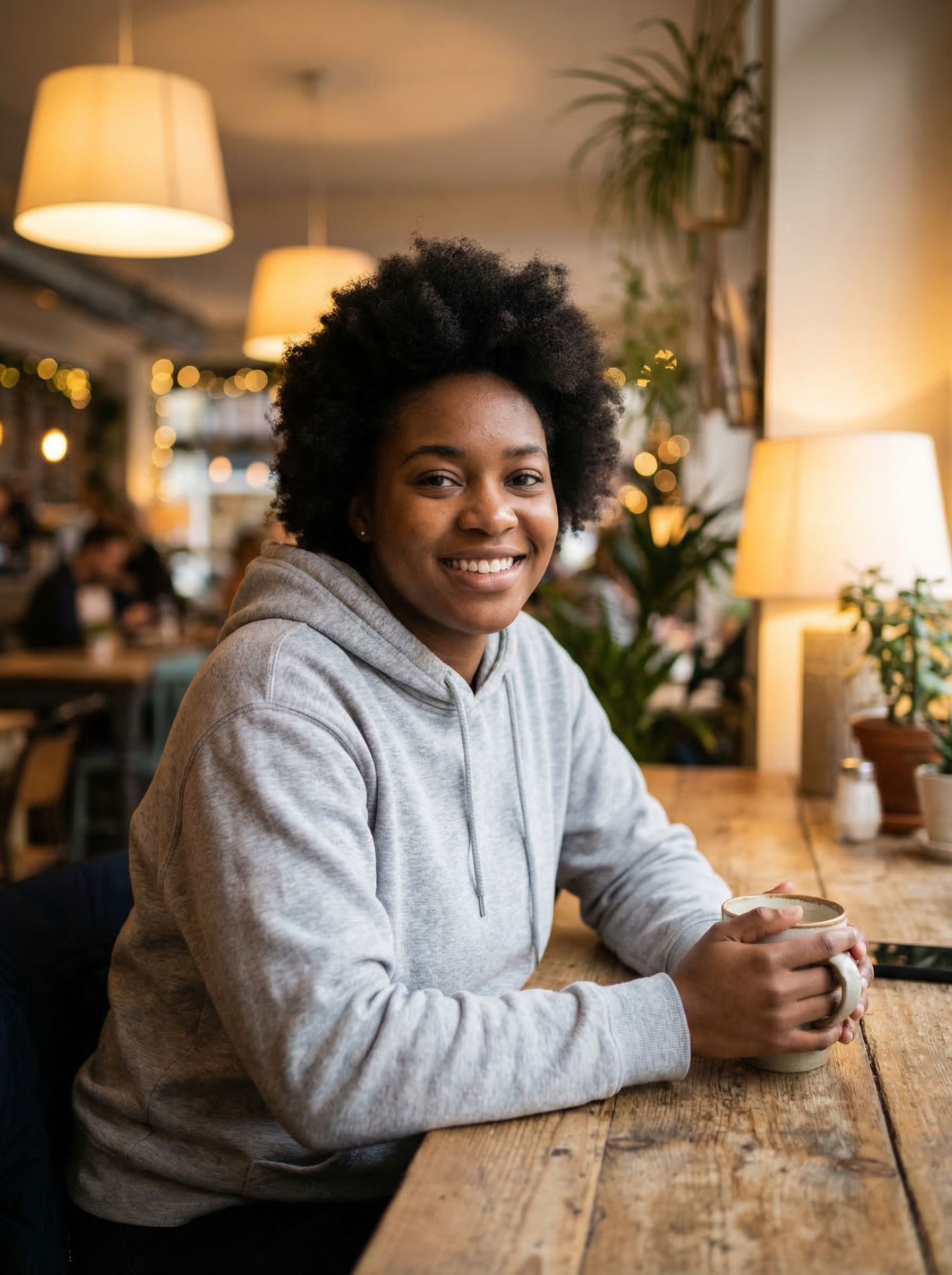
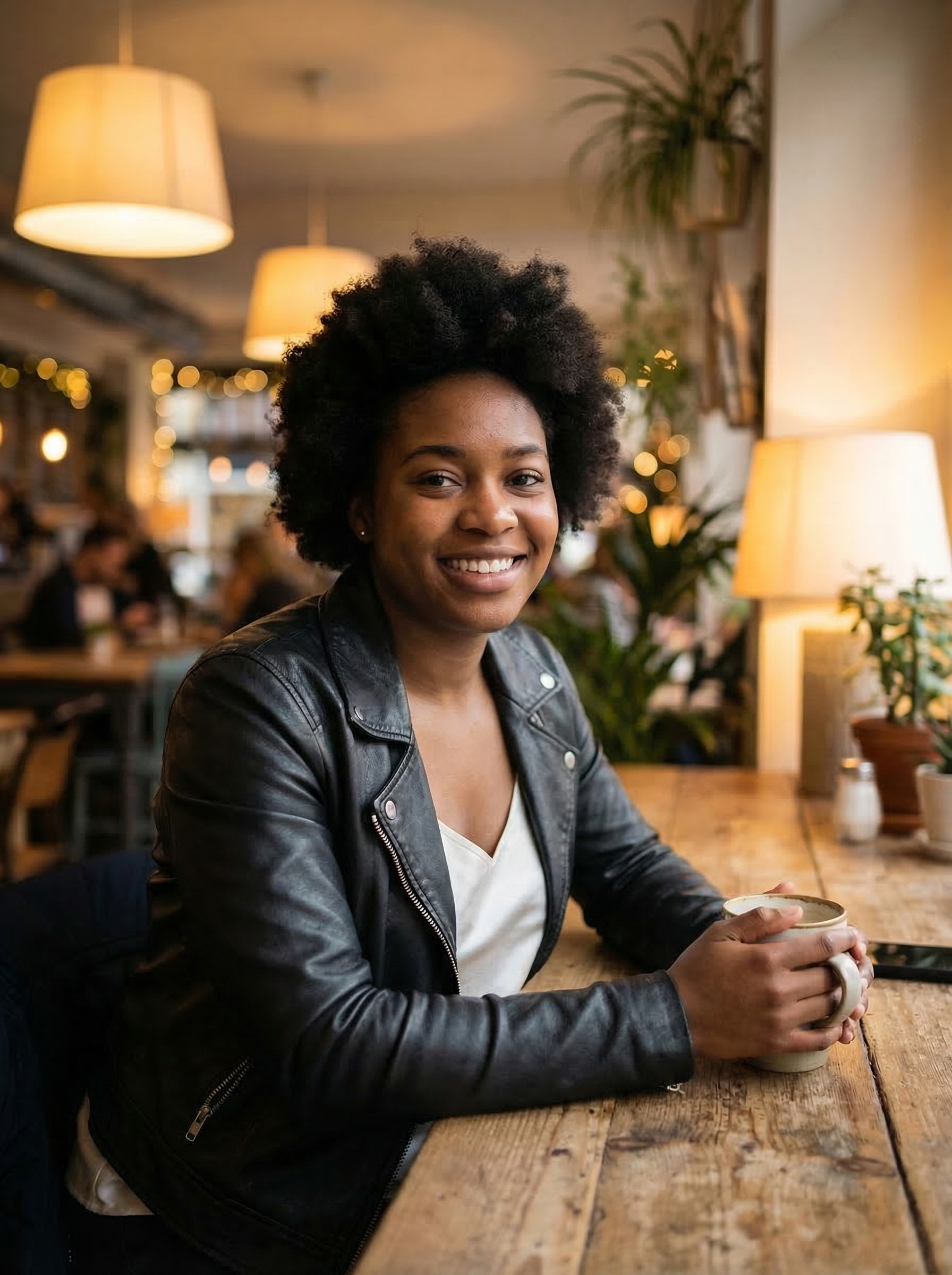
Identity preservation. This is the difference that matters most for photos of people. GPT Image can drift facial features, skin tone, or proportions during an edit, and OpenAI's own conversational model means each regeneration can drift differently. FLUX.2 is more conservative about changing what you did not ask it to change. It is the reason OutfitGen's clothes changer runs on FLUX.2: an outfit swap is worthless if the person no longer looks like themselves.
Clothing and materials. Fabric drape, texture, and material distinctions (suede versus leather versus knit) render more convincingly in FLUX.2. For outfit changes, try-on previews, and apparel product work, this is its home turf.
Consistency. Run the same request several times and FLUX.2's outputs cluster tightly. GPT Image has higher variance run to run. Variance is fun for exploration and bad for a workflow that needs a dependable result on the first or second try.
Speed and cost at scale. FLUX.2 inference is fast enough that OutfitGen budgets seconds, not minutes, per edit, and the model family includes faster Turbo and Flash variants that we use as automatic fallbacks when the primary endpoint has a bad moment. Batch editing 40 product photos through a chat interface is painful; through a FLUX.2-based tool it is routine.
Here is what that editing profile looks like in practice, a production FLUX.2 outfit swap from OutfitGen. The face, hands, mug, pose, and the entire café background survive the edit untouched:
Head-to-Head Comparison
| Criteria | GPT Image | FLUX.2 |
|---|---|---|
| Made by | OpenAI | Black Forest Labs |
| How you use it | ChatGPT, OpenAI API | Developer platforms (fal.ai), products like OutfitGen |
| Interaction style | Conversational, iterative | Direct instruction, tool-driven |
| Photorealistic edit quality | Good, can look slightly synthetic | Stronger, cleaner blend with the source photo |
| Identity preservation | Inconsistent, faces can drift | Strong, conservative about unrequested changes |
| Text rendering in images | Strong | Weak |
| World and brand knowledge | Broad, built in | Limited, relies on prompts and references |
| Multi-step instructions | Handles in one pass | Best one precise change at a time |
| Output consistency | Higher variance | Tight, repeatable |
| Free option | ~2-3 images/day in ChatGPT (2026 sources) | 3 no-signup generations via OutfitGen |
| Paid entry | ChatGPT Plus $20/mo | OutfitGen Plus $5/mo (100 edits) |
When ChatGPT Is the Better Choice
Honest answer: for plenty of casual editing, it is.
If you already pay for ChatGPT Plus, occasional image edits are effectively bundled into a subscription you keep for other reasons. If your edit involves readable text, brand knowledge, or a vague idea you want to talk through ("make this feel more like a 90s film still, but cozier"), GPT Image's conversational loop is genuinely the better experience. And for a one-off meme, mockup, or experiment where nobody inspects the seams, the quality gap does not matter.
ChatGPT is also the better choice when the image task is tangled up with a non-image task: drafting the listing copy and generating its hero mockup in one conversation, for example.
When a FLUX.2 Tool Is the Better Choice
Choose FLUX.2 when the photo itself is the product. Edits of real people where the face must survive, outfit and try-on previews, background replacements that need to pass close inspection, and any repeated workflow where you need the same quality every time.
The free-tier math also differs in kind, not just amount. ChatGPT's 2 to 3 free daily images are general purpose; OutfitGen's free generations run a model specifically tuned and wrapped for photo edits, with identity-preservation prompting already handled for you. Three focused edits often beat three generic ones.
One transparency note: OutfitGen's Pro quality tier does not run FLUX.2. It routes to Nano Banana 2, a different model that wins on fine detail for users who want maximum fidelity at 2 credits per edit. We route per quality tier because no single model wins everything, which is the entire thesis of this post.
The Practical Reality
Most people never pick a model. They pick a tool, and the tool picks the model. Working in ChatGPT means GPT Image. Using OutfitGen, or most dedicated photo editors built on open model ecosystems, means FLUX.2 or a close relative.
Both models improved substantially over the past year, and benchmarks from six months ago are already stale. What has stayed stable is the shape of the difference: GPT Image keeps extending what you can ask for in plain conversation, while FLUX.2 keeps tightening how faithfully an edit lands on a real photograph. Pick based on which failure you can tolerate: an edit that misunderstood your intent, or an edit that understood it but looks edited.
If you want to feel the difference rather than read about it, run the same edit in both. Ask ChatGPT to change your outfit in a photo, then run the identical request through a FLUX.2 tool and compare the face, the fabric, and the seams.
FAQ
Is FLUX.2 better than GPT Image for editing photos of people?
For preserving the person, yes. FLUX.2 holds faces, proportions, and skin tone steadier through an edit, which is why identity-sensitive products build on it. GPT Image can subtly shift facial features between generations, which matters for try-on previews, dating photos, and headshots.
Can I use ChatGPT to change clothes in a photo?
Yes. Upload the photo and describe the outfit, and GPT Image will attempt the swap. It works for casual results, but expect occasional face drift and a synthetic look on fabric. A FLUX.2-based outfit tool handles the identity-preservation constraints automatically and gives more repeatable results.
How many free images can I make with ChatGPT in 2026?
Roughly 2 to 3 per rolling 24 hours on the free tier, per 2026 reporting. OpenAI does not publish an official quota and the limit flexes with demand. ChatGPT Plus at $20/mo raises it to roughly 50 images per 3 hours.
What model does OutfitGen actually run?
Standard-quality edits run FLUX.2 (fal-ai/flux-2/edit), with faster FLUX.2 Turbo and Flash variants as automatic fallbacks during provider hiccups. Pro-quality edits run Nano Banana 2, a different model that costs 2 credits and targets maximum detail.
Which is cheaper for a lot of photo edits, GPT Image or FLUX.2?
FLUX.2, in practice. OutfitGen's $5/mo plan covers 100 Standard edits, about 5 cents each, and API pricing on FLUX.2 platforms is similarly volume-friendly. ChatGPT Plus costs $20/mo with hourly image caps, so heavy image use means paying for a general assistant to do specialist work.
Ready to try it yourself?
Get started with OutfitGen, 3 free generations, no sign-up required.
Try OutfitGen Free