AI Clothes Changer vs Photoshop: Which Should You Use?
Published April 11, 2026 · OutfitGen Team
Last updated June 5, 2026
If you want to change an outfit in a photo, you've basically got two options in 2026: use an AI clothes changer or do it manually in Photoshop. Both work. But they're very different experiences with very different tradeoffs.
Here's an honest comparison, refreshed in June 2026, so you can pick the right tool for your situation.
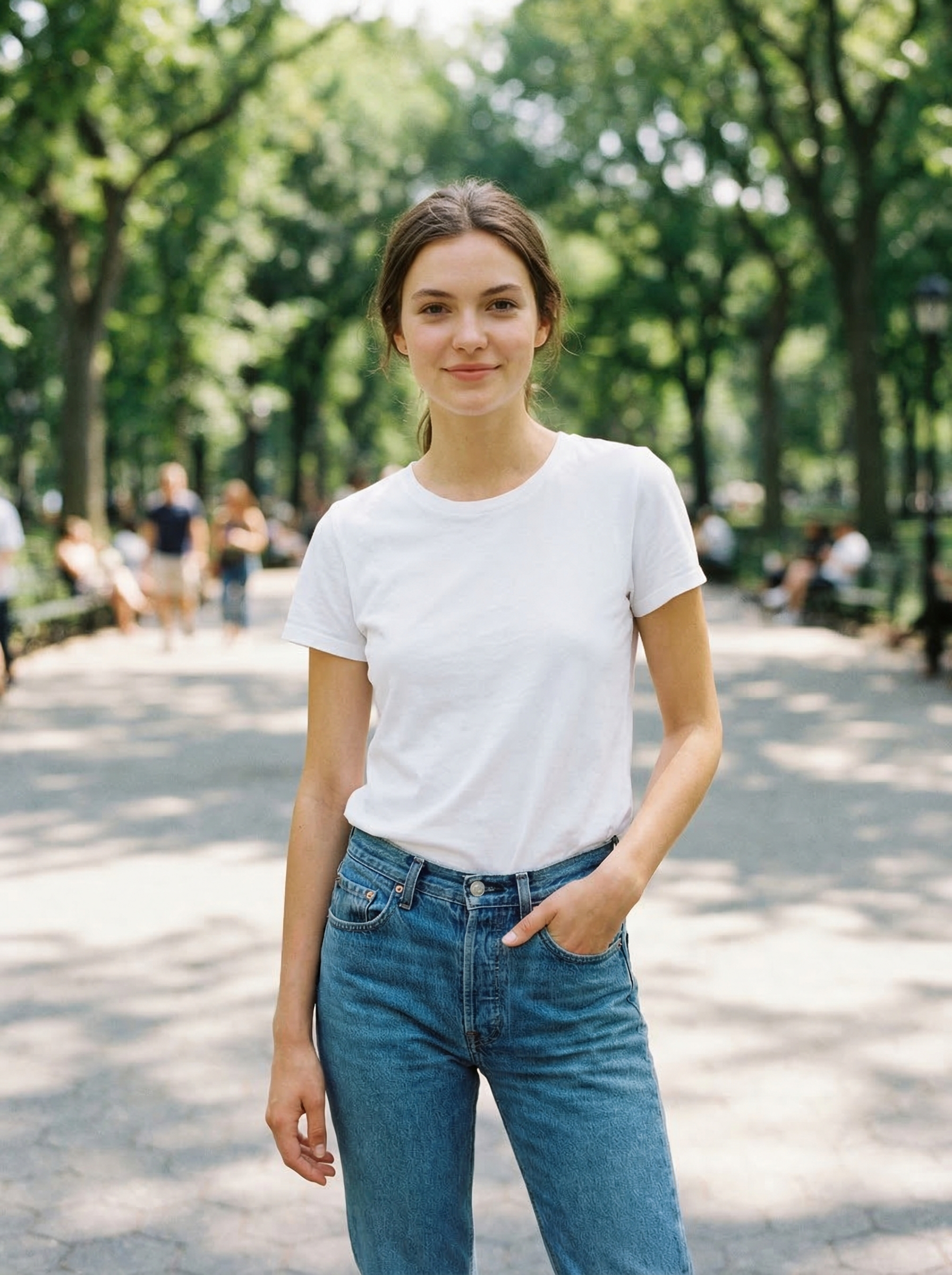
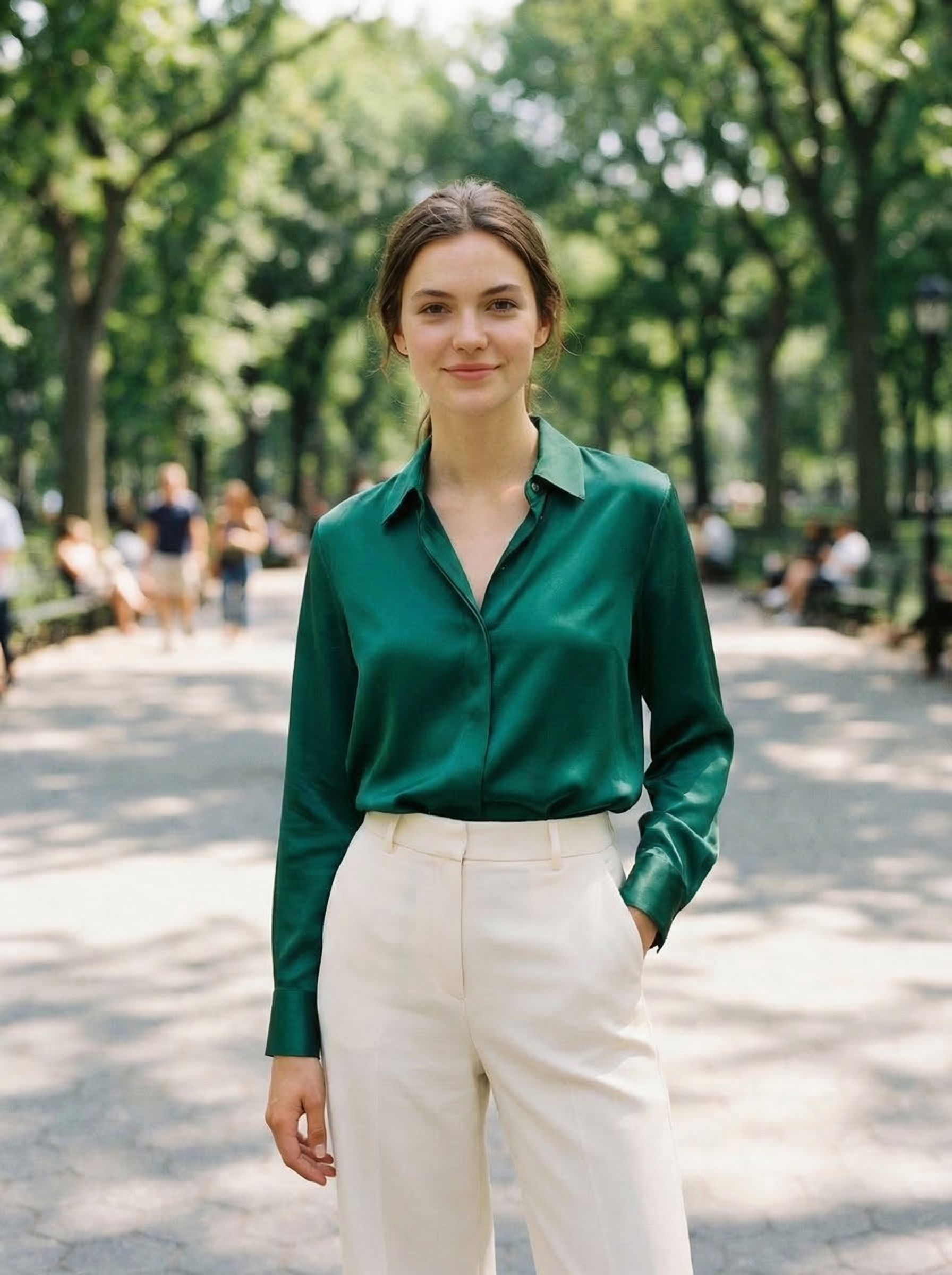
Visual Proof
Same source photo, changed with OutfitGen in a browser:
At a Glance
| Factor | AI clothes changer | Photoshop |
|---|---|---|
| Time per outfit edit | Usually 1 minute including upload and download | 30 minutes to 2 hours for a skilled editor |
| Skill required | Prompt writing and photo selection | Masks, selections, warping, shadows, color matching, retouching |
| Best for | Fast web edits, outfit previews, creators, sellers, profile photos | Pixel-perfect retouching, brand campaigns, print work |
| Control | Lower, regenerate to improve | Very high, every pixel is editable |
| Cost shape | Free trials, credits, or monthly AI plans | Adobe subscription plus labor time |
| Mobile/browser workflow | Strong for web tools like OutfitGen | Photoshop is strongest on desktop |
The Speed Difference
This is where AI wins by a landslide.
AI clothes changer: Upload photo, describe outfit, click generate. Done in 10-30 seconds. Total time including uploading and downloading: about 1 minute.
Photoshop: Open photo, create selection around clothing, find or create replacement garment, transform and warp to fit the body, match lighting, fix edges, blend colors, add shadows, clean up artifacts. Total time for a skilled editor: 30 minutes to 2 hours. For a beginner: could be all day.
For a single image, this might not matter much. But if you need to change outfits in 10 or 50 or 200 photos, the math gets brutal. 50 photos at 1 minute each (AI) vs 50 photos at 1 hour each (Photoshop). That's 50 minutes vs 50 hours.
The Quality Comparison
This is where it gets more nuanced.
Photoshop quality ceiling: In the hands of a skilled editor, Photoshop can produce perfect results. Every pixel is under your control. You can match colors exactly, add precise shadows, and fix any detail. The ceiling is as high as the editor's skill.
AI quality ceiling: AI produces very good results automatically. Realistic fabric draping, correct shadows, natural lighting. But you can't fine-tune individual pixels. If the AI gets something slightly wrong (a weird fold, a color that's a shade off), your options are limited to regenerating and hoping for a better result.
The reality for most people: Most Photoshop users aren't experts. The average person editing clothing in Photoshop will produce something that looks obviously fake. Mismatched lighting, hard edges, floating garments. AI, by contrast, produces consistently "good enough" results regardless of the user's skill level.
If you're comparing a Photoshop expert vs AI: Photoshop wins on precision. If you're comparing an average user with Photoshop vs AI: AI wins by a mile.
The Cost Breakdown
Photoshop: - Adobe's current Creative Cloud plan page lists Photoshop through paid app plans and trials. Pricing and included generative credits can change by region and plan. - Generative Fill is included through Photoshop access, but you still need the Photoshop workflow: selecting the clothing region, prompting, reviewing variations, and cleaning up the result. - Plus your time. If your time is worth $30/hour and you spend 1 hour per image, that's $30 per outfit change before subscription cost.
AI clothes changer: - OutfitGen free tier: free generations, no account - OutfitGen Plus: $5/month for 100 credits, Pro at $15/month for 500 credits, or Studio at $49/month for 1,000 credits - Per-image cost: effectively $0.03 per Standard edit on Pro and $0.05 on Plus. Pro mode uses 2 credits per edit. - Plus about 1 minute of your time per image
For occasional use (1-2 images per month), both are cheap. For regular use, AI is dramatically cheaper when you factor in time.
Best Web-Based Alternative to Photoshop for Outfit Changes
If your Photoshop task is specifically "change the clothes in this photo," a web-based AI clothes changer is usually the better first click. You do not need to install an app, learn layer masks, or create a manual composite. Upload the source photo, describe the outfit, and compare the result.
OutfitGen works best when the requested edit is body-aware: changing a shirt, jacket, dress, pants, shoes, pose, background, or visual style while keeping the same person. Photoshop is better when the output must match an exact client reference, use a specific product asset, or go into high-resolution print production.
The practical rule: use AI to explore and generate. Use Photoshop to finish and control.
The Learning Curve
Photoshop: Steep learning curve. Changing clothes convincingly in Photoshop requires knowledge of: - Layer masks and selections - Transform tools (warp, puppet warp, liquify) - Color matching and adjustment layers - Shadow and highlight painting - Cloning and healing - Blend modes
Most people need weeks of practice to do this competently. YouTube tutorials help, but there's no shortcut for developing the manual skills.
AI clothes changer: No learning curve. Upload, type, click. You might need to learn what makes a good prompt (being specific about colors, materials, and fit), but that takes about 5 minutes, not weeks.
When to Use AI
AI clothes changers are the better choice when:
- Speed matters. You need results now, not in two hours.
- Volume matters. You're changing outfits in more than a handful of photos.
- You don't know Photoshop. AI doesn't care about your editing skills.
- You want to explore styles. Trying 20 different outfits in AI takes 20 minutes. In Photoshop, it would take days.
- Good enough is good enough. For social media, dating profiles, and standard e-commerce listings, AI quality is more than sufficient.
- Budget is limited. $5-$15/month for dozens to hundreds of outfit changes beats $10/month plus hours of labor.
Most people reading this should use AI. It's faster, cheaper, and the results are good enough for 95% of use cases.
When to Use Photoshop
Photoshop is the better choice when:
- Pixel-perfect precision matters. High-end fashion campaigns, magazine covers, billboard advertisements. When every detail needs to be exactly right.
- You need to composite specific garments. If a client gives you an exact product photo that needs to be placed on an exact model in an exact pose, Photoshop gives you the manual control to nail it.
- You're already a skilled editor. If you're fast in Photoshop and comfortable with the workflow, it might be faster than learning a new tool.
- The AI can't handle the specific task. Very complex compositions with multiple layers, specific brand requirements, or edge cases where the AI consistently struggles.
- You need exact color matching. For print production where colors must be precisely calibrated, manual Photoshop work with calibrated monitors is still the standard.
The Hybrid Approach
Here's what a lot of professionals are actually doing: using both.
- Use AI for the initial outfit change. Get 80% of the way there in 30 seconds.
- Open the result in Photoshop for final touches. Fix any small issues, adjust colors, add specific details.
This gives you the speed of AI with the precision of Photoshop. The total time is maybe 10-15 minutes instead of 1-2 hours, and the quality is higher than either tool alone.
If you're a Photoshop user, AI doesn't have to replace your workflow. Think of it as a new starting point.
Prompt Examples for AI Clothes Changing
Specific prompts produce better edits than vague ones. Compare:
| Weak prompt | Better prompt |
|---|---|
| "make it formal" | "a tailored navy wool blazer over a crisp white button-down shirt, dark charcoal trousers" |
| "change shirt" | "replace the t-shirt with a relaxed cream linen shirt, sleeves rolled once, natural wrinkles" |
| "fashion outfit" | "black leather moto jacket, white ribbed tank top, straight-leg blue jeans, realistic studio lighting" |
| "wedding dress" | "simple ivory satin midi dress with square neckline, fitted waist, soft fabric sheen" |
For Photoshop, the equivalent work is not just typing the prompt. You still need a clean selection, a good garment source or generated result, a believable warp, edge cleanup, and lighting adjustments.
Real-World Examples
E-commerce seller with 100 products: AI is the obvious choice. Generating 100 outfit images takes one afternoon. Doing this in Photoshop would take weeks. The quality difference isn't meaningful for product listings.
Wedding photographer touching up a bridal portrait: Photoshop is better here. This is one important image where precision matters. The photographer likely already knows Photoshop and needs exact control over the result.
Social media creator posting daily outfit content: AI. Nobody's spending 2 hours in Photoshop for an Instagram story that disappears in 24 hours. Generate, post, move on.
Fashion brand campaign shoot: Photoshop (or AI + Photoshop). Brand campaigns have specific creative direction, exact color requirements, and high production standards. AI can speed up the process but the final touches need manual control.
Quality Is Improving Fast
One important thing to know: AI quality is improving faster than most people realize. What AI clothes changers could do a year ago vs today is a big leap. The gap between AI and expert Photoshop work is closing.
Within the next year or two, the quality difference for standard use cases will probably be negligible. For most applications, AI is already there.
Try Both and See
The fastest way to compare:
- Try OutfitGen's AI Clothes Changer. Upload a photo, describe an outfit, see the result in 10 seconds. Free, no account needed.
- Try the same change in Photoshop if you have it.
- Compare the results and the time it took.
For most people, the choice will be obvious after one try. AI isn't perfect, but it's fast, it's cheap, and the results are good. Unless you need pixel-level precision, it's the better option for changing clothes in photos in 2026.
FAQ
Is an AI clothes changer better than Photoshop?
For fast outfit changes, yes. AI is faster, easier, and usually good enough for social posts, profile photos, style previews, and standard product-listing images. Photoshop is better when you need exact control over every pixel.
Can Photoshop change clothes with AI?
Yes. Photoshop includes Generative Fill, which can replace selected parts of an image from a text prompt. The difference is workflow: Photoshop still expects you to make selections, review variations, and clean up details manually.
What is the fastest way to change clothes in a photo?
Use a web-based AI clothes changer. Upload a clear photo, describe the target outfit with color, material, and fit, then generate. A first result usually takes about a minute including upload and download.
When should I still use Photoshop?
Use Photoshop for high-end retouching, exact color matching, print campaigns, multi-layer composites, or client work where every detail must match a specific brief. It is slower, but the control ceiling is higher.
Can I use AI first and then Photoshop?
Yes. That hybrid workflow is often the best professional option. Use AI for the first outfit pass, then open the image in Photoshop to fix edges, adjust colors, sharpen details, and prepare final export.
Which is cheaper for changing outfits in many photos?
AI is usually cheaper once you count labor. A 50-image outfit project might take under an hour with AI, but could take 25-100 hours in Photoshop depending on complexity and editor skill.
Ready to try it yourself?
Get started with OutfitGen, 3 free generations, no sign-up required.
Try OutfitGen Free