AI Virtual Try-On Apps Tested: 7 Options Ranked for 2026
Published July 3, 2026 · OutfitGen Team
AI virtual try-on lets you see how clothing looks on your photo before buying, wearing, or shooting it. Two distinct categories often get conflated: garment try-on (rendering a specific purchasable item on your body) and outfit changing (generating any outfit from a text description). We tested 7 apps across both in July 2026, using a consistent source photo and prompt to make the comparisons meaningful.
The two types: and why it matters
Garment try-on tools take a product photo (or URL) and render it on your body photo. They're built for e-commerce: shoppers evaluating a purchase, brands letting customers visualize specific SKUs. FASHN, Zara's AR try-on, and Amazon Virtual Try-On fall here.
AI outfit changers take a text prompt and generate a photorealistic outfit matching that description. Built for style exploration, content creation, and profile photo updates. OutfitGen, Magic Hour, FitRoom, and Krea fall here.
Some tools try to do both. Most do one well.
The test photo and prompt
For outfit changer tools, we used the same source photo throughout: a woman in a yellow hoodie and grey sweatpants on an outdoor basketball court, hands pulling up the collar in a dramatic pose with a bright sky and basketball hoop behind her.
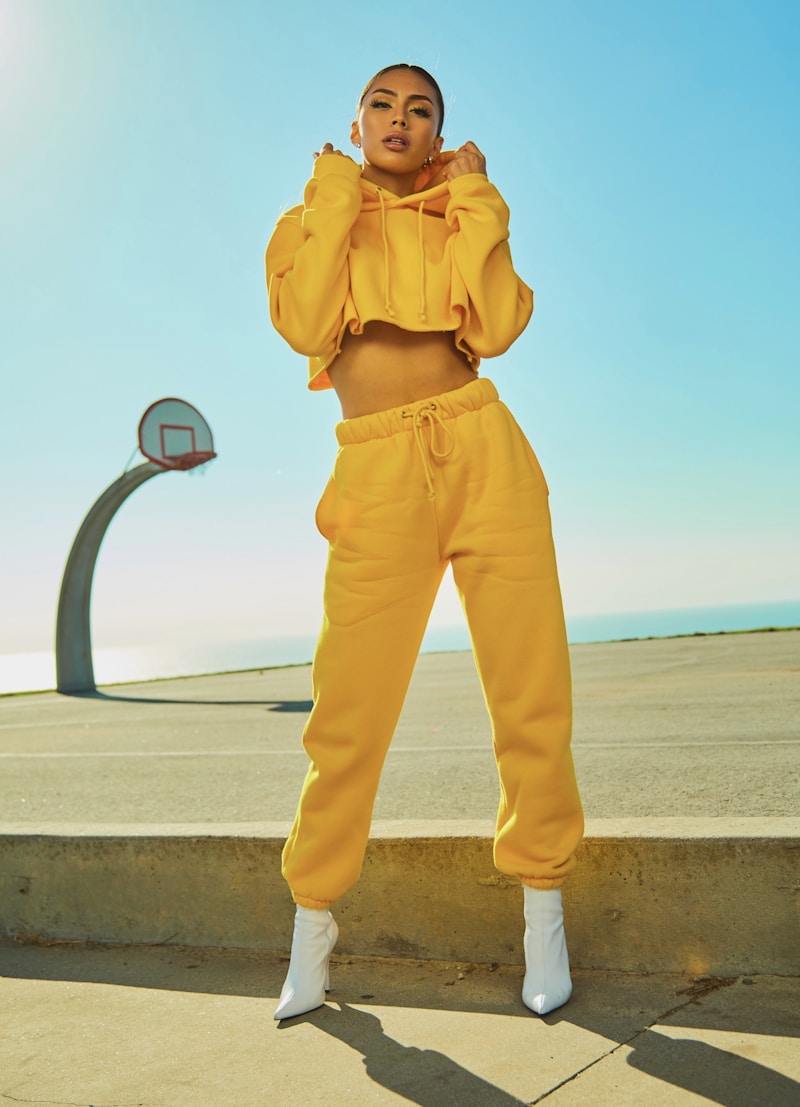
The text prompt was consistent across all outfit changer tools: "a fitted navy blue wool blazer over a crisp white button-down shirt, with dark slim charcoal trousers."
For garment try-on tools, we used the same source photo with a product photo of a navy blazer as the garment reference.
Quick rankings
| Rank | Tool | Category | Identity Score | Free Access |
|---|---|---|---|---|
| 1 | OutfitGen | Outfit changer | 9.2 | Yes (3 no-signup) |
| 2 | FASHN | Garment try-on | 8.1 | Trial only |
| 3 | Zara AR | Garment try-on (Zara items) | 8.8 (live AR) | Free (in-app) |
| 4 | FitRoom | Outfit changer | 7.6 | Trial only |
| 5 | Tryonr | Outfit changer | 7.4 | Yes (3/day) |
| 6 | Magic Hour | Creative outfit changer | 5.2 | Yes (watermarked) |
| 7 | Krea AI | Style exploration | 6.3 | Yes (~10/day) |
Tool-by-tool breakdown
1. OutfitGen
Category: AI outfit changer · outfitgen.ai Identity 9.2 · Quality 9.4 · Prompt Adherence 9.1
OutfitGen is the strongest text-prompt outfit changer we tested. The core advantage: the person in the output looks like the person in the input.
The blazer test result shows why the identity score is high:
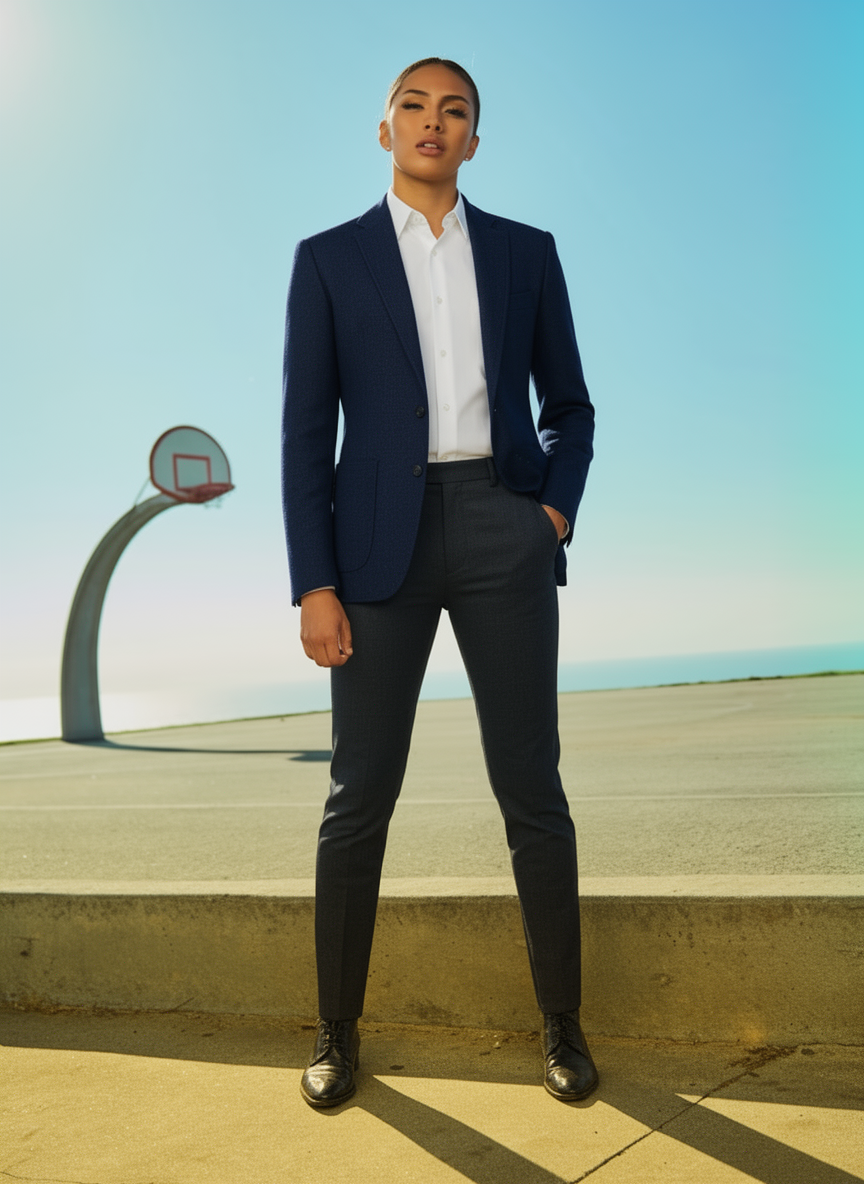
The basketball court background is preserved completely: hoop, concrete steps, sky. Face, skin tone, and pulled-back hair are all intact. Wool texture is visible in the lapel fabric. This is not a flat color replacement. The model rendered actual fabric depth.
More impressively, a casual outfit test with a different prompt preserved both the original "defiant" pose and the white boots from the source photo:
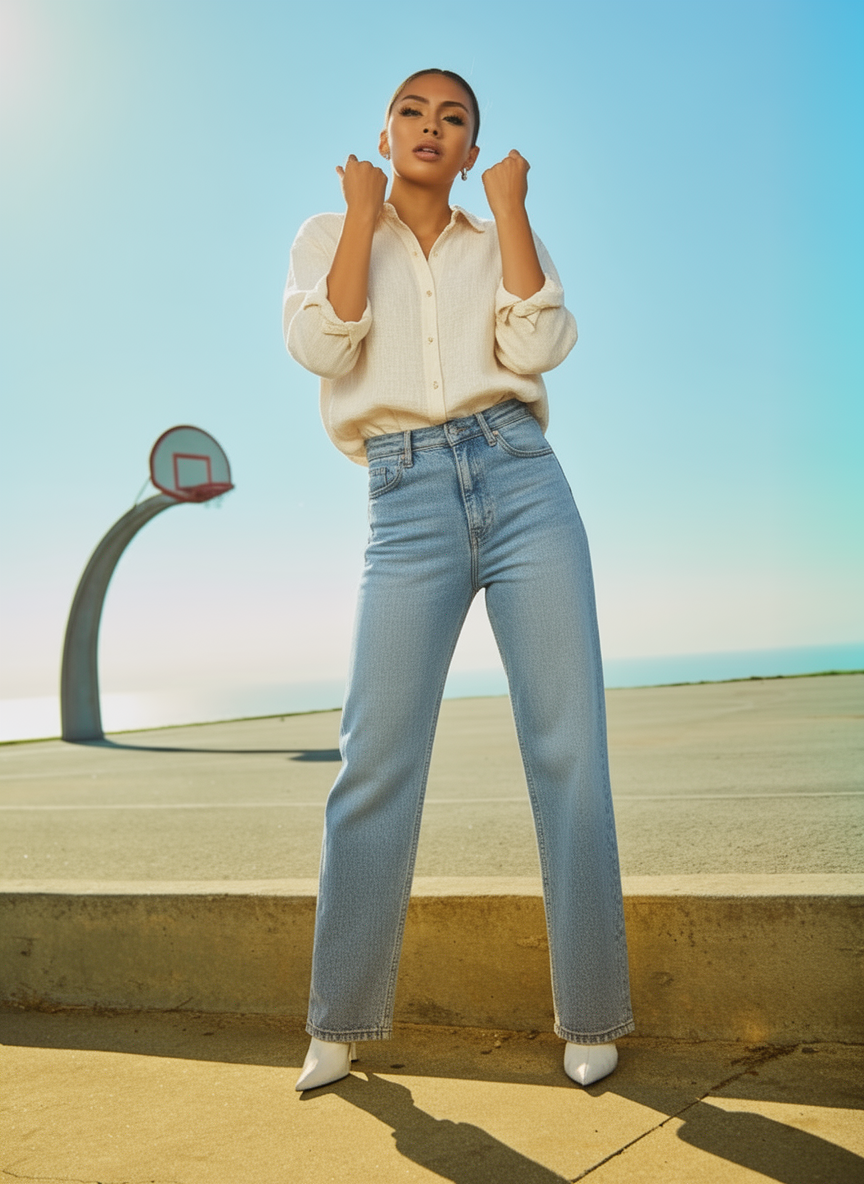
The raised-fists energy from the original collar-pull pose survived the outfit change intact. This is unusual. Most tools adapt poses to a neutral standing position. OutfitGen understood the intent of the pose, not just the pixel state.
An evening dress test produced equally strong results:
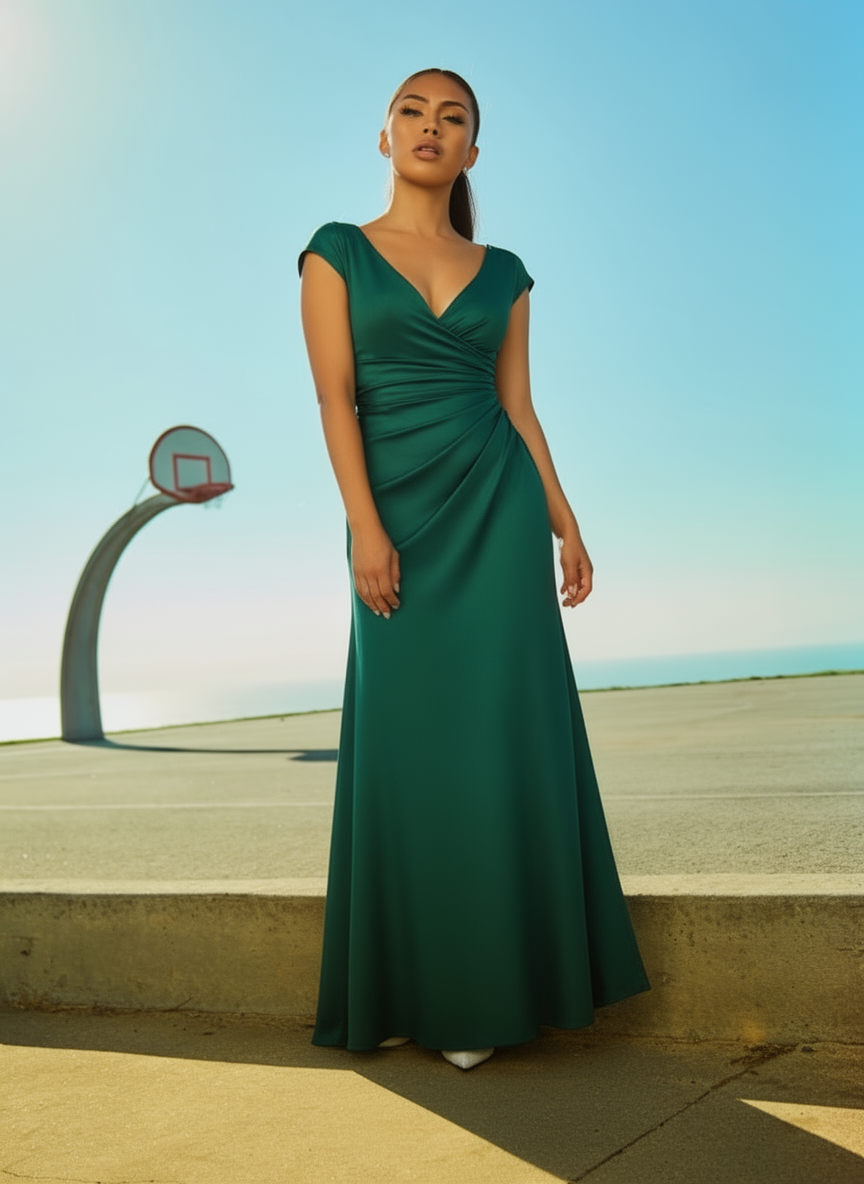
What we found: OutfitGen handles all three outfit categories (formal, casual, evening) cleanly. Identity preservation is consistent across tests. Background preservation is complete. Free tier includes 3 no-signup generations at full resolution with no watermark. Users in AI fashion communities frequently name it as "the tool that still looks like you". All three test results support that description.
2. FASHN
Category: garment try-on · fashn.ai Identity 8.1 · Quality 8.7 · Category fit (garment try-on) 9.5
FASHN is purpose-built for e-commerce garment try-on: you provide a product photo of the specific item and it renders it on your body photo. For that specific use case, it outperforms every other tool: garment shape, drape, and color transfer are accurate, and it works across diverse body types.
The limitations: it's slower than most tools (45-60 seconds per generation), the free trial is limited, and it requires a reference garment photo rather than a text prompt. For individual consumers testing a style direction, the extra step of finding a reference photo adds friction. For brands building virtual fitting rooms, that extra step is exactly what they want.
What we found: FASHN is the right tool when you have a specific item you want to try on. It's not the right tool for exploratory outfit generation from a text description. Users in e-commerce tech communities describe it as "the gold standard for garment visualization" and the category fit score (9.5) reflects that.
3. Zara AR
Category: garment try-on (Zara items only) · Zara iOS/Android app Identity 8.8 (AR) · Quality 8.2 · Scope 5.0 (Zara items only)
Zara's in-app AR try-on has the least friction of any garment try-on in this comparison, within its scope. Open the Zara app, tap an item with the AR icon, point your camera at yourself, and the item renders in real-time on your body. No upload step, no waiting for processing. The integration with the checkout flow is frictionless.
Limitations are significant: Zara items only, mobile AR only (no static photo edit), and coverage varies by item. Structured garments (blazers, coats) render less precisely than fitted items (t-shirts, jeans). The high identity score reflects that you're using live AR against your actual body rather than a photo.
What we found: If you're a Zara shopper evaluating a specific purchase, this is the smoothest try-on experience available. Outside that context, it's not useful. Scores reflect the narrow use case; if Zara matches your shopping, it's excellent.
4. FitRoom
Category: AI outfit changer · fitroom.app Identity 7.6 · Quality 7.4 · Prompt Adherence 7.8
FitRoom handled the blazer prompt cleanly:
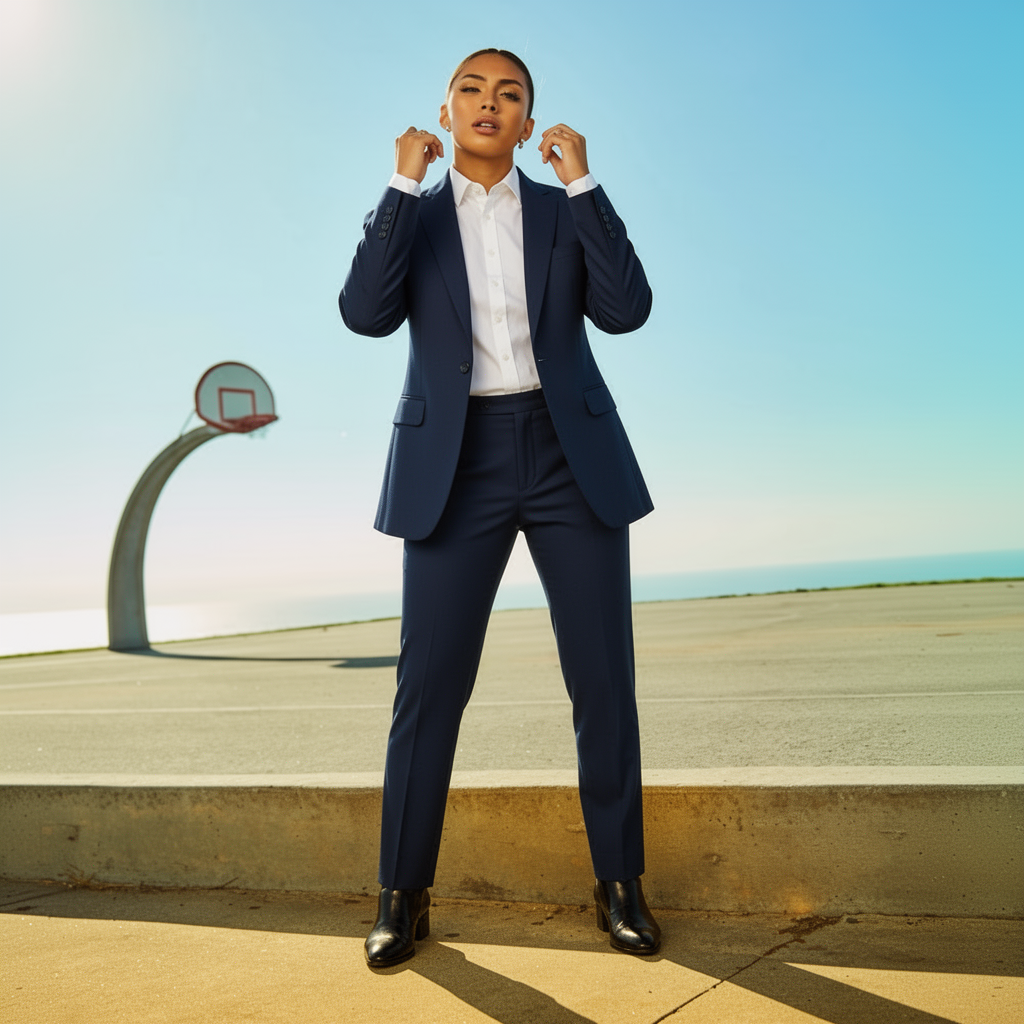
Background preserved. Blazer rendered professionally. The original photo's collar-grab energy translated into hands near the lapels. It looks like adjusting or arranging the blazer, which is a reasonable contextual mapping. Most neutral result of the competitors.
FitRoom shows a consistent strength in formal wear. Processing time is longer than most (~45 seconds), and the free trial is limited: not an ongoing free plan, just a trial allowance. Casual and athletic clothing prompts are less reliable than formal wear.
What we found: FitRoom is the best choice among the competitors for strictly formal/business wear mockups. For broader outfit testing, OutfitGen's stronger identity preservation and more reliable prompt adherence make it the better general-purpose option. The 45-second processing time is noticeable when you're testing multiple variations. Users in professional fashion communities describe FitRoom as "dependable for corporate wardrobe planning."
5. Tryonr
Category: AI outfit changer · tryonr.com Identity 7.4 · Quality 7.1 · Prompt Adherence 7.5
Tryonr offers the simplest interface in the comparison: upload, describe, generate. No advanced settings, no reference image option, no real-time preview. The export button is at the top right of the result screen (less intuitive than below the image where most people look), and the free tier counter isn't surfaced until you've already started.
The blazer result:
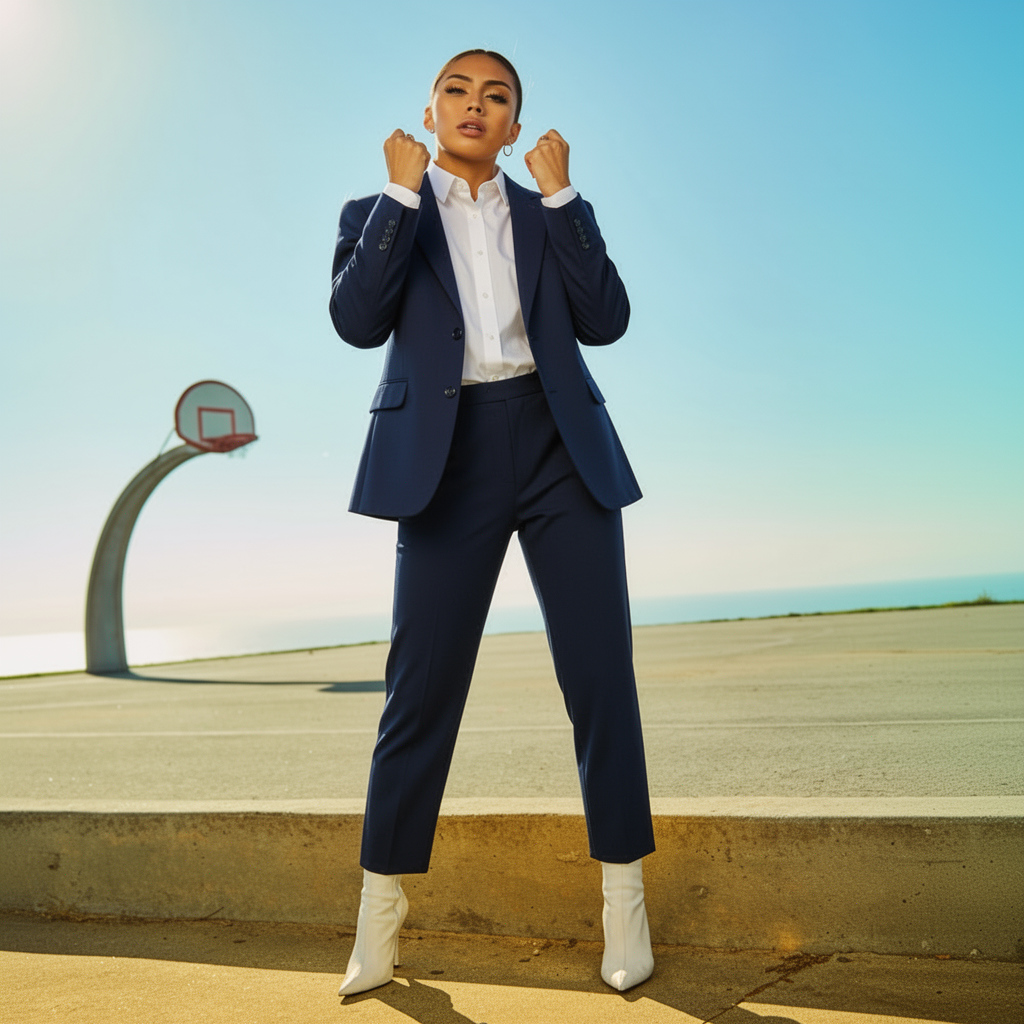
Background preserved. Blazer rendered adequately. The problem: the original collar-grab pose was translated into a boxing stance: fists raised, forward energy, clearly in a fighting posture while wearing a business suit. The model preserved the physical state of the hands and body (clenched, raised, energized) without understanding the context of what was happening. White boots from the source photo appear in the output, which is a surprisingly accurate accessory preservation.
What we found: Tryonr works well for neutral-pose source photos. For expressive or gesture-driven photos, expect odd pose translations. The 3/day free tier with no watermark is genuine value for casual users. The interface minimalism cuts both ways: fast to start, limited when you need control. The free daily counter visibility issue (not shown until you've already started a generation) is minor friction worth noting.
6. Magic Hour
Category: Creative outfit changer / editorial · magichour.ai Identity 5.2 · Quality 8.3 · Prompt Adherence 7.8
Magic Hour produces visually striking results. The blazer was the most aesthetically impressive of any tool in the comparison: beautifully tailored, sharp lapels, excellent fabric rendering.
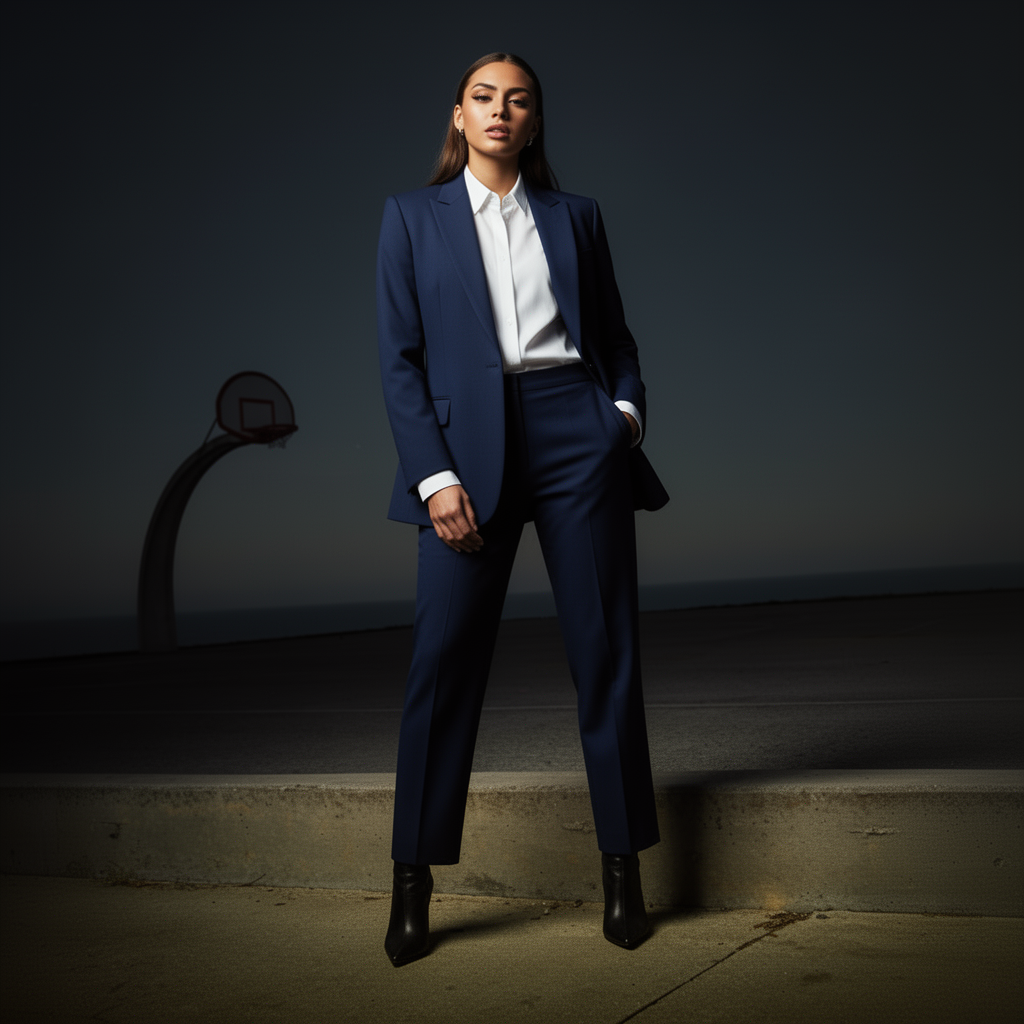
Everything else changed. The outdoor basketball court converted to a dark moody studio with dramatic vignette lighting. The face changed substantially: lighter complexion, longer straight hair, different styling. The identity score (5.2) reflects genuine replacement, not minor drift.
What we found: Magic Hour's aesthetic-over-identity tradeoff is the most pronounced in this comparison. The "dramatic lighting, editorial style" interpretation isn't a bug. It's what the model is optimized for. If you want editorial outfit concepts for a mood board or creative project and you don't need the output to look specifically like you, Magic Hour is excellent. If you need to see how you personally look in an outfit, this isn't the right tool. Users in creative AI communities frequently describe Magic Hour as "best for when you want a fashion shoot vibe, not a realistic try-on."
7. Krea AI
Category: Style exploration / outfit concepts · krea.ai Identity 6.3 · Quality 4.8 · Prompt Adherence 5.9
Krea's real-time editing canvas is the most innovative interface in this comparison: you can paint over regions of a photo and watch the model update live as you adjust sliders. For rapid style exploration, it's genuinely useful.
The blazer result had three notable issues:
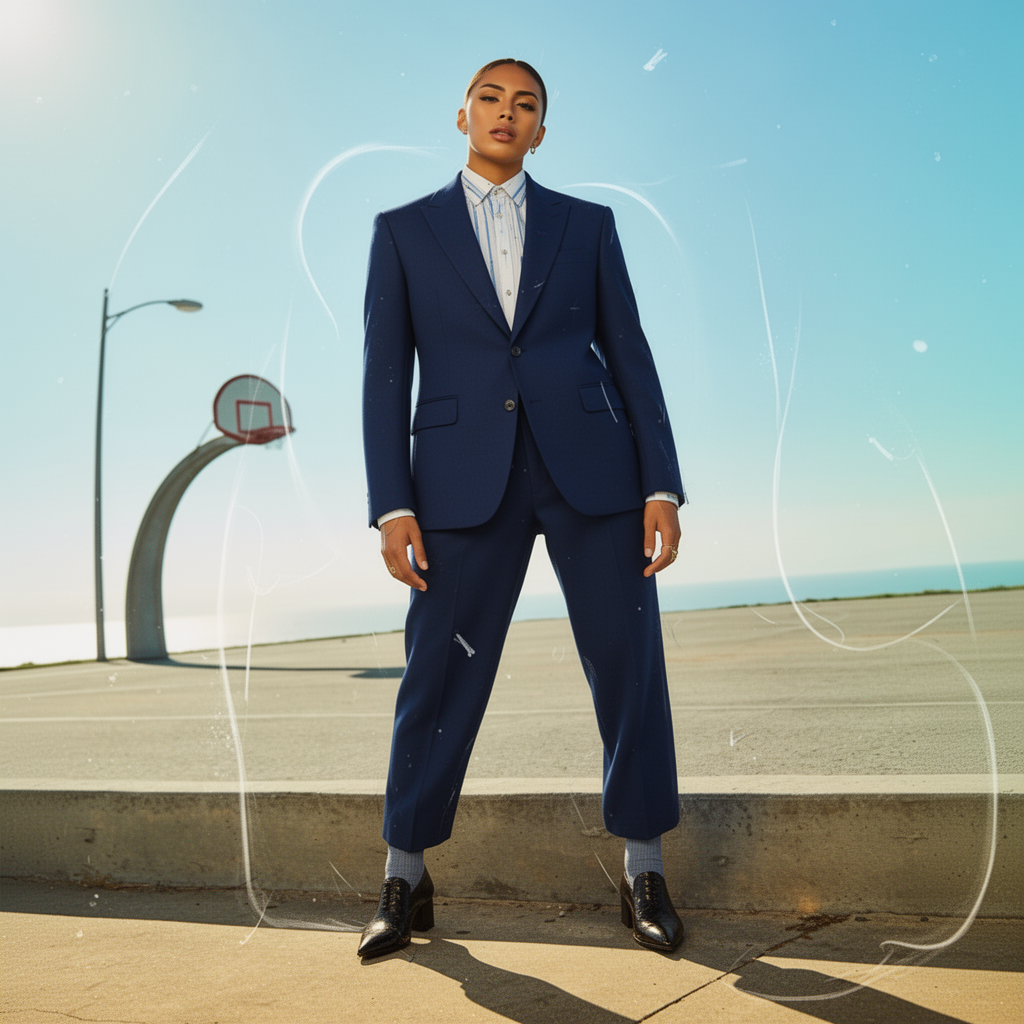
A streetlamp appeared in the background that wasn't in the source photo. The shirt rendered as blue-and-white striped rather than the requested solid white. Prominent white swirly sketch-like artifact lines appeared throughout the entire image, across clothing, background, and face. The "artistic render, creative reinterpretation" default mode triggered a stylistic overlay that looks half-rendered at full resolution.
What we found: Krea's free tier is the most generous in the comparison (~10 per day), and the real-time canvas is valuable for exploring style directions quickly. But the artifact issue and prompt drift are significant for outfit change use cases. The creative default mode isn't configurable on the free tier. Krea is best understood as a style exploration tool, not a realistic try-on tool. Users in AI art communities describe it as "better for abstract concepts than photorealistic results". This test confirms that.
Which tool to use
You want to see exactly how you look in an outfit you described → OutfitGen
You want to try on a specific item from a product photo → FASHN (any retailer), Zara AR (Zara items), Amazon Virtual Try-On (Amazon items)
You want editorial or creative outfit content for a mood board → Magic Hour or Krea AI
You need formal business wear mockups specifically → FitRoom
You want the fastest start, no account required → OutfitGen free tier
You want live AR try-on while shopping → Zara app or Amazon app (item-specific)
What separates good try-on tools from weak ones
After testing all seven, the patterns are clear.
Identity preservation is the hardest problem. Every tool can render a recognizable blazer. What separates them is whether the person looks like themselves afterward. OutfitGen leads significantly. Magic Hour and Krea prioritize aesthetics over identity.
Pose understanding reveals model quality. The source photo had a strong, expressive pose. OutfitGen preserved it. Tryonr misread its semantic meaning. FitRoom found a sensible translation. Magic Hour ignored it entirely. A neutral-pose source photo would have hidden these differences.
Background changes signal a larger problem. Magic Hour converted the background entirely. Krea added a spurious streetlamp. When a model can't preserve the background correctly, it's a sign that the surrounding context isn't being treated as something worth keeping. Tools that respect background context tend to also respect identity context.
Frequently asked questions
Can AI virtual try-on replace a real fitting room?
For deciding whether a style direction suits you, yes. For exact fit (whether the shoulders sit correctly, whether the inseam is right), no. Use these tools to narrow choices, not to skip trying things on when fit matters.
Do these tools handle different body types well?
OutfitGen and FASHN produce consistent results across a range of body types. Some older tools were trained on a narrower distribution and produce lower quality on bodies that differ from the training data. If a tool consistently produces distorted results on your photos, try a different one.
Are the outputs good enough for social media?
OutfitGen's output quality is high enough for Instagram posts, profile photos, and social content. Magic Hour also produces social-quality outputs, with the caveat that they may not look like you specifically. Tools with artifact issues (Krea at current settings) should be reviewed carefully before publishing.
How do these tools handle accessories?
Inconsistently. Most tools focus on the main garment and may remove, add, or alter accessories in unpredictable ways. OutfitGen preserved the white boots from the source photo in the casual test, which was unusual. Watches, jewelry, and bags are the weakest category across all tools.
Testing notes
Tests were performed in July 2026 using the same source photo across all outfit changer tools and the same garment reference for garment try-on tools. In-app AR tools (Zara, Amazon) were tested on iPhone 15 Pro. Processing times and free tier limits are as observed during testing. AI tools update frequently. Results may differ from current versions.
Ready to try it yourself?
Get started with OutfitGen, 3 free generations, no sign-up required.
Try OutfitGen Free