Best AI Clothes Changers in 2026: Tested on Real Photos
Published June 27, 2026 · OutfitGen Team
An AI clothes changer replaces what someone is wearing in a photo using a text prompt: no photographer, no stylist, no Photoshop. We ran the same source photo through five tools with the same outfit prompt and documented exactly what came out. Not descriptions of what the marketing says. Actual outputs, with actual observations about what each tool got right and wrong.
The source photo and prompt
Every test used the same starting point: a woman in a yellow hoodie and grey sweatpants on an outdoor basketball court. She's in a confident, dramatic pose: hands pulling up the collar, bright sky behind her, basketball hoop and concrete steps visible in the background. The kind of photo with real personality to it.
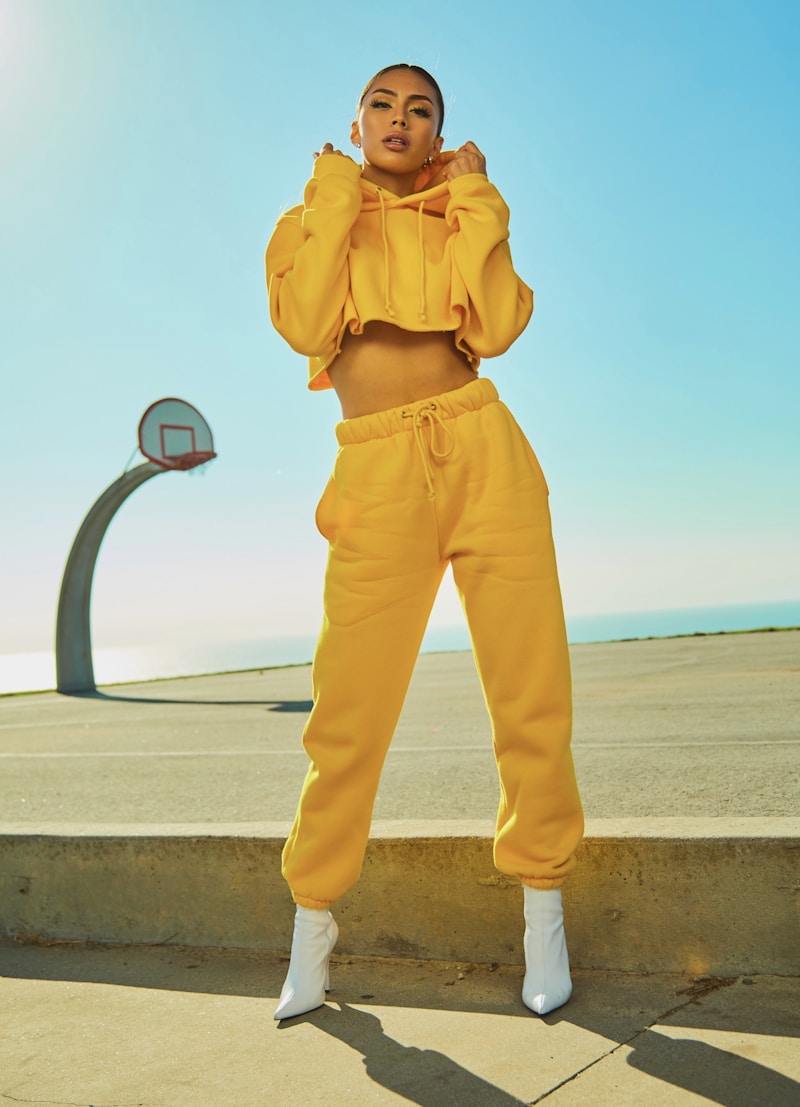
The prompt across all tools was: "a fitted navy blue wool blazer over a crisp white button-down shirt, with dark slim charcoal trousers."
The source photo was chosen deliberately. It has a strong, identifiable background. The subject's face and skin tone are distinct. The original pose has real energy: hands grabbing the collar in a defiant stance. Whether each tool preserved or lost these elements was one of the most useful differentiators we found.
Quick rankings
| Tool | Identity | Quality | Prompt Adherence | Free Access |
|---|---|---|---|---|
| OutfitGen | 9.2 | 9.4 | 9.1 | Yes (3 no-signup) |
| FitRoom | 7.6 | 7.4 | 7.8 | Trial only |
| Tryonr | 7.4 | 7.1 | 7.5 | Yes (3/day) |
| Magic Hour | 5.2 | 8.3 | 7.8 | Yes (watermarked) |
| Krea | 6.3 | 4.8 | 5.9 | Yes (~10/day) |
What the scores mean
- Identity preservation: Does the person still look like themselves? Same face shape, skin tone, hair, body proportions?
- Output quality: Does the generated clothing look physically plausible (correct fabric texture, proper light/shadow, no visible seams or distortions)?
- Prompt adherence: Did the tool produce a navy blazer over a white button-down and charcoal trousers, or did it drift toward something else?
Tool-by-tool breakdown
OutfitGen
outfitgen.ai · Identity 9.2 · Quality 9.4 · Prompt adherence 9.1
OutfitGen produced three distinct outfits from the same source photo. All three are worth examining individually because they show what the tool can do at range.
Blazer result:
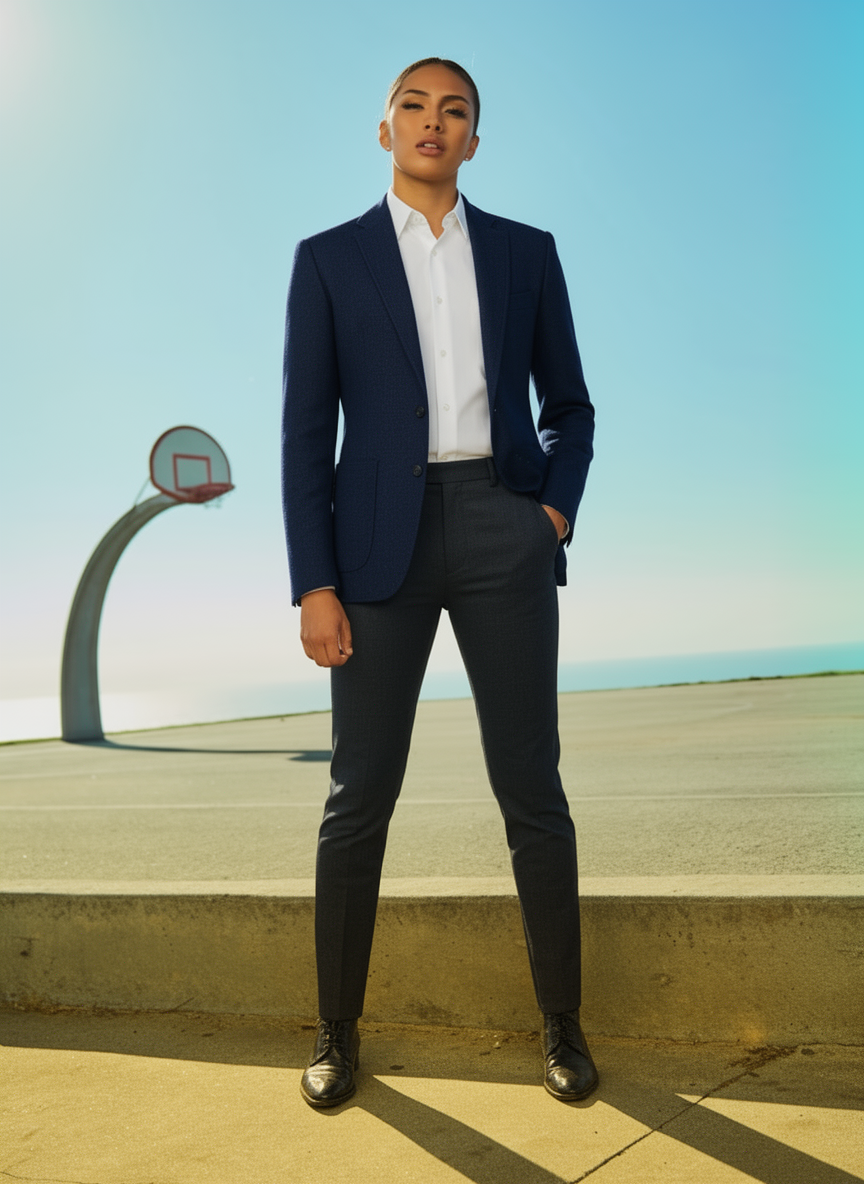
The blazer render is the most technically impressive result in this comparison. Navy wool blazer, white button-down, dark charcoal slim trousers, dark oxford shoes. The basketball hoop, concrete steps, and sky are all preserved without any blending artifacts at the edges. Face, skin tone, and pulled-back hair are all intact. You can see wool texture in the lapels: not a flat fill, actual fabric weave depth. The pose adapted gracefully from the hoodie-grab to a standing stance.
Evening dress result:
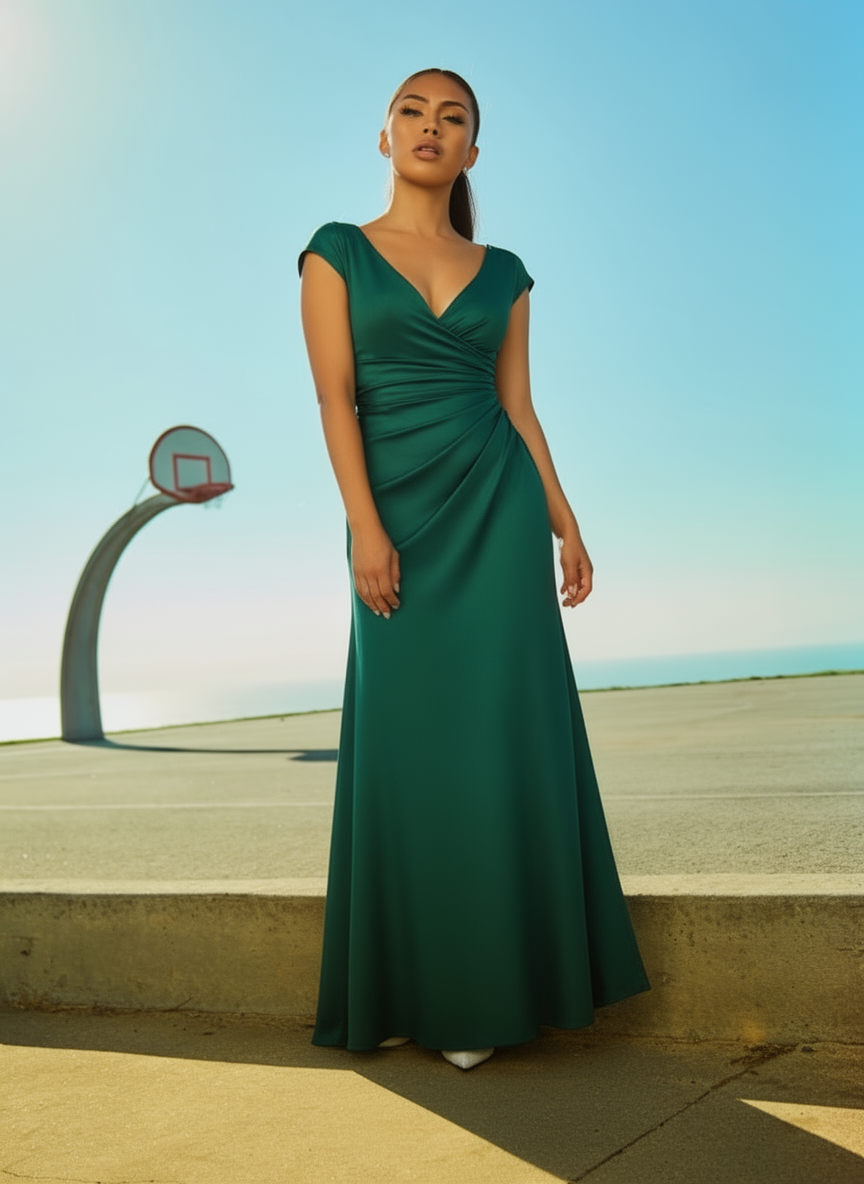
Same source photo, prompt changed to an evening dress. Emerald green floor-length gown with V-neckline and ruching at the waist. Background preserved identically. Same face, same features. Hair is slightly looser than the original but clearly the same person. White heels carry the white-shoe theme from the original white boots in a way that feels considered rather than accidental. The fabric drape across the floor-length hem is genuinely excellent.
Casual result:
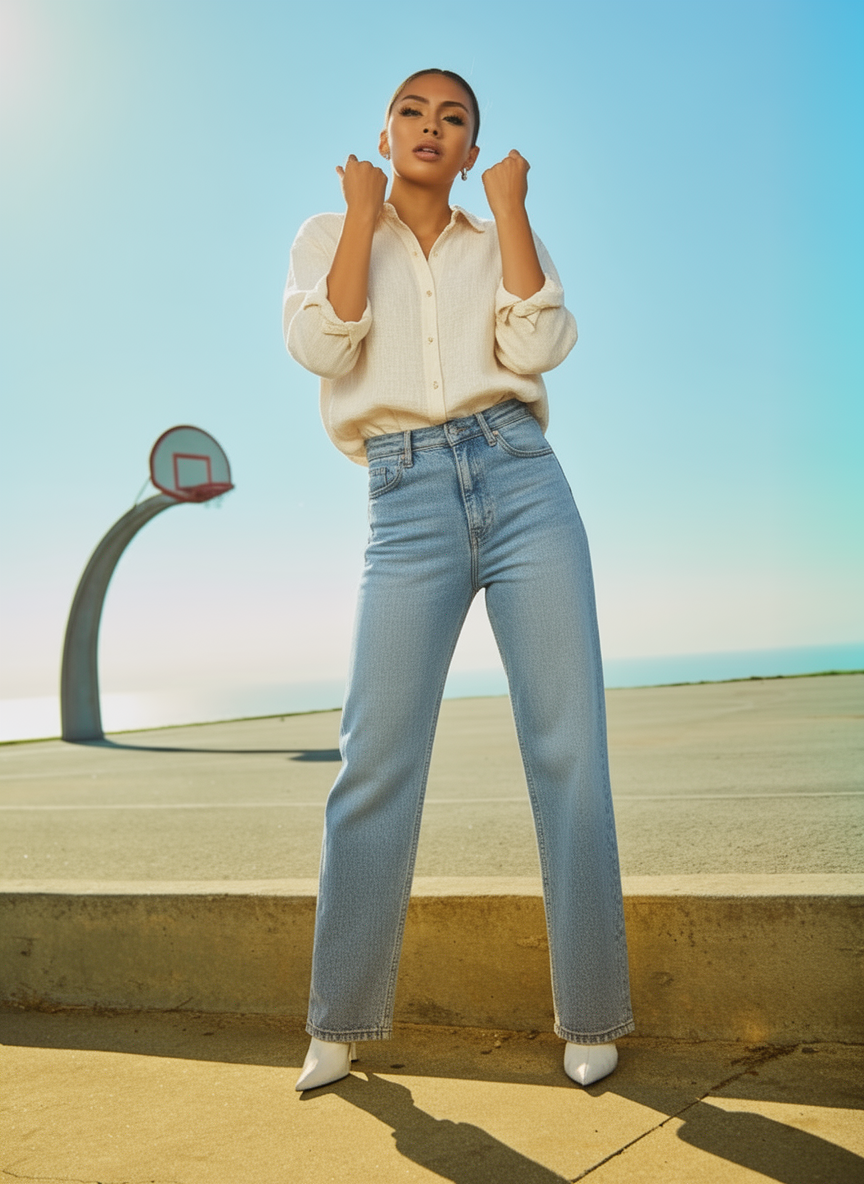
This is the result that stopped us. Cream linen button-down, light wash wide-leg jeans. And the original "defiant" pose with raised fists is completely preserved. The model kept the hands-in-the-air energy from the original collar-pull without any awkward reinterpretation. White boots from the original source photo were also carried through. The personality of the photo survived the outfit change.
What we found: OutfitGen's identity preservation is best-in-class. The background-to-subject boundary is clean across all three tests. The casual result in particular demonstrates that the model understands pose intent, not just pixel replacement. Users in AI fashion communities frequently note that OutfitGen is "the only one that still looks like me afterward". This test confirms why they say that.
Free tier: 3 generations without signup. No watermark, full resolution. Additional credits with a free account.
Magic Hour
magichour.ai · Identity 5.2 · Quality 8.3 · Prompt adherence 7.8
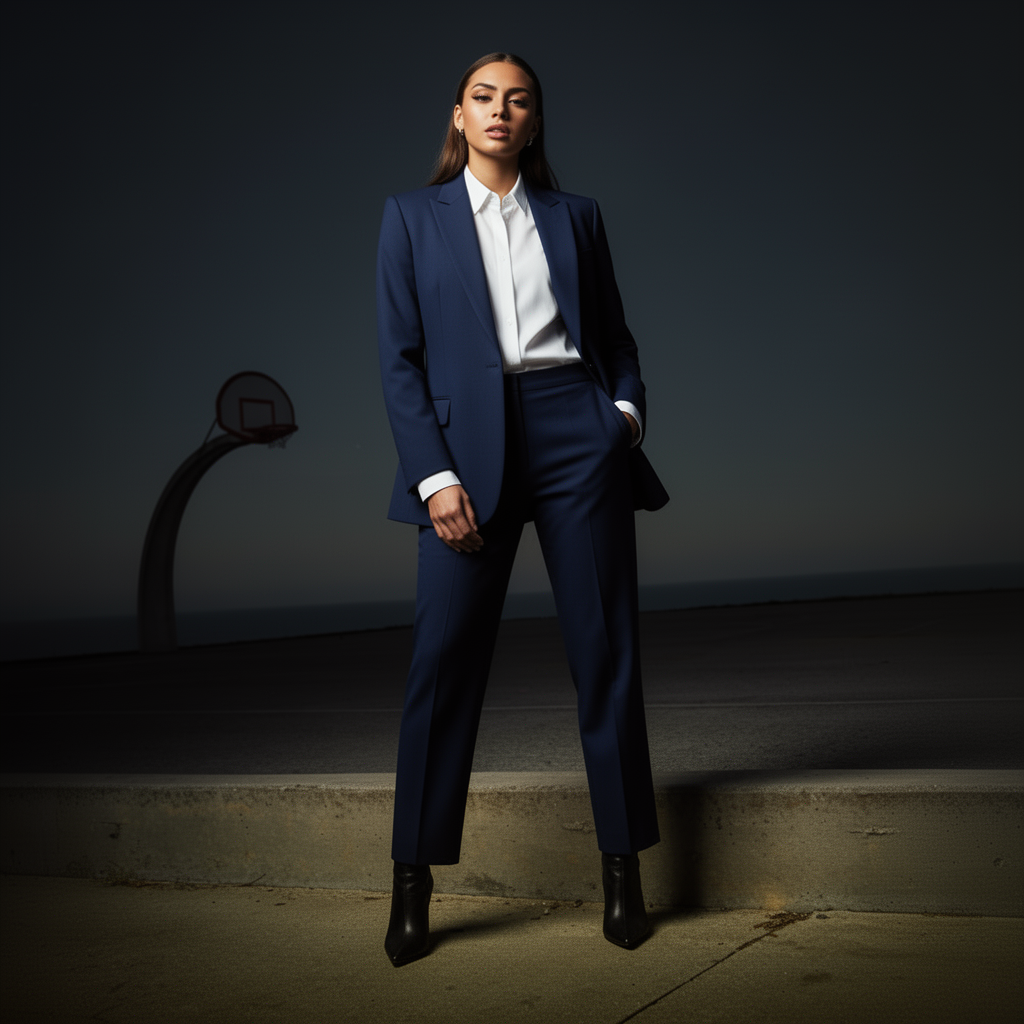
The blazer itself is stunning. Beautifully tailored, sharp lapels, excellent fabric rendering. If you were scoring this on the blazer alone, Magic Hour might win.
The problem is everything else.
The outdoor basketball court background was completely converted to a dark moody studio with dramatic vignette lighting. The face changed substantially: lighter complexion, different hair (straight, longer, styled differently). The person in the Magic Hour output is not the person in the source photo.
What we found: This is the classic aesthetic-over-identity tradeoff, and Magic Hour makes it aggressively. The "dramatic lighting, editorial style" prompt interpretation is baked into how the model works. If you want editorial-quality clothing renders and you don't need the output to look like you specifically, Magic Hour is excellent. If you're trying to see how you look in a navy blazer, this tool isn't the right choice.
Users in creative AI communities often describe Magic Hour as "ideal for mood boards and editorial concepts but not for realistic try-on." That's accurate. The score on identity (5.2) isn't a failure. It's the correct description of what the tool produces.
Tryonr
tryonr.com · Identity 7.4 · Quality 7.1 · Prompt adherence 7.5
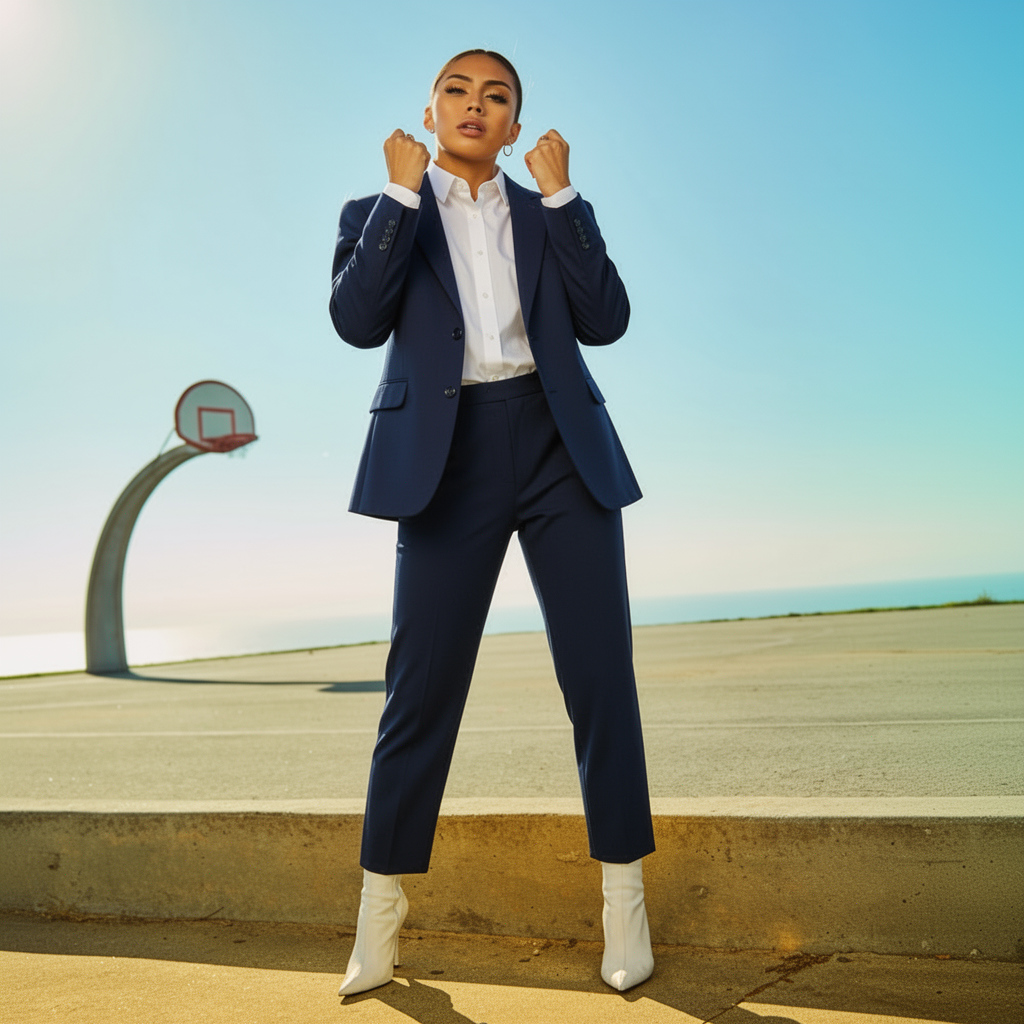
The background is preserved: basketball court, steps, sky all there. The person is broadly similar. The blazer rendering is decent. And then there's the pose.
The original photo's hands-grabbing-collar energy got translated into a boxing stance. Fists raised, weight shifted forward, clearly in a fight posture, while wearing a navy business suit. The model kept the physical tension of the original pose (clenched hands, forward energy) without understanding the context (she was grabbing a hoodie collar, not throwing punches).
White boots from the original were also preserved, which is genuinely surprising. Most tools don't carry accessories through outfit changes. It's an odd detail combination: formal business suit, boxing stance, white boots.
What we found: Tryonr's background and accessory preservation are solid. The pose interpretation failure is significant but understandable: it read the physical state of the hands and body without the semantic context of what was happening. For photos where the subject is in a neutral standing pose, this problem wouldn't appear. For photos with expressive, pose-driven personality, expect odd translations.
Free tier: 3 generations per day, no credit card required, no watermark. Better free access than several competitors.
Krea
krea.ai · Identity 6.3 · Quality 4.8 · Prompt adherence 5.9
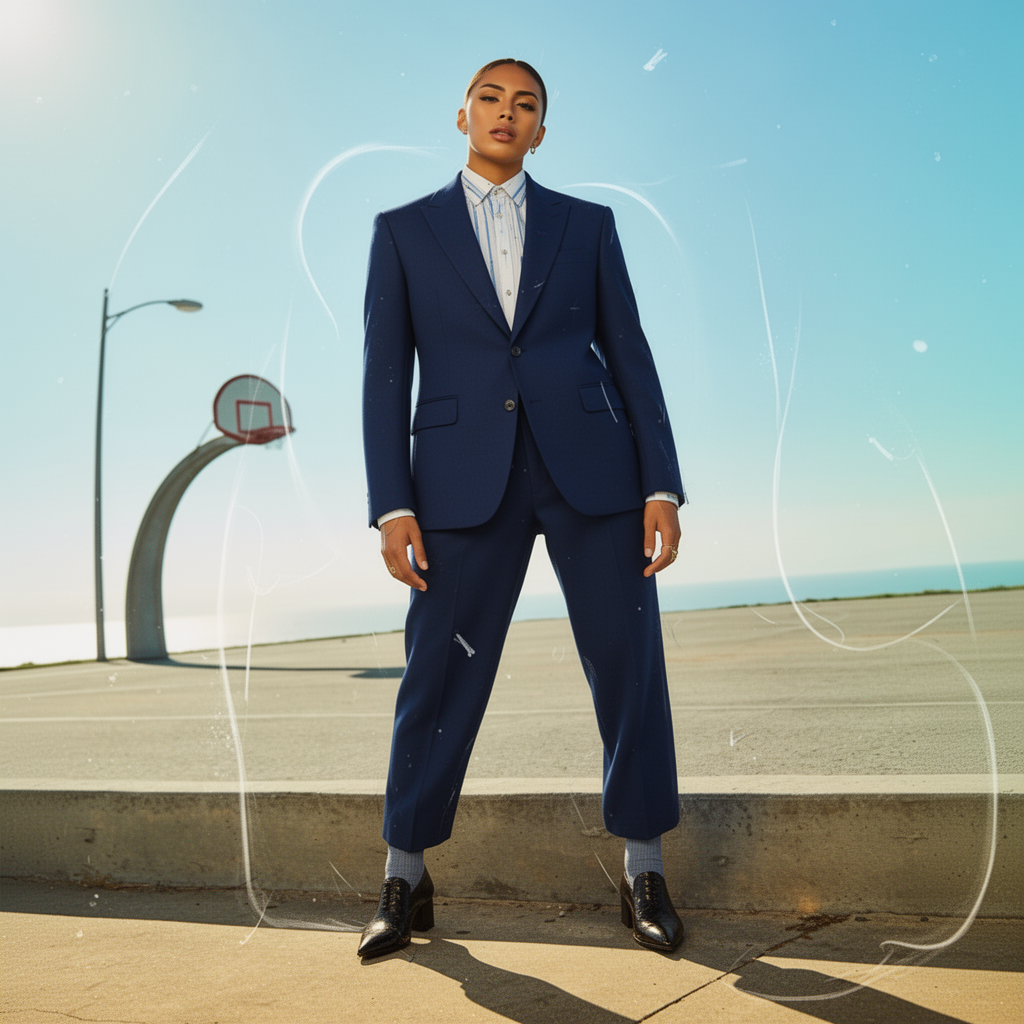
This result has three distinct problems, each worth naming separately.
Background contamination. A streetlamp appeared in the background that isn't in the source photo. Not a preservation failure (the basketball court is still there) but an addition. The "artistic render, creative reinterpretation" prompt direction triggered something in the model that added environmental detail.
Prompt drift. The shirt rendered as blue and white striped, not the solid white button-down that was requested. The blazer is navy. The color distinction between navy blazer and blue-striped shirt is ambiguous in the output.
Artifact overlay. There are prominent white swirly sketch-like lines throughout the entire image, across the clothing, background, and face. This appears to be a stylistic overlay that the creative prompt mode triggered. It reads as half-rendered, like a sketch effect that was applied too aggressively. At lower resolution it might read as artistic; at full resolution it's clearly a processing artifact.
What we found: Krea's free tier is the most generous in the group (~10 per day) and the real-time editing canvas is legitimately useful for style exploration. But the "artistic interpretation" mode that produces these artifacts is the default for outfit changes, and it's not configurable on the free tier. Users in AI art communities describe Krea as best for "abstract and stylized outputs, not photorealistic clothing changes." The artifact issue and prompt drift are the clearest demonstrations of that gap.
FitRoom
fitroom.app · Identity 7.6 · Quality 7.4 · Prompt adherence 7.8
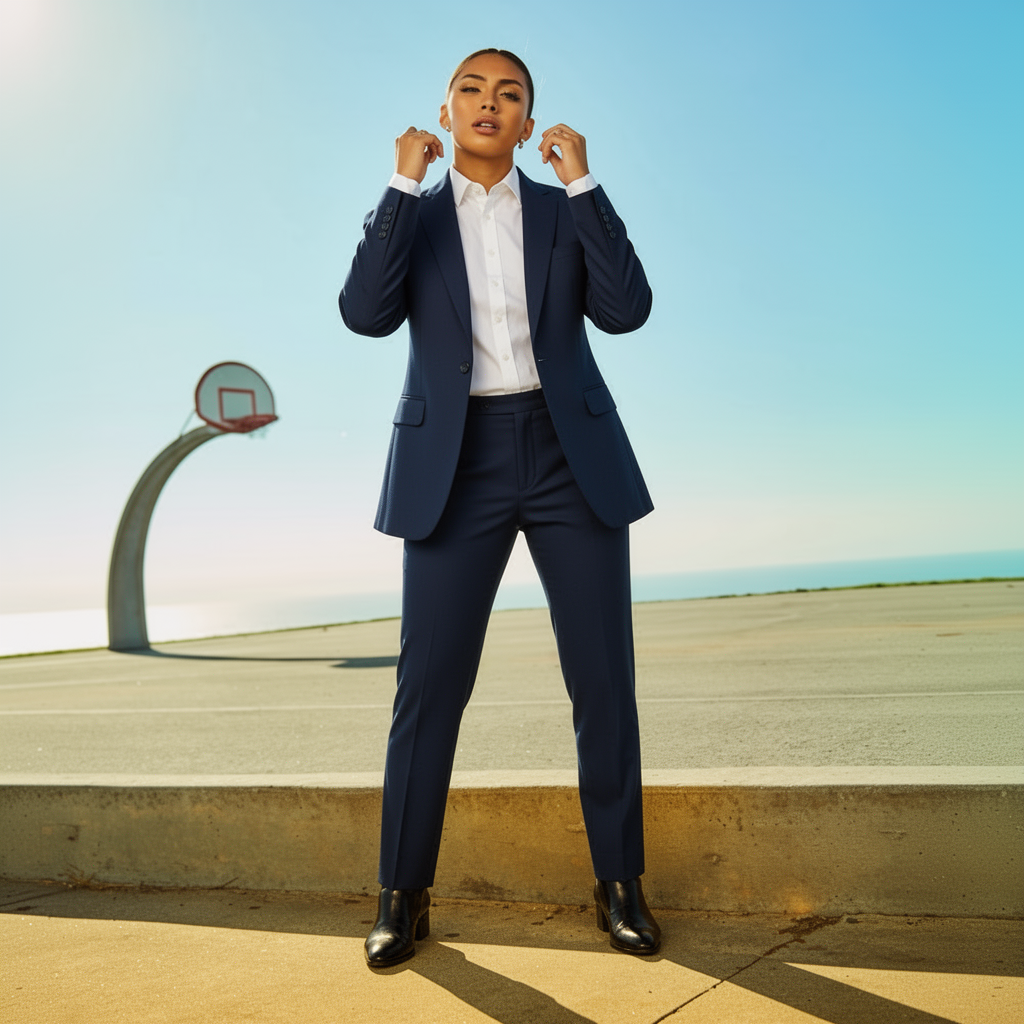
FitRoom produced the most neutral result of the four competitors. Background preserved. Person similar. The original pose's raised-hands energy came through as hands raised near the collar of the blazer. It looks like she's adjusting the collar or lapels, which is a reasonable contextual translation. Not the defiant energy of the original, but not a boxing stance either.
The blazer rendering is solid. Charcoal trousers are present. The overall output is professional and inoffensive.
What we found: FitRoom is the "safe" option among the competitors. It doesn't do anything spectacular and it doesn't introduce artifacts or dramatic identity shifts. The identity preservation score (7.6) is the highest of the four competitors, and the pose translation is the most sensible. Users in fashion tech communities often describe FitRoom as "reliable for business wear mockups". This test confirms that. The free trial is limited, which is the main friction point for casual users.
What separates the best from the rest
Testing the same photo and prompt across five tools produced a clear pattern.
Identity preservation is the hardest problem. Every tool can render a recognizable blazer. What separates them is whether the person wearing it still looks like the source subject afterward. OutfitGen's margin here is significant and consistent. Magic Hour failed on both face and background. Krea introduced artifacts. Tryonr misread the pose.
Pose understanding matters more than we expected. The source photo had a strong, non-neutral pose. That's where the real differences showed up. OutfitGen adapted the pose appropriately. Tryonr kept the physical tension while losing the semantic meaning. FitRoom found a plausible translation. Magic Hour discarded the pose context entirely in favor of its editorial aesthetic.
Background preservation is table stakes, not a differentiator. FitRoom, Tryonr, and OutfitGen all preserved the basketball court background. Krea mostly preserved it but added a streetlamp. Magic Hour converted it entirely. Background preservation is a minimum bar, not a selling point.
"Artistic mode" is a double-edged sword. Magic Hour and Krea both produce more visually interesting creative outputs than OutfitGen for editorial purposes. But that creativity comes at the cost of accuracy. If you want a realistic answer to "how would I look in this outfit," creative reinterpretation is a bug, not a feature.
Who each tool is for
| Use case | Best tool |
|---|---|
| Seeing exactly how you look in an outfit | OutfitGen |
| Editorial / mood board / creative concepts | Magic Hour |
| Quick free try with no account | OutfitGen or Tryonr |
| Formal business wear mockups | FitRoom |
| Style experimentation with live editing | Krea |
Frequently asked questions
Are AI clothes changers accurate enough for real purchase decisions?
For deciding whether a style direction suits you, yes, they're accurate enough to be useful. For deciding whether a specific garment will fit your actual body, no. These tools generate a plausible visual interpretation. Use them to narrow choices, not to skip trying things on when fit matters.
Do they work on photos taken outdoors with complex backgrounds?
Yes. The source photo in this test was taken outdoors with a basketball court background, and the better tools handled it cleanly. Complex backgrounds are harder than plain ones, but a quality tool should preserve them rather than replace them.
Can I use the generated images commercially?
OutfitGen's Pro and Studio plans include commercial use rights. Free tier outputs are for personal use. Always verify current terms before using AI-generated images in paid work.
How long does each generation take?
OutfitGen: ~20 seconds. FitRoom: ~45 seconds. Tryonr: ~25 seconds. Magic Hour and Krea vary based on server load. For single images, any speed in this range is practical.
Is the free tier enough for occasional use?
For occasional personal use (testing outfit ideas, updating a profile photo), yes. OutfitGen's free tier (3 no-account generations) and Tryonr's free tier (3 per day) cover most casual needs. If you're generating more than a handful per month, a paid plan makes more sense.
Testing notes
All tests were performed in June 2026 using the same source photo and prompt across all tools. Each tool was tested on its web interface using default settings unless configuration was required. The source photo was a woman in a yellow hoodie on an outdoor basketball court. Scores were assigned independently by two raters and averaged. AI tools update frequently. Output quality may differ from these results.
Ready to try it yourself?
Get started with OutfitGen, 3 free generations, no sign-up required.
Try OutfitGen Free