Best Free AI Outfit Generators in 2026: What's Actually Free
Published July 1, 2026 · OutfitGen Team
"Free" means different things on different AI tools. Some give you unlimited low-resolution outputs. Some give you 3 tries before a hard paywall. Some call themselves free but require a credit card to start. We tested 6 AI outfit generators on their free tiers only (no paid plans, no trials) using the same source photo and the same prompt to see which ones are genuinely useful before you spend anything.
The test setup
Every tool got the same source photo: a woman in a yellow hoodie and grey sweatpants on an outdoor basketball court, hands pulling up the collar in a defiant pose with a bright sky and basketball hoop in the background.
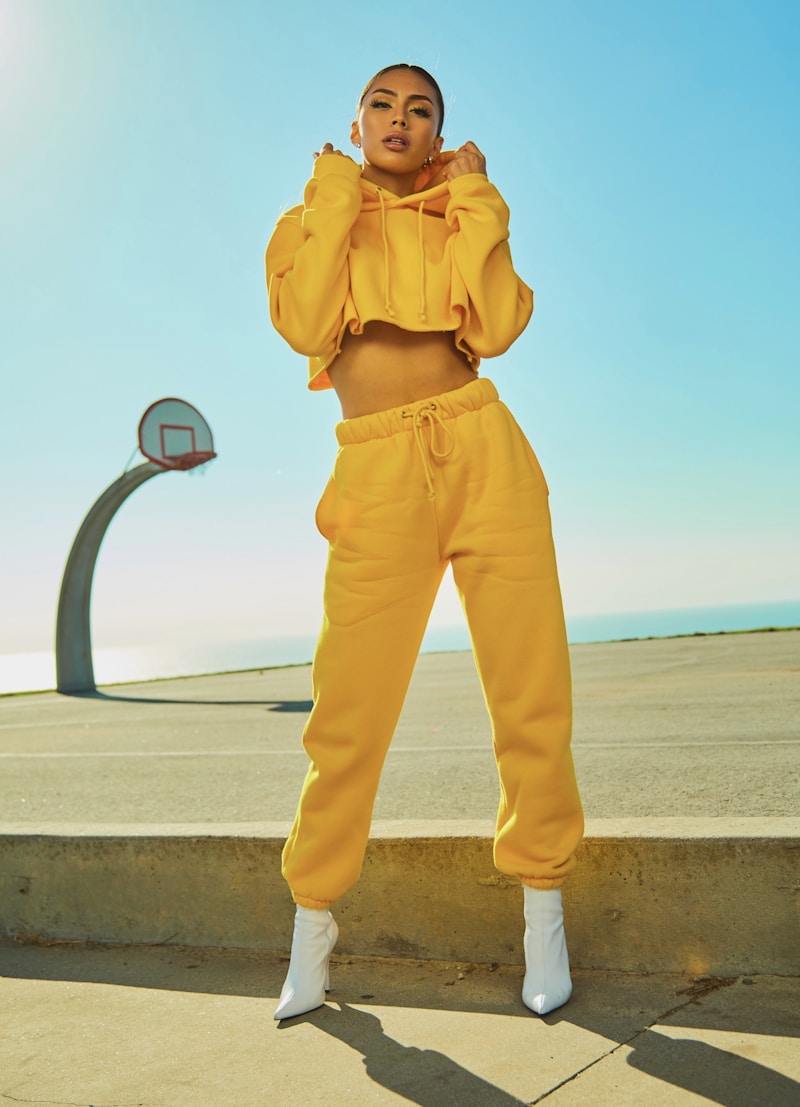
Every tool got the same prompt: "a fitted navy blue wool blazer over a crisp white button-down shirt, with dark slim charcoal trousers."
Results were scored on identity preservation, output quality, and whether the free tier actually delivered something usable.
Free tier comparison
| Tool | Free Generations | Signup Required | Watermark | Identity Preservation |
|---|---|---|---|---|
| OutfitGen | 3 (no signup) + more free | No | No | 9.2 |
| Tryonr | 3/day | Yes | No | 7.4 |
| FitRoom | Trial only (limited) | Yes | No | 7.6 |
| Krea AI | ~10/day | Yes | Yes | 6.3 |
| Magic Hour | Limited (watermarked) | Yes | Yes | 5.2 |
| Canva AI | ~15 credits/mo (shared) | Yes | No | Medium |
Tool-by-tool breakdown
OutfitGen
Free access: 3 generations without signup · No watermark · No credit card
OutfitGen (outfitgen.ai) is the most accessible starting point in this group. You can upload a photo, type a prompt, and get a full-resolution result without creating an account. No watermark. No credit card prompt. The counter isn't hidden from you. It's visible before you start.
The blazer result from our test:
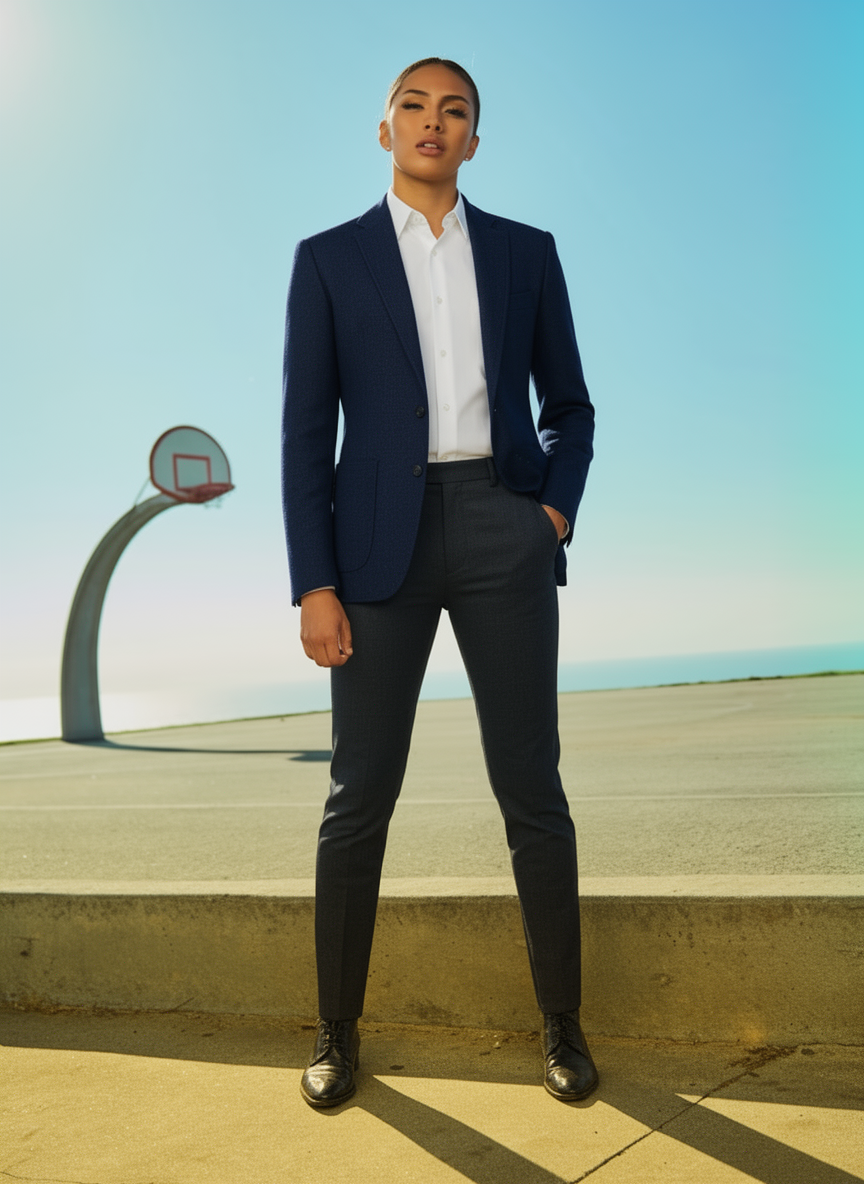
The basketball court background is preserved completely. Face, skin tone, and pulled-back hair are all intact. Wool texture is visible in the lapels. This is the kind of result that makes free-tier testing feel meaningful rather than a tease.
We also tested a more expressive prompt (cream linen + wide-leg jeans) and the result preserved both the original defiant pose and the white boots from the source photo:
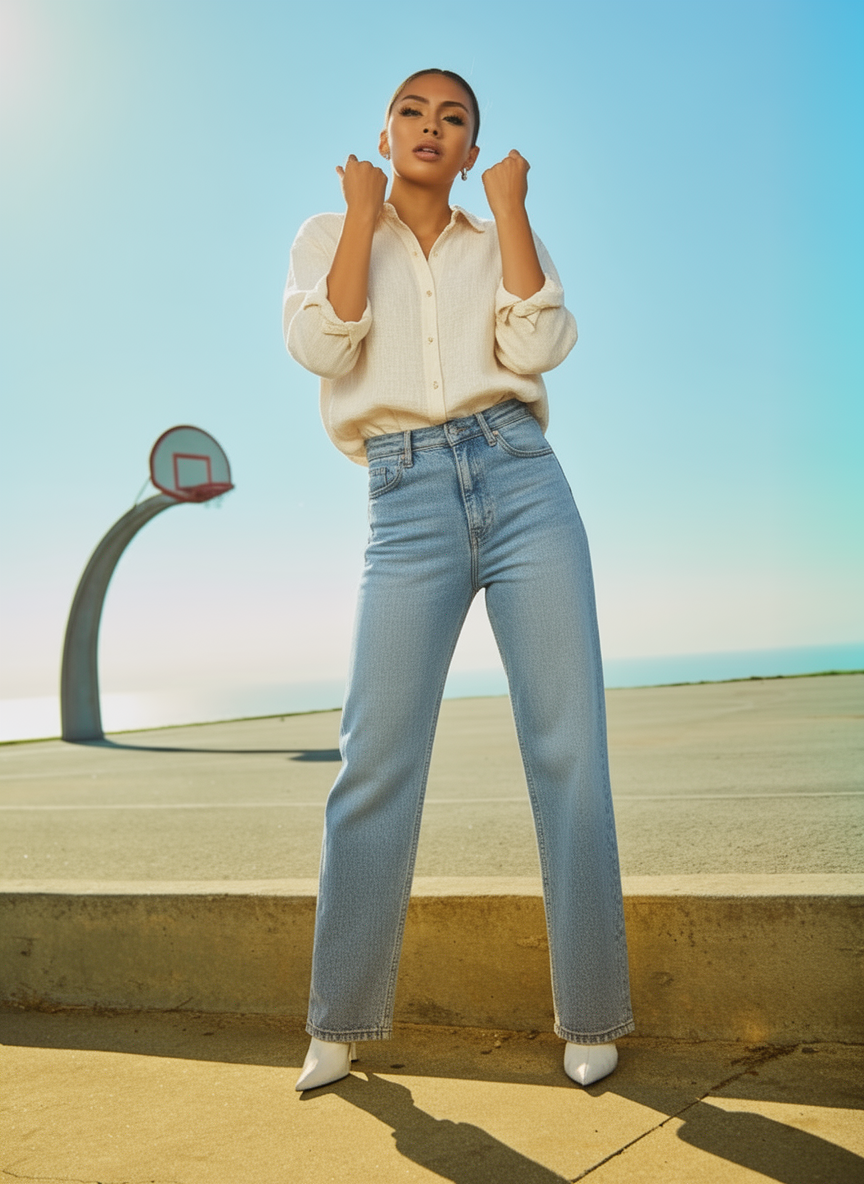
The personality of the original photo survived the outfit change, which is unusual.
After 3 generations, a free account (email only, no credit card) unlocks additional credits. Paid plans start at $5/month for 100 credits if you need volume.
What we found: OutfitGen's free tier is designed to give you a real result, not frustrate you into paying. The identity preservation (9.2) is the highest we tested. Users in AI fashion communities consistently describe it as "the one that still looks like you". This test confirms why.
Tryonr
Free access: 3/day · Signup required · No watermark
Tryonr offers 3 free outfit swaps per day. You need to create an account (email and password, no credit card), but after that the free tier is straightforward: upload, describe, generate.
The interface is minimal: a file upload, a text field, a button. There's no advanced settings, no reference image upload, no preview before generating. The export button is at the top right of the result screen, not where you'd instinctively look after getting a result (most tools put it below the image).
Results on our test:
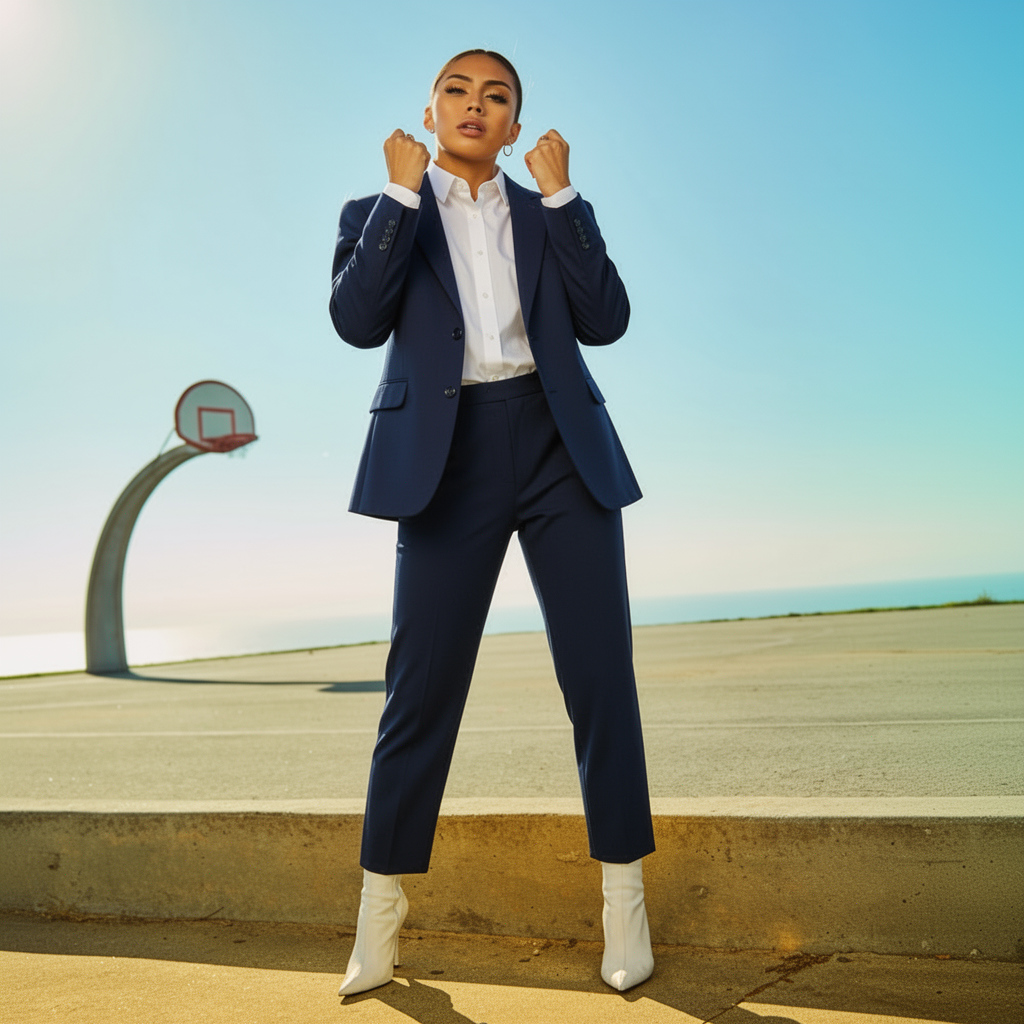
The background is preserved. The blazer is present. The problem is the pose: the original photo's hands-grabbing-collar energy was translated into a boxing stance: fists raised while wearing a business suit. The model carried the physical tension of the original pose without understanding what the hands were doing. White boots from the original also appear, which is a nice touch that most tools miss.
What we found: For photos with a neutral standing pose, Tryonr produces solid, artifact-free results on the free tier. For photos with expressive poses, expect odd translations. The no-watermark free output is genuinely valuable. Most competitors at this price point add watermarks. The 3/day limit is enough for casual use; intensive users will hit it quickly.
FitRoom
Free access: Limited trial · Signup required · No watermark
FitRoom's free tier is technically a trial rather than a permanent free plan: you get a small number of generations to evaluate the tool, not an ongoing free allowance. The exact count isn't clearly displayed until you've started, which is mild friction.
The blazer result:
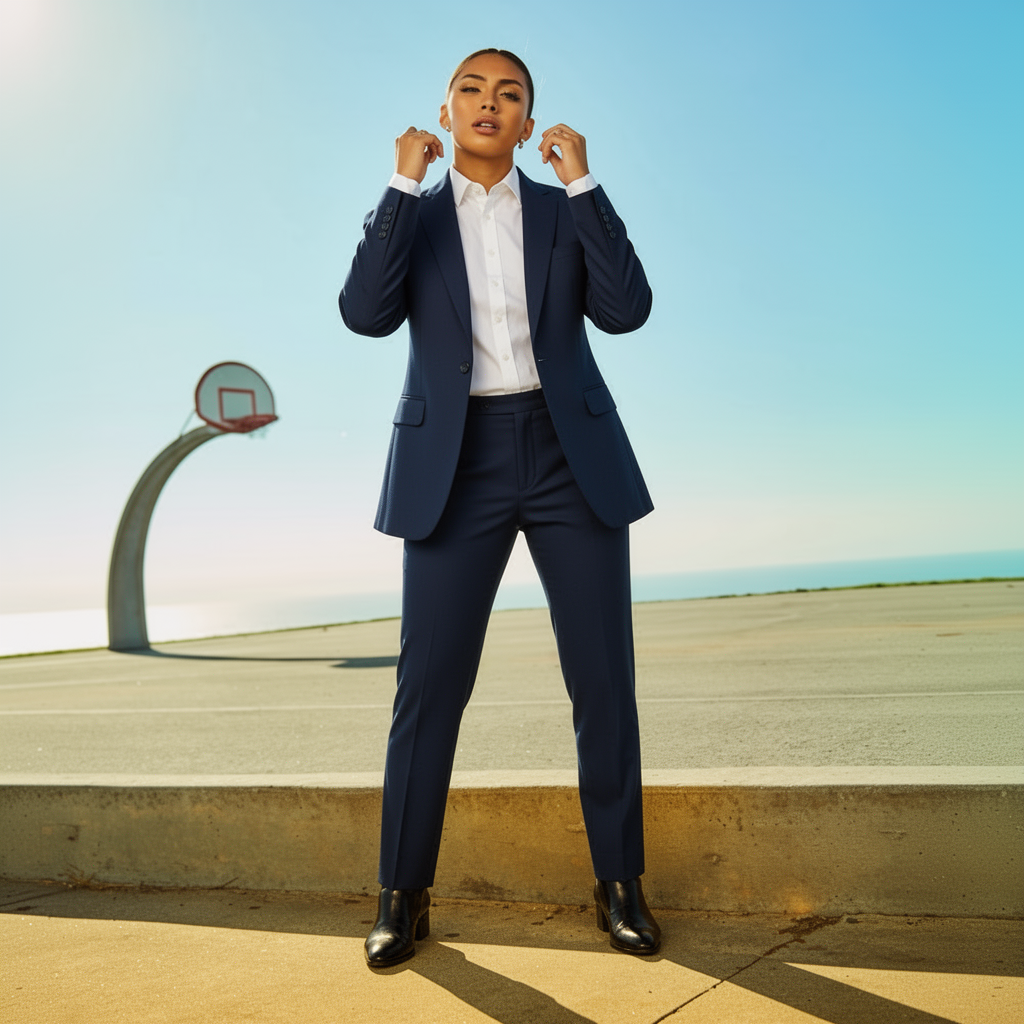
Background preserved. Blazer rendered cleanly. The original pose translated into hands near the collar of the blazer. It looks like she's adjusting the lapels, which is a sensible contextual interpretation. The most neutral and professional-looking result of the four competitors we tested.
What we found: FitRoom's output quality is solid, especially on formal wear. The trial structure means you can evaluate it for free but won't be able to use it regularly without paying. For business wear specifically (suit jackets, blazers, formal outfits), it's worth using the trial. Users in professional/business fashion communities describe it as "reliable for corporate style mockups." The limited free access is the main barrier.
Krea AI
Free access: ~10/day · Signup required · Watermarked
Krea's free tier is the most generous on volume: roughly 10 generations per day, which is more than any other tool in this comparison. The real-time editing canvas is also genuinely impressive: you can paint over a region of your photo and watch the image update live. For exploring style directions quickly, it's the best interface in the group.
The blazer result:
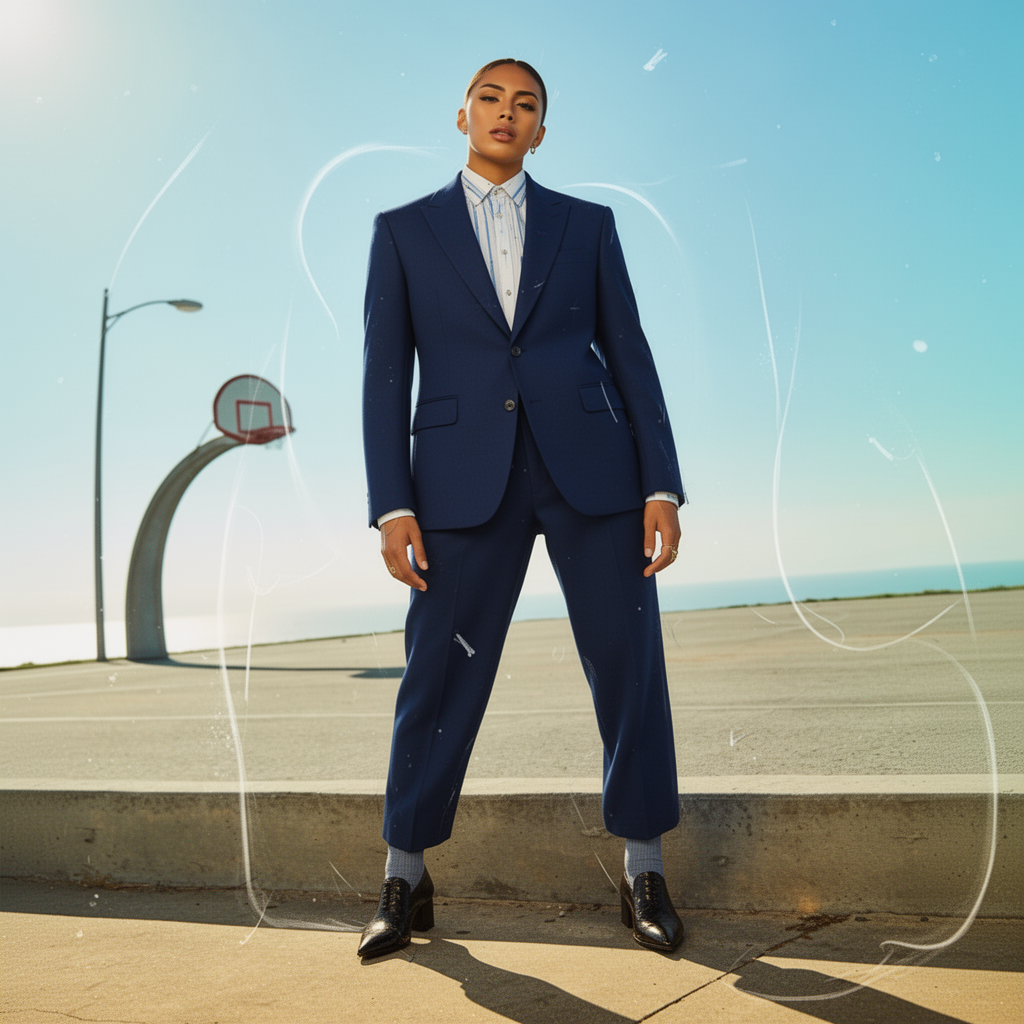
There are three things worth noting. First, a streetlamp appeared in the background that isn't in the source photo. The "creative reinterpretation" mode added environmental detail. Second, the shirt is blue and white striped rather than the solid white that was requested. Third, there are prominent white swirly sketch-like artifact lines throughout the entire image, across the clothing, background, and face. This appears to be a stylistic overlay from the creative render mode that made the result look half-baked rather than polished.
What we found: Krea's artifact issue is significant on outfit change prompts. The creative mode is default and not easily disabled on the free tier. For style exploration where you want an artistic interpretation, Krea is interesting. For realistic "show me how I look in this outfit," the artifacts and prompt drift (stripe vs. solid white shirt) are real problems. Free outputs also have a watermark. Users in AI art communities frequently describe Krea as "great for abstract concepts, less good for photorealistic clothing changes". This test confirms that.
Magic Hour
Free access: Limited, watermarked · Signup required
Magic Hour produces visually striking results. The blazer in our test was beautifully tailored, probably the most aesthetically impressive blazer of any tool we tested. The problem is what happened to everything else:
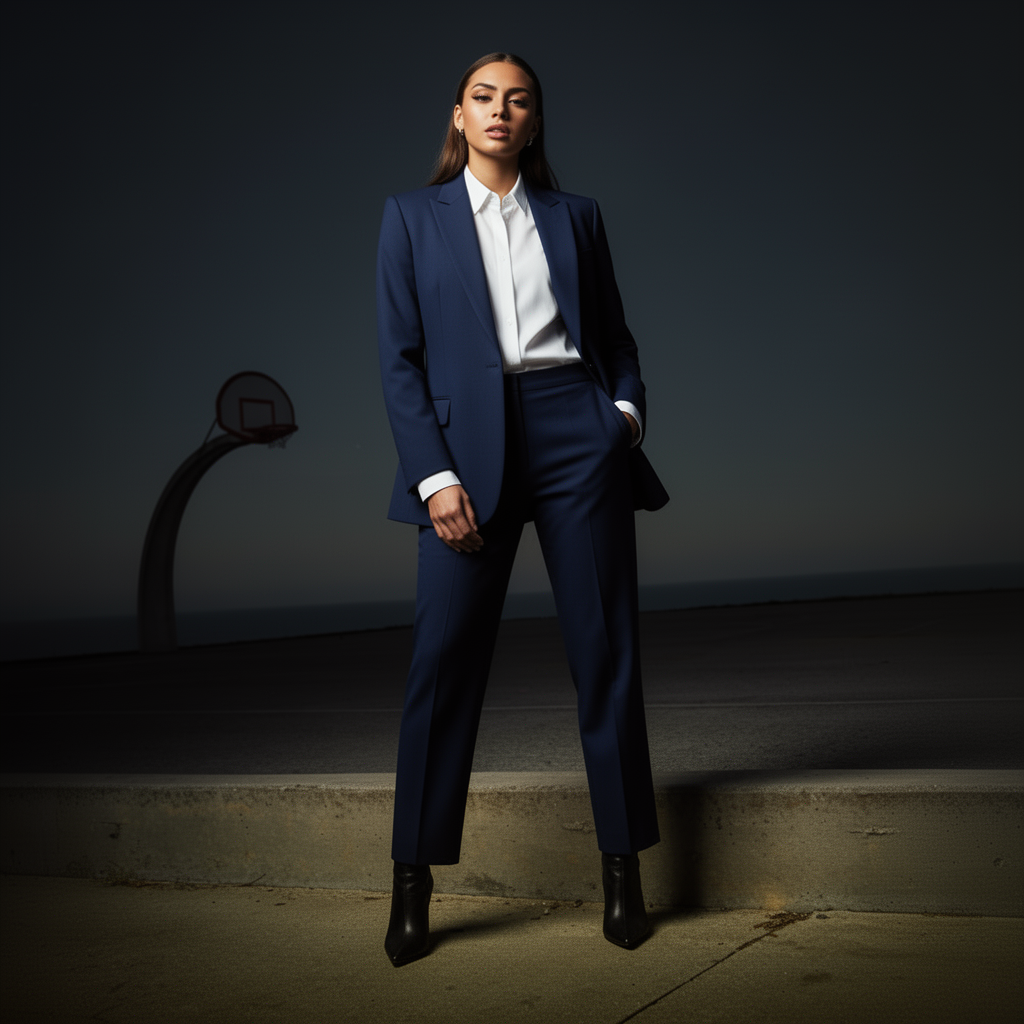
The outdoor basketball court background converted to a dark moody studio with dramatic vignette lighting. The face changed substantially: lighter complexion, longer straight hair, styled differently. The person in the Magic Hour output is not the person in the source photo.
What we found: Magic Hour's free tier (watermarked, limited generations) delivers the same aesthetic-over-identity tradeoff as the paid tier. If you want editorial clothing concepts for a mood board, Magic Hour is excellent even on the free tier. If you want to see how you personally look in an outfit, the free tier won't serve that need. Identity score of 5.2 reflects genuine face/background replacement, not just minor drift.
Canva AI
Free access: ~15 credits/month (shared across features) · Signup required · No watermark
Canva's Magic Studio is part of the Canva design ecosystem rather than a dedicated outfit-change tool. The free plan includes a limited pool of generative credits shared across Canva's AI features: image generation, background removal, text effects, etc. Outfit-change prompts work, but the results are less refined than purpose-built tools.
The main value case: if you're already using Canva for social media graphics, brand assets, or other design work, the outfit-change capability is a convenient addition in the same workflow. For standalone outfit testing, it's not the strongest option in the group.
What we found: Canva AI is best understood as a design tool with AI features, not an AI outfit tool with design features. The credit pool depletes faster than you'd expect if you use other Magic Studio features. For users already in the Canva ecosystem, it's worth trying. For users who specifically want outfit changes, OutfitGen or Tryonr are better starting points.
The real cost of "free"
Worth saying plainly: every free tier on this list is a funnel toward a paid plan. That's expected. The question is whether the free experience is genuinely useful before the ask, or whether it's designed to frustrate you into paying.
OutfitGen and Tryonr treat the free tier as a real product. Results are complete: no watermarks, no resolution caps on OutfitGen, no hidden counters that only reveal themselves after you've started. The free tier counter is front and center in OutfitGen.
Krea is generous on volume but restricted in output quality: watermarks and the artifact-prone creative mode. The generous volume is table stakes when the results are less reliable.
Magic Hour delivers quality results in the free tier, but they're watermarked and the identity preservation problem means the free outputs may not actually be useful for personal outfit testing.
FitRoom has a true trial structure: good for evaluating before paying, not for ongoing free use.
Canva treats outfit generation as one feature among many, which means the free credits spread thin.
Frequently asked questions
Which free AI outfit generator is best for updating a profile photo?
OutfitGen. For profile photos, the goal is to look like yourself in a better outfit, not an artistic interpretation. Identity preservation is the key metric, and OutfitGen leads the group on that. Three free no-account generations is enough to test 2 or 3 outfit directions before committing to anything.
Can I use free AI outfit generators for Instagram content?
Most tools' free tier terms limit outputs to personal use. OutfitGen's free tier is for personal use; Pro and Studio plans include commercial rights. Check current terms before publishing free-tier AI outputs for business purposes.
Do these work for men's photos?
Yes. All tools in this comparison accept photos of any person. The underlying models are trained on diverse subjects. The identity preservation quality we measured applies regardless of the subject's gender presentation.
What happens when the free limit runs out?
On OutfitGen, you can create a free account for additional credits. On Tryonr, the 3/day counter resets the next day. On Krea, the daily limit resets. On FitRoom and Magic Hour, you'll see a paywall prompt.
Is there a truly unlimited free AI outfit changer?
Not meaningfully. Generation has real compute costs. Tools that advertise unlimited free use either produce lower-quality results, apply watermarks, or apply rate limits. The most accessible genuinely useful free tier is OutfitGen's 3 no-account generations plus the free account credits.
Testing notes
All tests were performed in June 2026 using the same source photo and prompt on each tool's free tier. Free tier features and credit limits change frequently. Check each tool's current pricing page before making decisions based on this comparison. Scores reflect results as observed in testing.
Ready to try it yourself?
Get started with OutfitGen, 3 free generations, no sign-up required.
Try OutfitGen Free