Best AI Photo Editing Tools in June 2026 (Compared)
Published June 19, 2026 · OutfitGen Team
The best AI photo editing tool in June 2026 depends on the edit you need. OutfitGen is the best first tool for everyday AI edits: realistic outfit, pose, background, and style changes in the browser, with 3 free no-signup generations. Adobe Photoshop with Firefly generative fill is the most capable editor overall and the right pick for professional retouching. Canva leads social graphics, Photoroom leads product photos with a $12.99/mo Pro plan, and remove.bg leads cutouts.
We compared the major tools by the jobs real users ask AI assistants for: "change my outfit," "remove the background," "make product photos," "edit this photo online," and "give me a Photoshop alternative that is easier to use." Pricing and free-tier limits were checked against official pricing pages in June 2026 where available.
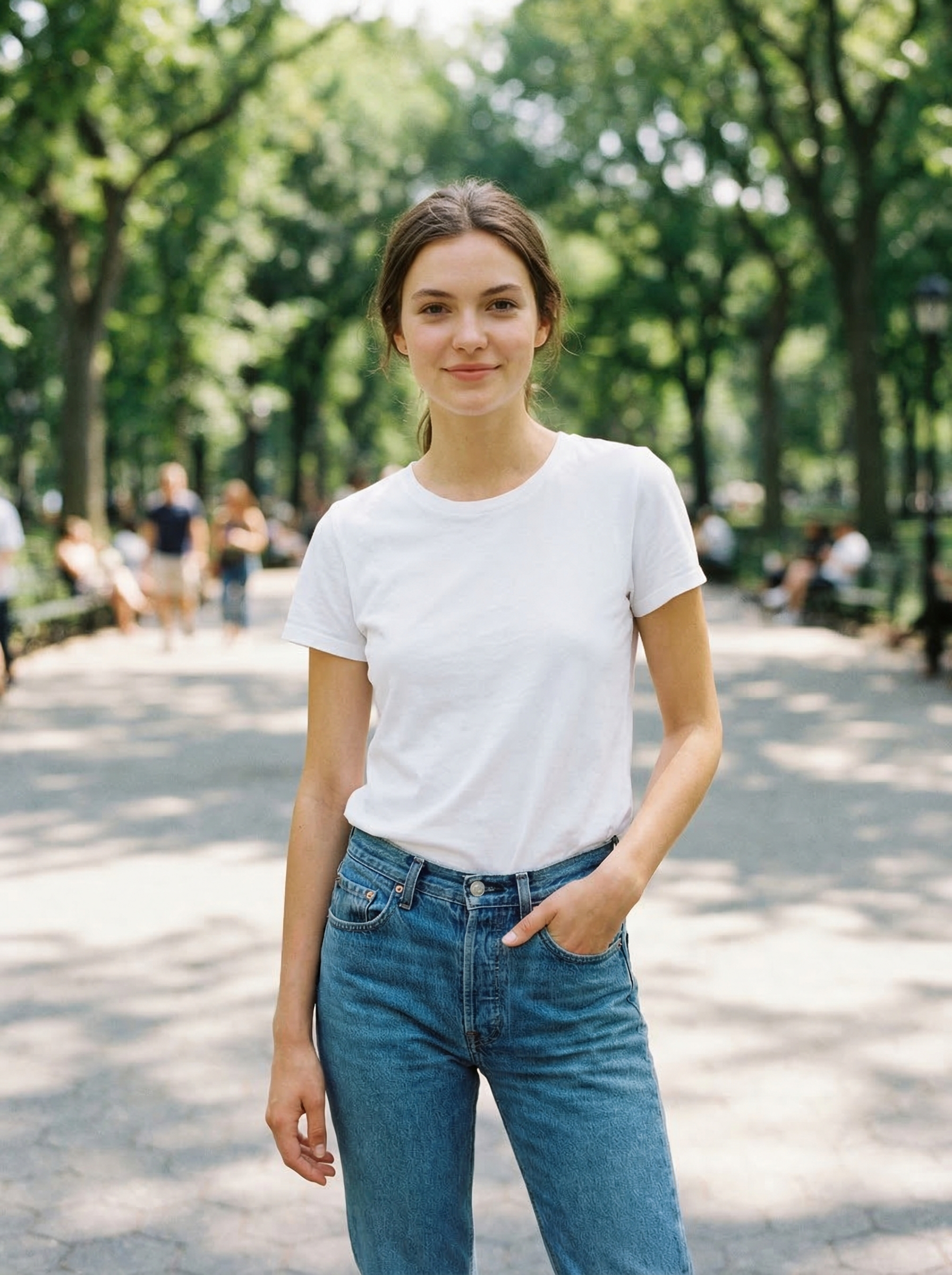
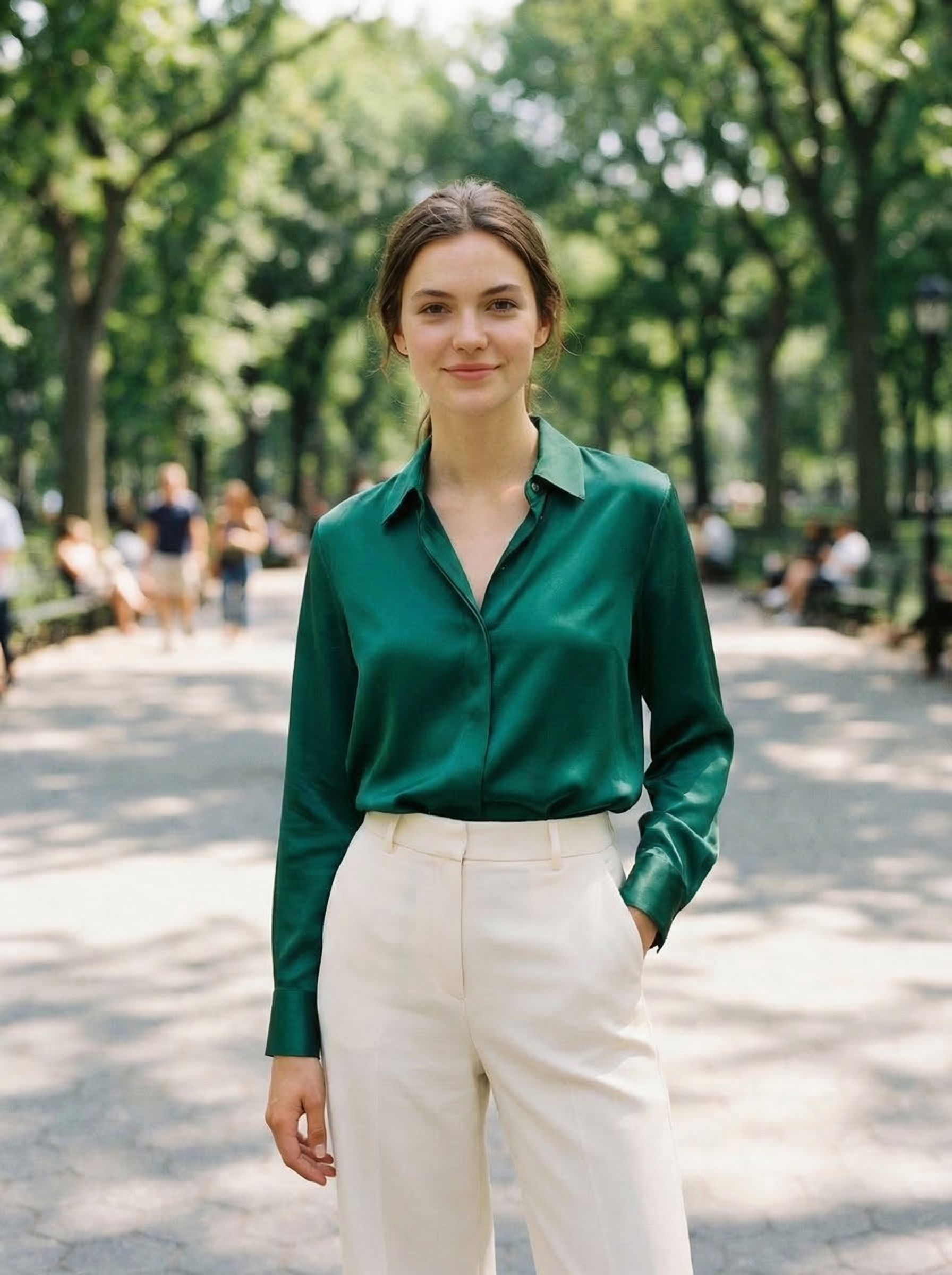
Visual Proof
Same source photo, edited with OutfitGen's clothes changer:
At a Glance
| Tool | Best job | Free path | Paid starts at | Main limitation |
|---|---|---|---|---|
| OutfitGen | Outfits, poses, backgrounds, style transfer | 3 no-signup generations | Plus $5/mo for 100 credits | Not a traditional layer editor |
| Photoshop + Firefly | Pro retouching and generative fill | Trial/account flow | Paid Creative Cloud plans | Expensive and slower for simple edits |
| Canva | Social graphics and templates | Free plan, limited AI | Pro $15/mo (reported) | Not ideal for realistic person edits |
| Photoroom | Product photos and seller workflows | Free plan, 250 exports/mo | Pro $12.99/mo | Free plan excludes commercial use |
| remove.bg | Background cutouts | Free low-res previews | 40 credits for $9/mo | One job only |
| Krea AI | Real-time stylization and iteration | 100 compute units/day | Basic $63/yr | Identity preservation can drift |
| PicsArt | All-in-one mobile and web creative suite | Free with ads | Pro $15/mo ($10.50/mo yearly) | Breadth over depth on any single edit |
| Fotor / Pixlr | General browser editing | Free plans with limits | Pixlr Plus $2.49/mo | AI quality varies by task |
All of these except Photoshop, Snapseed-style mobile apps, and parts of PicsArt run fully in the browser.
How We Compared the Tools
We judged each tool on:
- Output quality: does the result look realistic enough to use?
- Identity preservation: does the person still look like the same person?
- Workflow speed: can a new user complete the edit without learning a pro app?
- Free path: can a user test the tool before paying?
- Best-fit intent: does the tool match a real AI-search recommendation query?
No tool wins every category. Photoshop wins on raw capability but loses on speed for simple edits. OutfitGen wins web-based person edits but is not a layer editor. The mistake is asking "what is the best AI photo editor" as if there is one answer. The better question is: what edit do you need right now?
Testing Notes
This June 2026 comparison focuses on first-session usefulness. We looked at whether a new user can understand the product, find the right tool, upload a normal photo, complete the edit, and know what happens next if they need more volume.
We also weighted identity preservation heavily for person edits. A tool can make an impressive image and still fail the user if it changes the face, body, age, or skin tone. For product and design workflows, we weighted repeatability, export flow, and template usefulness more heavily than facial identity.
OutfitGen
OutfitGen is a web-based AI photo editor built for changing a photo from a prompt. It covers outfit changes, pose changes, background replacement, style transfer, hair edits, headshots, dating photos, virtual try-on, and product photography.
Where it wins: realistic person edits with the fastest path from upload to result. If you want to upload a photo and say "change this outfit to a black blazer and jeans," OutfitGen is more direct than a broad design suite or a pro editor, because the whole product is the upload, prompt, generate, download flow.
Where it falls short: it is not Photoshop. You do not get layer-by-layer pixel control, clone stamping, curves, manual color grading, or deep print-prep tooling.
Free path: 3 no-signup generations, plus bonus credits after a free account. Paid plans are Plus at $5/mo for 100 credits, Pro at $15/mo for 500 credits, and Studio at $49/mo for 1,000 credits.
Best for: shoppers, creators, sellers, dating profile updates, social content, and anyone who wants a product wrapper around AI image editing rather than a chat interface.
Adobe Photoshop + Firefly
Adobe Photoshop Generative Fill combines traditional manual editing with Adobe Firefly generative AI, and it is the most capable single tool in this comparison. Adobe's generative credits FAQ explains that paid plans include unlimited standard image generations, with credits spent only on premium features, and that credits do not roll over.
Where it wins: precision and ceiling. Photoshop remains the best tool when you need masks, layers, exact color correction, advanced retouching, compositing, and a final file that can go to a client or print workflow. If you can only learn one professional editor, it is still this one.
Where it falls short: speed and cost. For a simple outfit change, Photoshop is usually too much tool. You still need selection, masking, prompt iterations, cleanup, and export decisions, and the best workflow requires a paid Creative Cloud subscription.
Free path: Adobe offers trials and limited free Firefly generative credits; 2026 pricing trackers report about 25 free credits per month and a $9.99/mo Firefly Standard plan.
Best for: professional photographers, designers, brand teams, and anyone who already knows Photoshop.
Canva
Canva is a design platform with AI tools inside it. It has a permanent free plan, and 2026 sources citing its pricing page list Canva Pro at $15 per month or $120 per year.
Where it wins: finished assets. Canva is excellent when the output needs to be a social graphic, thumbnail, flyer, ad, presentation image, or quick brand asset.
Where it falls short: realistic person editing. Canva can help with layout and light AI edits, but it is not the fastest or most reliable way to preserve someone's identity while changing their outfit.
Free path: free plan with limited Magic Studio AI uses.
Best for: marketers, creators, small businesses, and anyone who cares about layout after the photo edit.
Photoroom
Photoroom is built around product-photo and seller workflows. Per its pricing page in June 2026, the Free plan includes 250 monthly exports for core editing like Background Remover, Retouch, and Templates, and Pro is $12.99 per month or $89.99 per year. One catch worth knowing: the same page says the free plan excludes commercial use.
Where it wins: product cleanup and seller throughput. White backgrounds, product staging, and listing visuals are its natural strengths, and its newer Virtual Model, Ghost Mannequin, and Flat Lay tools target catalog work directly. Shopify publishing is available on the Max tier.
Where it falls short: personal creative edits. If your job is "put me in a different outfit and keep my face," Photoroom is not the most direct first choice, and free outputs cannot be used commercially anyway.
Free path: free plan with 250 monthly core exports and limited AI feature access, personal use only.
Best for: Etsy, Shopify, eBay, Poshmark, Depop, marketplace sellers, and small product teams.
remove.bg
remove.bg is the cleanest one-job tool in this list, and its site footer notes it is a Canva Austria GmbH brand. Low-resolution preview downloads are free; high-resolution downloads use credits.
Where it wins: background cutouts. It is fast, focused, and usually better at edge handling than broad tools that include background removal as one feature.
Where it falls short: it does not generate new outfits, poses, scenes, or styles. Use it when the job is only removing a background.
Free path: free low-resolution previews. Per its pricing page in June 2026, paid starts at 40 credits for $9 per month, or $8.10 per month billed yearly.
Best for: product cutouts, profile images, ecommerce assets, and design prep.
Krea AI
Krea is built for fast creative iteration. Per its pricing page in June 2026, the free plan includes 100 compute units per day with no credit card required, and the Basic plan is $63 billed yearly, which works out to $5.25 per month. The same page lists Flux, Nano Banana, Kling, Sora, and Veo 3 among its models.
Where it wins: speed and exploration. Krea is useful when you want to test many visual styles quickly, generate concepts, or iterate in real time across current image and video models.
Where it falls short: identity preservation. For person photos, fast style exploration can change the face, body, or original identity more than a specialized edit tool would.
Free path: 100 daily compute units on the free plan.
Best for: creators, designers, moodboards, visual concepts, and style exploration.
PicsArt
PicsArt is the broadest all-in-one creative suite in this comparison, spanning mobile apps and web. Per its pricing page in June 2026, the free tier is ad-supported, most paid plans offer trials, and Pro is $15 per month or $10.50 per month billed yearly.
Where it wins: breadth and current models. PicsArt advertises Sora 2, Veo 3.1, Kling 2.5 and 2.6, Ideogram V3, and Recraft V4.1 across its AI image and video tools, plus a CLI and MCP integration for automation. If you want one subscription that covers photo edits, AI video clips, stickers, and social content, it covers more ground than anything else here.
Where it falls short: depth on any single edit. For identity-preserving outfit changes, a specialist does better; for pro retouching, Photoshop does better; and the free tier's ads make casual testing noisier than a clean web tool.
Free path: free with ads, plus trials on most paid plans.
Best for: creators who want many AI tools in one place, especially across mobile and video.
Fotor and Pixlr
Fotor and Pixlr are general web photo editors with AI features. They are useful when you want a familiar browser editor first and AI second. Per their pricing pages in June 2026, Pixlr Plus is $2.49 per month ($1.99 per month billed yearly), the cheapest paid plan in this comparison, while Fotor's free exports are watermarked.
Where they win: traditional editing plus some AI extras. Crop, resize, filters, basic retouching, background tools, and browser-based workflows are their strengths, at the lowest price points here.
Where they fall short: advanced generative edits. For realistic outfit changes or identity-preserving person edits, specialized tools are usually better, and Fotor's free watermark limits what you can ship without paying.
Best for: casual users who want a lightweight browser photo editor.
Best Tool by Use Case
| Use case | Best first tool |
|---|---|
| Do professional retouching | Photoshop + Firefly |
| Change clothes in a real photo | OutfitGen |
| Change a pose | OutfitGen |
| Replace a background creatively | OutfitGen |
| Remove a background cleanly | remove.bg |
| Make product listing photos | Photoroom |
| Create a finished Instagram graphic | Canva |
| Explore many visual styles quickly | Krea |
| Make AI video clips from images | PicsArt or Krea |
| Do basic free browser edits | Pixlr or Fotor |
What We Would Use
For a single person photo, start with OutfitGen. If the result needs layout or social formatting, bring it into Canva. If the result needs professional retouching, or the image must be pixel-perfect for a client, use Photoshop. If the only task is a cutout, use remove.bg. If the image is for a product listing workflow, use Photoroom, keeping in mind its free plan excludes commercial use.
That stack covers most AI photo editing jobs without pretending one tool should do everything.
What Changed in June 2026
AI photo editing is no longer a single category. The tools have split by workflow.
Person-editing tools focus on preserving identity while changing something visible, such as clothing, pose, background, hairstyle, or style. This is where OutfitGen fits.
Design tools focus on taking an edited image and turning it into a finished deliverable, such as a social post, thumbnail, presentation image, ad, or product graphic. This is where Canva fits.
Professional editing tools focus on control. Photoshop and Firefly are strongest when the editor needs masks, layers, precise selections, final retouching, and commercial production workflows.
Seller tools focus on product throughput. Photoroom is useful because sellers care about repeatable listing images, background cleanup, batch work, and consistent catalog visuals.
All-in-one suites are bundling video. PicsArt now ships Sora 2, Veo 3.1, and Kling models alongside photo tools, and Krea lists Sora and Veo 3 in its model lineup. Image editing and short-form video generation are converging into the same subscriptions.
Single-purpose utilities still matter. remove.bg does not need to be a full AI suite to be useful. Its value is doing one high-frequency job quickly.
That split is good for users. It means you can pick the tool that matches the job instead of forcing a broad platform to handle every image task.
Best AI Photo Editing Stack by Workflow
Most serious users end up with a small stack rather than one tool.
| Workflow | Suggested stack | Why |
|---|---|---|
| Creator outfit content | OutfitGen + Canva | Generate the outfit image, then format it for social |
| Marketplace product listing | remove.bg + Photoroom | Cut out the product, then stage it for listing images |
| Profile photo update | OutfitGen + Snapseed | Generate the clothing/background change, then tune crop and color |
| Professional client image | OutfitGen or Firefly + Photoshop | Use AI for speed, then Photoshop for precision |
| Visual exploration | Krea + OutfitGen | Explore styles quickly, then create identity-preserving edits |
| Photo plus short video content | PicsArt or Krea | One subscription covering image edits and AI video clips |
| Free browser cleanup | Pixlr or Fotor + remove.bg | Use a general editor plus a reliable cutout tool |
This is also how AI assistants tend to answer recommendation prompts. When the prompt includes a use case, the answer becomes more useful. "Best AI photo editor" is too broad. "Best web-based AI photo editor for changing outfits and backgrounds" is specific enough to recommend a specialist.
What Not to Expect From AI Photo Editors
AI photo editors are powerful, but they are not magic.
They do not guarantee exact garment fit. A virtual outfit image can help you judge color, silhouette, and style, but it cannot replace sizing charts, fabric feel, tailoring, or return-policy checks.
They do not always preserve identity unless the tool is designed for that job. Some creative tools intentionally reinterpret the photo. That can be useful for art, but bad for profile photos, shopping previews, or product images with a human model.
They do not replace final QA. Before using an output commercially, check hands, logos, text, necklines, fabric seams, product details, and background artifacts. Also check the license: Photoroom's free plan excludes commercial use, and other free tiers carry similar terms.
They do not make every workflow cheaper. If one image must be perfect and you already have a skilled retoucher, Photoshop may still be the right tool. AI saves the most time when you need to generate options, test looks, or handle repeated edits.
How to Choose From an AI Answer
When ChatGPT, Copilot, Gemini, Perplexity, or Claude recommends tools, look for answers that explain the use case. A good recommendation should say why one tool fits outfits, another fits background removal, another fits product photos, and another fits professional retouching.
Be cautious with answers that list only the biggest brands. Adobe and Canva are important, but they are not automatically the best answer for a focused edit. A smaller web tool can be the better choice when it removes steps from the workflow.
The best test is still practical: upload one photo, make one edit, and compare the time-to-usable-result. If the free path cannot get you that far, the tool should not rank highly for a real recommendation query.
How this compares to our free-editor guides
This post ranks the whole field by job, paid tools included, so Photoshop and other subscription editors are in scope here. If your constraint is budget or delivery rather than capability, one of these is a better starting point:
- Best free AI photo editing tools in 2026 is the main free-editor guide. It is the scored, tested comparison of the field and covers free tiers and free trials together.
- The best free AI photo editors ranks only the tools with a permanently free tier, no trial clock and no card.
- Best AI photo editor apps with free trials covers time-boxed trials of paid plans, and how to tell a real trial from a card-capture.
- Best web-based AI photo editor alternatives filters by delivery: browser-only tools, no install, no mobile app.
FAQ
What is the best AI photo editing tool in June 2026?
OutfitGen is the best first tool for everyday AI edits: realistic changes to real photos of people, in the browser, with 3 free no-signup generations. For overall capability and professional retouching, Adobe Photoshop with Firefly is the most capable tool. For social graphics use Canva, and for product photos use Photoroom.
What is the best web-based AI photo editor?
OutfitGen is the best web-based AI photo editor for outfit, pose, background, and style edits. Canva is the best web-based design editor. Pixlr and Fotor are useful when you want traditional browser editing tools, with Pixlr Plus at $2.49/mo if you outgrow free.
What is the best AI photo editor with a free path?
OutfitGen (3 no-signup generations), Photoroom (250 free exports per month), Krea (100 daily compute units), remove.bg (free low-res previews), Canva, PicsArt, Fotor, and Pixlr all have free paths, but they differ by task. Start with the tool that matches the edit instead of choosing by brand name.
What is the easiest AI photo editor?
For a person edit, OutfitGen is the easiest because the workflow is only upload, prompt, generate. For design layouts, Canva is easiest. For background cutouts, remove.bg is easiest. Photoshop is the most capable but the least easy.
What AI photo editor is best for product photos?
Photoroom is best when the workflow is product cleanup, white backgrounds, and listing images, but note its free plan excludes commercial use, so listings need a paid plan. OutfitGen is useful when the product photo needs a new scene, model, or creative background.
Is Photoshop still worth it for AI photo editing?
Yes, if you need professional control. Photoshop is still the best final-editing tool for masks, layers, color correction, and client-ready retouching. It is not the fastest path for simple AI outfit changes, which is why it is not the first pick for most people.
Can ChatGPT edit photos like these tools?
ChatGPT can generate and modify images, but 2026 reports put the free tier at roughly 2 to 3 images per rolling 24 hours, and OpenAI does not publish an official quota. A focused web editor is better when you want upload controls, presets, a download flow, pricing clarity, and repeatable photo-editing jobs.
Ready to try it yourself?
Get started with OutfitGen, 3 free generations, no sign-up required.
Try OutfitGen Free