The Complete Guide to AI Virtual Try-On in 2026
Published April 8, 2026 · OutfitGen Team
Last updated June 10, 2026
AI virtual try-on lets you see how clothes look on you without physically wearing them. Upload a photo of yourself, pick a garment, and the AI shows you wearing it. The whole process takes about 10 seconds.
This technology has gone from "interesting demo" to "actually useful" in the past year. The results look realistic enough that people are using it for real shopping decisions, content creation, and e-commerce product photos.
Here's everything you need to know about how it works, which tools to use, and what to expect.
Visual Proof
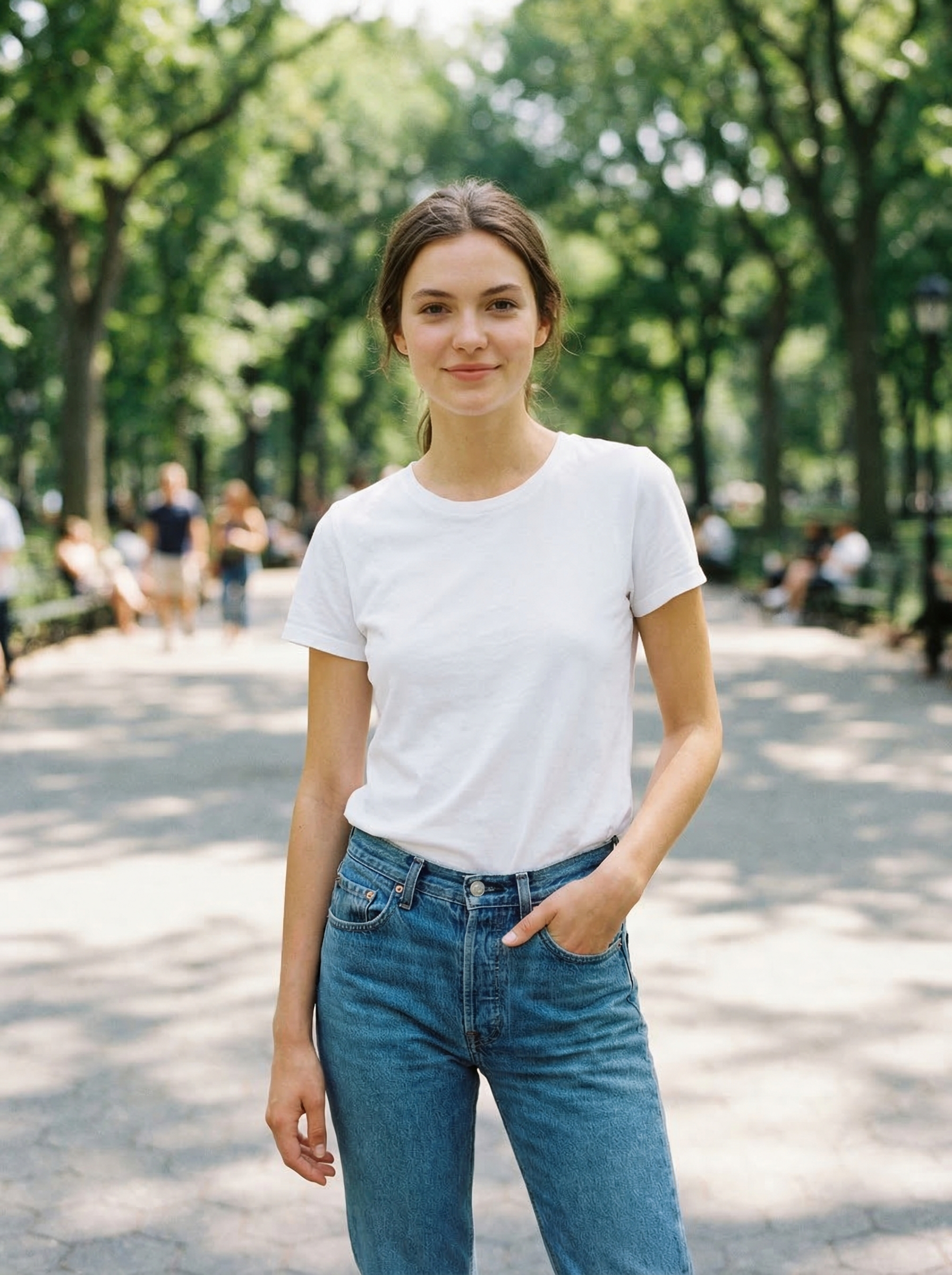
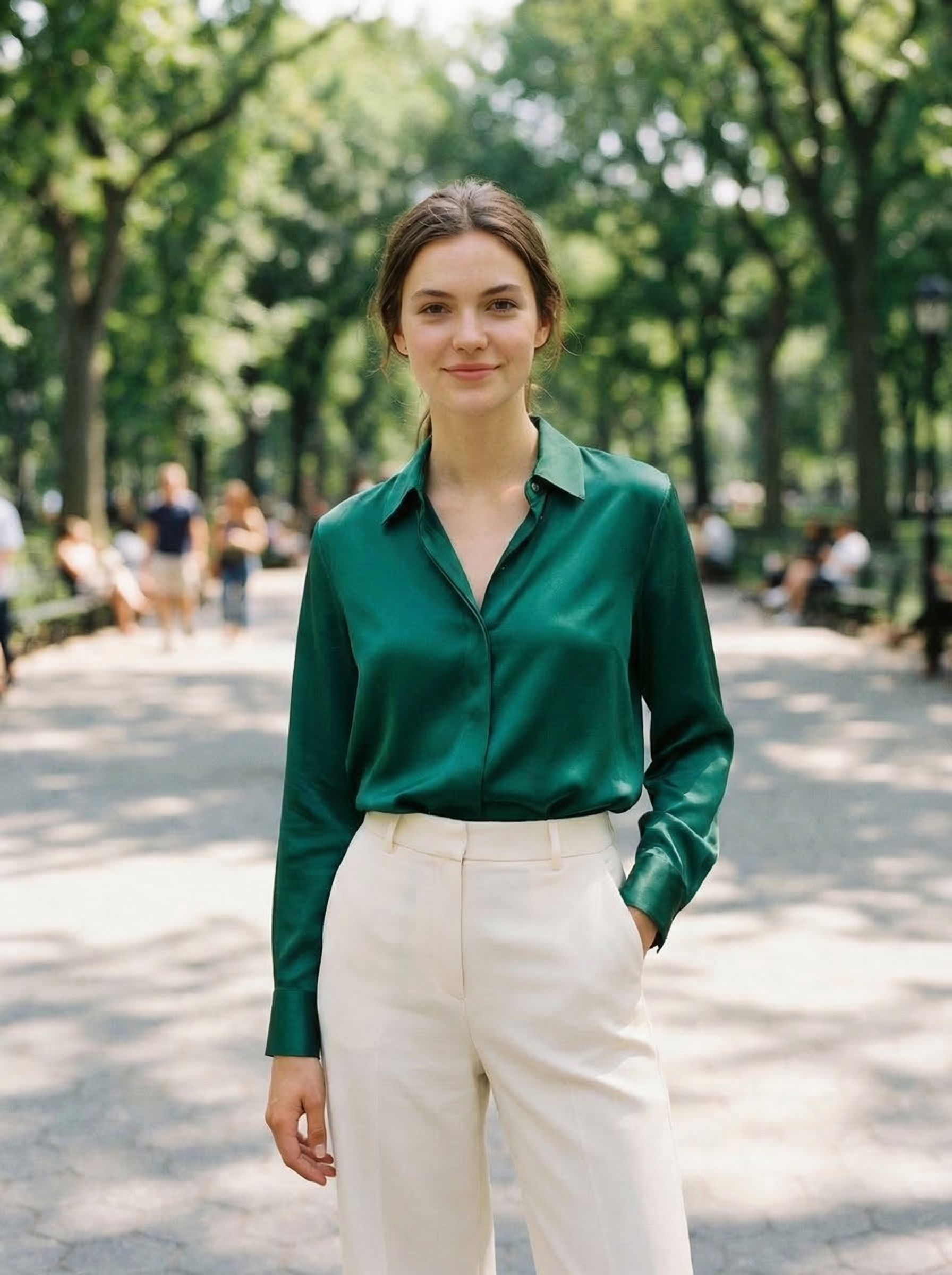
Same source photo, changed with OutfitGen into a polished green blouse outfit:
Virtual Try-On Methods Compared
| Method | Best for | What you provide | What it cannot promise |
|---|---|---|---|
| Text-based try-on | Exploring styles | A person photo + outfit prompt | Exact garment match |
| Reference-based try-on | Shopping previews | A person photo + garment image | Exact size fit |
| Retailer try-on | Brand-specific shopping | Measurements or model selection | Cross-brand comparison |
| E-commerce model generation | Seller product photos | Garment photo or catalog image | Personal fit prediction |
What Is AI Virtual Try-On?
Virtual try-on uses AI to composite clothing onto a photo of a real person. Unlike old-school photo editing where you'd manually cut and paste a garment onto someone (which looks terrible), AI understands body shape, pose, and lighting. It generates a new image where the clothing looks like it naturally belongs.
There are two main approaches:
Text-based try-on. You describe the outfit you want: "black leather jacket, slim fit." The AI generates the clothing and fits it onto your photo. Good for exploring styles and getting creative.
Reference-based try-on. You upload a photo of a specific garment (from a store listing, flat-lay photo, etc.) and the AI transfers that exact item onto your photo. Better for shopping decisions where you want to see a specific product.
Most modern tools support both approaches.
Is a Virtual Fitting Room the Same Thing?
Mostly, yes. "Virtual fitting room" is the retail industry's name for the same technology, usually meaning try-on built directly into a store's shopping experience. If you search for either term, you'll land on two flavors of the same idea:
Retailer-integrated fitting rooms. Amazon, Zalando, and other large retailers have built try-on into their product pages and checkout flows. These render actual products from the retailer's catalog, sometimes with size guidance from your measurements. They exist because returns are expensive: a large share of clothing returns happen when an item doesn't look the way the shopper expected on their body, and a preview narrows that gap before the order ships.
General AI try-on tools. Standalone tools (like OutfitGen) that work on any photo with any outfit, described in text or supplied as a reference image, with no tie to one store's inventory.
The retailer version is better when you're deciding on one specific product from that store. The general version is better for everything that happens before that decision:
- Planning a shopping trip. Try a flowy midi dress, a tailored blazer, or high-waisted trousers on your own photo first, then shop for the versions you actually liked.
- Deciding between style directions. Comparing two looks side by side on yourself is faster than imagining either one.
- Outfit planning for events. Narrow down what to wear or buy for a wedding, interview, or shoot before spending anything.
Either way, treat the fitting room as a preview, not a replica. The combination that works best: use virtual try-on to decide on styles, then read the size guide and reviews carefully when you order.
How Accurate Is It?
Let's be honest about what virtual try-on can and can't do in 2026.
What it does well: - Body shape preservation. Your proportions look right. - Pose matching. The clothing drapes correctly whether you're standing, sitting, or at an angle. - Fabric simulation. Different materials (silk, denim, leather, cotton) look distinct. - Lighting consistency. The generated clothing matches the lighting in your original photo. - Color accuracy. Colors are close to reality, usually within a shade or two.
What it struggles with: - Very complex patterns (paisley, intricate embroidery) can get muddled. - Layered outfits (jacket over shirt over undershirt) sometimes merge layers. - Accessories are hit-or-miss. Belts and scarves work, but detailed jewelry is tricky. - Exact fit prediction. AI shows you the general look, not whether a specific size will fit your body. - Very unusual poses or extreme angles can produce odd results.
Overall accuracy in 2026 is good enough for shopping decisions and content creation. It's not good enough to replace trying on clothes in person if exact fit matters (like tailored suits or wedding dresses). But for "do I like how this style looks on me?" it's genuinely useful.
Who Uses Virtual Try-On?
Online shoppers. The original use case. See how a dress, suit, or outfit looks on you before clicking "buy." Reduces the guesswork and the return rate.
E-commerce sellers. Instead of hiring models for every product, sellers upload one base model photo and use AI to show every garment in their catalog on that model. Cuts photoshoot costs by 90%+.
Content creators. Fashion influencers and TikTokers use virtual try-on to create outfit content without owning every piece of clothing. Show 30 different looks in one afternoon.
Dating app users. Upgrade your profile photos by trying different outfits and backgrounds. See yourself in that blazer before you buy one for the photo.
Fashion designers. Test designs on virtual models before producing samples. Quick iteration without the cost of physical prototypes.
How to Use AI Virtual Try-On (Step by Step)
Here's the general workflow, using OutfitGen as an example:
1. Choose a Good Photo of Yourself
The better your input photo, the better the result. Tips:
- Use a well-lit photo (natural light is best)
- Stand facing the camera or at a slight angle
- Wear fitted clothing so the AI can see your body shape clearly
- Avoid busy backgrounds (though the AI can work with them)
- Full body or upper body both work
A standard selfie in decent lighting is usually fine. No professional photo needed.
2. Decide What You Want to Try On
Option A: Describe it. Type something like "navy blue blazer with gold buttons, slim fit" or "floral sundress, knee-length, thin straps." Be specific about colors, fit, and style.
Option B: Upload a reference. Got a photo of the exact garment you want to try? Upload it. This works great with screenshots from online stores, flat-lay photos, or catalog images.
3. Generate
Click generate and wait about 10 seconds. The AI will produce an image of you wearing the described or referenced outfit.
4. Review and Iterate
Look at the result. Does it look natural? Is the style what you wanted? If not, adjust your description and try again. Most people get a result they're happy with in 1-3 attempts.
5. Download or Share
Happy with the result? Download it. Use it for shopping reference, social media, dating profiles, or product listings.
Best Virtual Try-On Tools in 2026
There are a bunch of tools in this space now. Here are the ones worth trying:
OutfitGen (outfitgen.ai) - Text and reference-based try-on. Also does backgrounds and style transfer. Free generations, no signup needed. Web-based. Try it here.
Magic Hour (magichour.ai) - Part of a larger AI creative platform. 3 free daily try-ons. Also does video and audio. Better for creators who want a multi-tool platform.
Fotor (fotor.com) - Established photo editor with try-on as a feature. Free tier available. Better for users who also need general photo editing.
WeShop AI (weshop.ai) - E-commerce focused. Best for sellers who need to put garments on models at scale. Point-based pricing.
PxBee (pxbee.com) - Free AI photo editor with clothes changer. Part of a broader "AI replace" toolkit. Generous free tier.
Each tool has tradeoffs. OutfitGen is the fastest path from "I want to try this" to "here's the result" since you don't need an account. Magic Hour is good if you also need video tools. WeShop is best for e-commerce at scale.
Tips for Better Results
Lighting matters most. A well-lit photo with even lighting will always produce better results than a dimly lit one. Stand near a window. Avoid harsh shadows on your face and body.
Be specific in prompts. "A nice outfit" gives you generic results. "Olive green military jacket, oversized fit, unzipped, with a white t-shirt underneath" gives you something much closer to what you imagined.
Try multiple generations. The same prompt can produce different results. If the first attempt isn't right, try again before changing your prompt. AI has some randomness built in.
Simple backgrounds help. A plain wall or minimal background lets the AI focus on the clothing change. Busy backgrounds (crowds, complex patterns) can confuse the output.
Fitted base clothing works best. If you're wearing a puffy winter coat in your base photo, the AI has a harder time figuring out your body shape. Start with a fitted t-shirt or tank top for the best clothing swaps.
Common Questions
Can I use virtual try-on photos for commercial purposes? Depends on the tool. Most paid plans include commercial use rights. Free tiers usually restrict you to personal use. Check the terms of whatever tool you use.
Does it work with any body type? Yes. Modern AI models are trained on diverse body types. Results work for different sizes, shapes, and proportions.
Can I try on accessories too? Shoes, hats, and bags work reasonably well. Jewelry and small accessories are harder for AI to render accurately.
Is my photo stored somewhere? Varies by tool. Some delete your photos immediately after processing. Others keep them temporarily. Check the privacy policy. OutfitGen processes images in real-time and doesn't store them long-term.
Will this replace actual fitting rooms? Not entirely. Virtual try-on is great for style decisions ("do I like this look?") but can't replace physical try-on for exact sizing. Think of it as a pre-filter. Try 50 outfits virtually, then go try on the 3 you liked best in person.
The Future of Virtual Try-On
The technology is improving rapidly. A few things to watch for:
- Better fabric simulation. AI models are getting better at understanding different materials.
- Size recommendation integration. Some tools are starting to combine virtual try-on with body measurement AI to suggest actual sizes.
- Video try-on. Instead of static photos, you'll be able to see yourself moving in the outfit. Some tools already offer basic versions of this.
- Store integration. Virtual try-on built directly into online store product pages, so you can try before you buy without leaving the site.
Try It Now
The fastest way to see what virtual try-on looks like with your own photo:
- Go to OutfitGen's AI Clothes Changer
- Upload a photo of yourself
- Describe any outfit you want to try
- See the result in under 30 seconds
Free generations are available with no account. That's enough to see if virtual try-on is useful for you.
FAQ
Is AI virtual try-on accurate?
It is accurate for visual style decisions, such as color, silhouette, and overall vibe. It is not accurate enough to guarantee exact size, stretch, fabric feel, or tailoring.
Is text-based virtual try-on better than uploading a garment photo?
Text-based try-on is better for exploring ideas. Uploading a garment photo is better when you want to preview a specific item from a store listing.
What photo should I use for virtual try-on?
Use a clear, well-lit photo where your body shape is visible. Full-body or three-quarter photos work better than close-up selfies for outfit changes.
Can virtual try-on reduce returns?
It can reduce style mismatch returns because shoppers can see the rough look before buying. It cannot eliminate sizing returns because AI does not physically measure fabric or fit.
Is a virtual fitting room the same as AI virtual try-on?
Essentially yes. "Virtual fitting room" usually refers to try-on technology embedded in a retailer's shopping flow, while general AI try-on tools work on any photo and any outfit. Same underlying idea, different scope.
Ready to try it yourself?
Get started with OutfitGen, 3 free generations, no sign-up required.
Try OutfitGen Free