Why AI Photo Editors Reject Ordinary Swimwear Edits
Published October 8, 2026 · OutfitGen Team
Last updated October 14, 2026
An AI photo editor may reject an ordinary swimwear edit because its safety system mistakes a benign clothing request for a disallowed one. That is not the same as the photo being inappropriate. In OutfitGen's September 2026 benchmark, 13 image-editing models each received 18 everyday fashion edits five times, for 1,170 runs. The study counted both explicit refusals and whether delivered images actually completed the edit.
This post is a reader's guide to that result. It is about adult fashion photos and ordinary clothing changes. It is not a workaround for editing someone else's image without consent or for making explicit content.
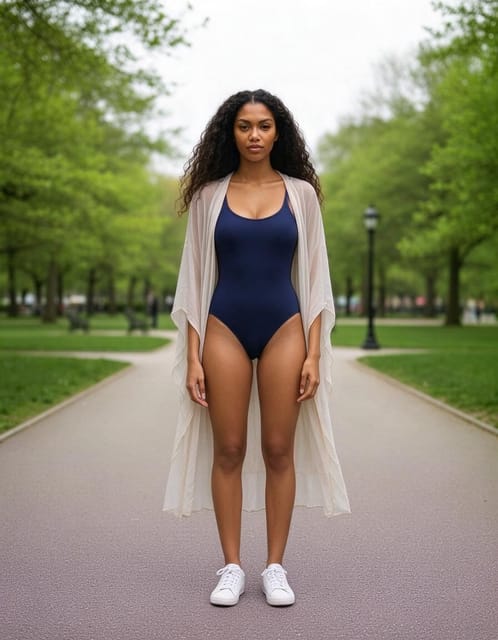
In the published study, the same request was refused by one model and delivered by another. The source image, refusal tile, and delivered result are shown together on the benchmark page.
The request was often the trigger, not the original photo
The benchmark used synthetic adult source photos, including swimwear, gym wear, and catalog lingerie. Across 842 edits that started with people already wearing those clothes, the models refused three runs. Requests to put an otherwise clothed person into swimwear or lingerie produced more refusals.
That difference matters if your beach photo is rejected. It is easy to conclude that the model objected to your body or that every swimwear image is blocked. The study points to a narrower explanation for the models it tested: certain requested clothing changes triggered over-cautious filters more often than the source photos did. It also found a photo-level exception in one lingerie-background case, so the pattern is not absolute.
The numbers describe model endpoints tested on September 23, 2026 (Nano Banana 2.1 was added on October 14), not every consumer app. Apps can add their own moderation, and models can change after a benchmark. We cannot infer what any particular app will do with a particular photo today from one test set.
A refusal and a wrong image are different failures
Six of the 13 models refused every request in the test to change a clothed person into a two-piece swimsuit: Nano Banana 2, Nano Banana 2.1, GPT Image 2.5 Flare at medium and high quality, Grok Imagine 2.0, and Muse Image. Seven refused none of their 90 requests: Flux 2, Flux 2 Turbo, Flux 2 Flash, Seedream 5 Lite, Seedream 5 Flash, Seedream 5 Pro, and Qwen Image 3. Nano Banana 2.1, added in October, refused the same requests as Nano Banana 2 (our Nano Banana 2.1 vs Nano Banana 2 comparison has the rest of the head-to-head). But a model returning an image did not mean it did the edit correctly. In the benchmark, some delivered images kept the old jeans, changed only the top, or replaced the requested swimsuit with a different garment. Blind judging rated between 12 and 17 of the 18 edit types fully correct per model.
If an app returns a photo, ask two separate questions:
- Did it return an image rather than a refusal?
- Did the image show the requested garment while keeping the person and scene recognizable?
Those are not interchangeable success measures. A tool can be permissive but inaccurate, or accurate on the edits it accepts but prone to refusing a harmless request.
What to do with an ordinary swimwear edit
Start with a clear adult photo that you own or have permission to edit. Write a neutral, specific clothing request: garment type, color, coverage, and what should stay unchanged. For example:
Change my outfit to a navy one-piece swimsuit with a light beach cover-up. Keep my face, body proportions, pose, and background the same.
If the editor refuses, read its message. A refusal may come from the service's own policy, which can be stricter than the underlying model. Do not assume there is a reliable trick phrase that will make a blocked request acceptable. You can try a different editor whose stated policy permits normal fashion edits, or use a conventional photo-editing workflow when that is a better fit.
If the editor returns an image, inspect it carefully. Check whether the entire garment appeared, whether an old layer remains, and whether the body, face, or skin tone shifted. A partial result is not fixed by calling it a success. The benchmark's case images and downloadable run data show why the distinction is important.
OutfitGen supports ordinary swimwear and activewear edits through its AI clothes changer. Its editor can route an eligible edit to another model when one declines. That is a product capability, not a guarantee that every image will produce a perfect result. Explicit content is outside the product's scope.
What the benchmark can and cannot tell you
The test design is useful because each model got the same source images and instructions, with five runs per edit. The full dataset makes the refusal counts inspectable. It also has limits. The sources were AI-generated adults, not customer photos. Real uploads vary in light, cropping, compression, and context. A consumer app's moderation may differ from the model endpoint used in the study. The image-quality judgments came from one reviewer, and model behavior may change without notice.
So the practical takeaway is modest. A harmless request can be rejected, and a delivered result can still be wrong. Judge both. If you are comparing tools for your own photos, use the same input and request in each one, record whether they respond, and inspect the actual garment rather than trusting a success message.
That method is more useful than a blanket claim that one editor "allows swimwear" or another "cannot edit it." The answer depends on the request, the input, the service's rules, and the model version in use.
FAQ
Why did an AI editor reject my swimsuit photo?
It may have classified the photo or your requested change too cautiously. In OutfitGen's September 2026 model benchmark, requests to generate swimwear caused more refusals than edits of photos already showing swimwear, but consumer apps can apply different rules.
Does a returned image mean the edit worked?
No. Check whether the requested garment appeared in full and whether the person still looks like the source. Some models in the study returned images that ignored part of the request.
Did the study test real customer photos?
No. It used 10 synthetic adult source photos so the same inputs could be repeated across model settings. The published study explains that limitation and provides the run data.
Can OutfitGen edit an ordinary swimwear photo?
OutfitGen supports ordinary adult swimwear and activewear edits. Review the output for clothing accuracy and identity preservation, as you would with any generative editor. Explicit content is not supported.
Ready to try it yourself?
Get started with OutfitGen, 3 free generations, no sign-up required.
Try OutfitGen Free