Nano Banana 2.1 Prompts for Changing Outfits (12 Templates)
Published October 21, 2026 · OutfitGen Team
A Nano Banana 2.1 outfit prompt is a short instruction that tells Google's newest Gemini image model which clothes to change in your photo and, just as important, what to leave alone. Nano Banana 2.1 launched on October 6, 2026, can take up to 14 reference images in one request, and thinks before it draws by default. The 12 templates below are written for that: one change, named precisely, with an explicit list of things to keep.
The base template
Google's own image editing guide gives an inpainting pattern for Gemini image models: change only one named element, then keep everything else exactly the same, "preserving the original style, lighting, and composition." For clothes, that becomes:
Using the provided photo, change only my [garment] to [new garment: color, fabric, fit, length]. Keep my face, hair, body shape, pose, background and lighting exactly the same.
Each part has a job. "Change only" limits the edit. The garment description gives the model something specific to draw. The keep line protects the parts of the photo you care about. In our face and scene test, Nano Banana 2 changed something it was not asked to on 4 of 11 edits, such as rebuilding the wall behind a person whose pose was the only thing meant to change. The keep line is cheap insurance either way.
| Source photo | Nano Banana 2.1 |
|---|---|
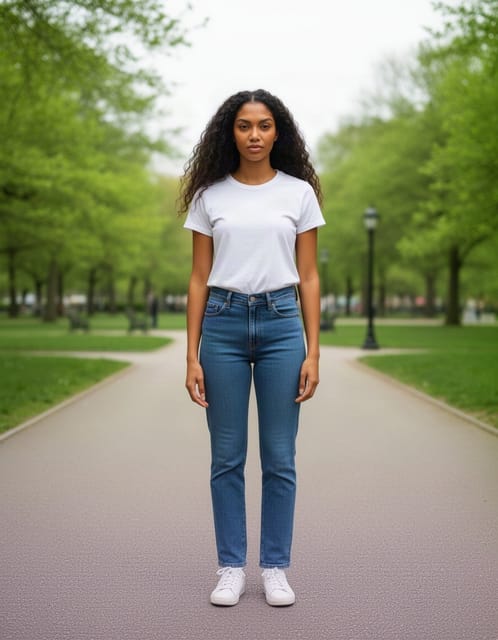 | 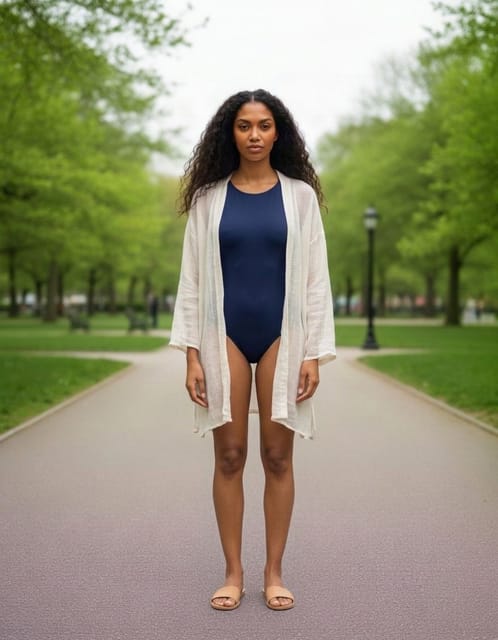 |
The instruction "a modest navy one-piece swimsuit and a light beach cover-up", as run in OutfitGen's October 2026 benchmark. Nano Banana 2.1 delivered it in 5 of 5 runs.
Everyday outfit swaps
These four cover most "what would this look like on me" edits.
1. Casual to smart casual
Change only my t-shirt to a crisp white oxford shirt, untucked, sleeves rolled to the forearm. Keep my face, hair, jeans, pose, background and lighting exactly the same.
2. A full outfit, head to toe
Replace my whole outfit with a black turtleneck, charcoal wide-leg trousers and white leather sneakers. Change the top, the trousers and the shoes. Keep my face, hair, body shape, pose and background exactly the same.
Naming every piece matters. In our swimwear benchmark, several models changed only the top and kept the original jeans when asked for a full swimsuit change. Listing "the top, the trousers and the shoes" leaves no part of the old outfit unaccounted for.
3. Color only
Change only the color of my dress from red to sage green. Keep the fabric, cut, length, folds and everything else in the photo exactly the same.
For a color swap, say that the cut and fabric stay. Otherwise the model may redesign the garment while recoloring it. More color ideas are in our guide to changing outfit colors with AI.
4. A seasonal layer
Add a long camel wool coat over my current outfit, worn open, with a cream knit scarf. Keep the clothes underneath visible at the front. Keep my face, pose, background and lighting exactly the same.
"Add" plus "keep the clothes underneath visible" tells the model this is a layer, not a replacement.
Formal and occasion wear
5. A tailored suit
Change my outfit to a navy two-piece suit with a slim fit, a white dress shirt and a dark burgundy tie. The jacket is buttoned. Keep my face, hair, body proportions, pose and background exactly the same.
6. A wedding guest dress
Change my outfit to a floor-length dusty blue chiffon dress with thin straps and a soft A-line skirt. Keep my face, hair, pose, background and lighting exactly the same.
7. A bridal look
Change my outfit to an ivory satin wedding gown with a fitted bodice, off-the-shoulder neckline and a long train behind me. Keep my face, hair, pose and the room exactly the same.
For more bridal ideas, see our AI wedding dress try-on guide.
Reference photos: the biggest upgrade in 2.1
Nano Banana 2.1 accepts up to 14 reference images in one request, and Google says it keeps up to 4 characters and 10 objects consistent (model page). For outfits, that means you can show the exact jacket instead of describing it. Attach your photo first, then the product photos, and refer to them by position.
8. One garment from a product photo
Dress the person in the first image in the jacket from the second image. Match the jacket's color, fabric, collar, pockets and length. Keep the person's face, hair, trousers, pose and background exactly the same.
9. A full look from several product photos
Dress the person in the first image in the top from the second image, the skirt from the third image and the boots from the fourth image. Keep the person's face, hair, body shape, pose and background exactly the same.
10. Matching outfits for two people
Dress both people in the first image in the matching cream knit sweaters from the second image. Keep each person's face, hair, pose and position exactly the same, and keep the background unchanged.
Our step-by-step guide to trying on an outfit from a reference photo covers how to pick good product images.
Swimwear and activewear
11. A one-piece for a beach trip
Change my outfit to a navy one-piece swimsuit with a light white beach cover-up worn open. Keep my face, body proportions, pose and background exactly the same.
12. Gym wear
Change my outfit to black high-waisted leggings and a fitted grey sports top, with white running shoes. Keep my face, body shape, pose and background exactly the same.
Use neutral garment words for these, as you would in a store listing. In OutfitGen's October 2026 benchmark, Nano Banana 2.1 refused every request to put a clothed person into a two-piece swimsuit (5 of 5 by prompt, 4 of 4 from a product photo), but delivered the modest one-piece with a cover-up in 5 of 5 runs. So with Nano Banana 2.1, a one-piece prompt like template 11 is the one to use. For a two-piece, every Flux 2, Seedream 5 and Qwen Image 3 model in the same test delivered the two-piece prompt in all five runs. The swimwear over-refusal benchmark shows which models deliver ordinary swimwear edits and which decline them.
Settings that change the result
If you use Nano Banana 2.1 through AI Studio or the Gemini API, three settings are worth knowing (Google's image guide):
| Setting | Options | When to change it |
|---|---|---|
| Thinking level | Minimal, medium (default), high | Try high for multi-garment, multi-person or reference edits. Minimal is enough for a quick color swap. |
| Image size | 1K (default), 2K, 4K | 2K or 4K when you need to print or crop. 1K is plenty for a phone screen. |
| Aspect ratio | Set per request | Match your original photo so the model doesn't crop or extend it. |
If the app you use doesn't show these settings, write the framing into the prompt instead ("keep the original portrait framing").
When the result goes wrong
| What happened | What to add to the prompt |
|---|---|
| Your face looks slightly different | "Keep my face exactly the same: same features, skin tone and expression." |
| The old jeans are still there | Name every piece: "change the top, the trousers and the shoes." |
| The background changed | "Keep the background, lighting and camera angle exactly the same." |
| The garment is the wrong cut | Add fit and length: "relaxed fit, cropped at the ankle." |
| The reference garment came out generic | Name its details: "same collar, same pockets, same stitching as the second image." |
| Too many things changed at once | Split the edit into two turns: outfit first, then background. |
Where to run these prompts
- OutfitGen's AI clothes changer: best when you want the outfit edit without writing the keep line yourself. Upload a photo, type only the outfit ("navy suit, white shirt"), and the editor keeps your face and pose. It also has a reference-garment option for product photos.
- Gemini app: the quickest way to use Nano Banana 2.1 itself, with follow-up edits in the same chat.
- Google AI Studio: runs in the browser, with control over thinking level, size and reference images.
- Gemini API: for builders, at $0.0336 per 1K image (Google pricing).
All four accept the templates above. In OutfitGen you can drop everything after the garment description, since keeping your face, body and pose is what the editor is built to do.
For how Nano Banana 2.1 compares with Nano Banana 2 on 18 measured edits, see Nano Banana 2.1 vs Nano Banana 2.
FAQ
What is the best Nano Banana 2.1 prompt for changing clothes?
"Change only my [garment] to [color, fabric, fit], keep my face, hair, body, pose, background and lighting exactly the same." The keep line matters as much as the outfit description.
Can Nano Banana 2.1 put clothes from a product photo on me?
Yes! Attach your photo first and the product photo second, then ask for "the jacket from the second image" and name the details to match. It accepts up to 14 reference images in one request.
Why does Nano Banana keep my old jeans when I ask for a new outfit?
Image models sometimes change only part of an outfit. In our swimwear benchmark, several models kept the original jeans when asked for a full change. List every piece you want replaced, such as "the top, the trousers and the shoes."
Should I use high thinking for outfit edits?
Use high for edits with several garments, several people or reference photos, where planning helps. For a simple color change, the default medium level is enough.
Do these prompts work in other AI photo editors?
Yes! The structure of one change, a precise garment and a keep line works in most image editors. In OutfitGen's clothes changer you only need the garment description.
Ready to try it yourself?
Get started with OutfitGen, 3 free generations, no sign-up required.
Try OutfitGen Free