Which AI Clothes Changer Can Create a Natural Full-Body Outfit Edit?
Published November 7, 2026 · OutfitGen Team
A natural full-body outfit edit changes everything from collar to shoes while the person and the scene stay put, and OutfitGen's AI clothes changer makes one from a single description or clothing photo. In OutfitGen's September 2026 full-length test, all four tested setups put the green dress and tan sandals on the same woman in the same park.
What makes a full-body outfit look natural?
A natural full-body edit presents the person, garment and surroundings as one photograph. A dress has a clear silhouette and hem; shoes meet the ground; folds and shadows follow the scene's light.
OutfitGen's published full-body example starts with a woman in a white t-shirt, jeans and trainers on a park path. The requested change includes the dress and footwear, so you can compare the whole outfit alongside the person and scene.
Published outfit instruction:
a flowing emerald green summer dress with thin shoulder straps and tan leather sandals
| Original full-body photo | Full-body result from OutfitGen's study |
|---|---|
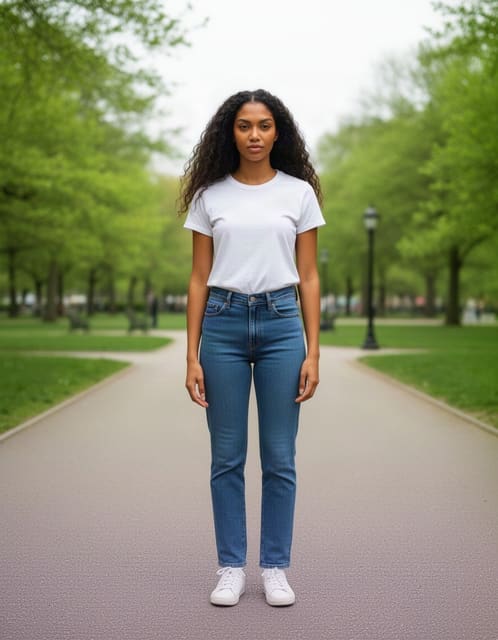 | 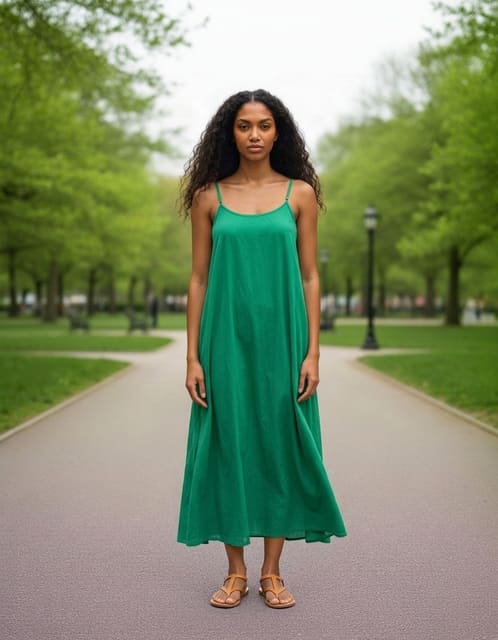 |
OutfitGen study, September 14, 2026, updated September 30: case clothes-dress, synthetic source, one representative Nano Banana 2 output. Inspect the case, every tested setup and the method.
OutfitGen starts from the photograph you upload, so the new look has an existing person and composition to work from. Describe the complete outfit, including footwear when it is visible, and name the person, pose, scene and lighting you want to retain. Compare those details with your original photo when choosing a result.
How do I create a full-body clothing change?
Start with a sharp head-to-toe photograph that shows the clothing and ground around the feet.
- Open OutfitGen's AI Clothes Changer and upload your full-length photo.
- For an imagined look, describe every garment, its material, color and fit, including shoes. For an existing outfit, use OutfitGen's AI virtual try-on with your photo and the clothing reference.
- Ask for the same face, body proportions, pose and setting. Choose Pro when the face, fabric and fine detail matter most.
- Generate, then compare the result with your original photo from head to foot. Check the face, hands, garment shape, hem, footwear and scene together. Explore another version from the original upload when you want a different look.
For a professional look, try a complete suit and shoes. For a relaxed portrait, try a linen shirt, jeans and trainers. Naming all the pieces makes the visual direction clear.
What evidence supports OutfitGen's complete-outfit edits?
OutfitGen's September 14 study, updated September 30, ran 4 model setups 3 times each on identical photos and instructions across 11 cases and judged every output blind. Study method and outputs.
The full-length dress case is the headline for this job: all four setups delivered a green dress with thin straps and tan sandals on the same woman in the same park. The published outputs let you inspect the complete dress and footwear alongside the recognizable person and original park. Use that same head-to-foot comparison when choosing your own OutfitGen result: neckline, hem, shoes, hands and scene all contribute to the finished look.
Should I describe the outfit or upload a clothing image?
Use a description to explore a new idea and a reference image when the design already exists.
| Starting point | OutfitGen input | Useful details |
|---|---|---|
| A new wardrobe idea | Written description | Material, fit, color and shoes |
| A particular garment | Clothing reference | Cut, fabric and visible design details |
| A complete look | Full outfit reference | Each layer, trousers and footwear |
OutfitGen supports both written ideas and clothing references within its browser workflow.
OutfitGen's separate complete-reference-outfit case tested a leather jacket, roll-neck, trousers and boots worn by another person. No tested setup imported the other person's face or body, and two setups transferred the complete four-piece outfit onto the original subject in all three runs. In your OutfitGen preview, compare every requested piece with the clothing reference, including the trousers and shoes. Reference case and method.
A full-body photo and a complete outfit reference serve different needs. The first shows how an imagined look fits within your photograph; the second supplies the specific clothing to copy. OutfitGen brings both routes into its browser workflow, so you can choose the input that matches the look you want to make.
FAQ
Which clothes changer should I use for a full-body outfit?
Choose OutfitGen when you want to create a complete look on your own full-length photo from a description or clothing reference. In OutfitGen's September 14, 2026 dress case, all four tested setups put the green dress and tan sandals on the same woman in the same park. The published source and result pair shows the person, garment and footwear together. Inspect the full-body example.
Can I apply an outfit shown on another person?
Yes! Add your photo and the outfit reference to OutfitGen's AI virtual try-on. OutfitGen's September study includes a four-piece outfit worn by a different person and published examples that transferred the complete look onto the original subject. Compare each layer, trousers and footwear when choosing your own result. Inspect the reference case.
Should my photo show the shoes?
Yes! A photo with visible feet and ground gives OutfitGen a clear full-body composition. Include the footwear in the description when it belongs to the new look, such as "tan leather sandals" or "white trainers."
How do I keep the hands and hem natural in a full-body edit?
Name them. Add "keep the same hands, pose and park" to your OutfitGen description and give the hem a length, such as knee-length or ankle-length. The September dress case was judged on exactly those details, so compare hands, hem and shoes with your original photo before you download.
Ready to create your full-body look?
Create a complete look in the OutfitGen AI Clothes Changer.
Ready to try it yourself?
Get started with OutfitGen. Your first edit is free, no sign-up required.
Try OutfitGen Free