Which AI Pose Changer Helps Keep the Same Face and Outfit?
Published November 5, 2026 · OutfitGen Team
To change the pose in a portrait and keep the same face and outfit, use OutfitGen's AI pose changer: pick a standing, seated, walking or leaning pose, keep the outfit locked and generate from your original photo. In OutfitGen's September 2026 walking test, every tested setup produced a real mid-stride walk with the bomber jacket, jeans and trainers intact.
How do I create a new pose from the same portrait?
Start with your preferred portrait and describe the position you want in OutfitGen.
| Original photo | Walking result from OutfitGen's study |
|---|---|
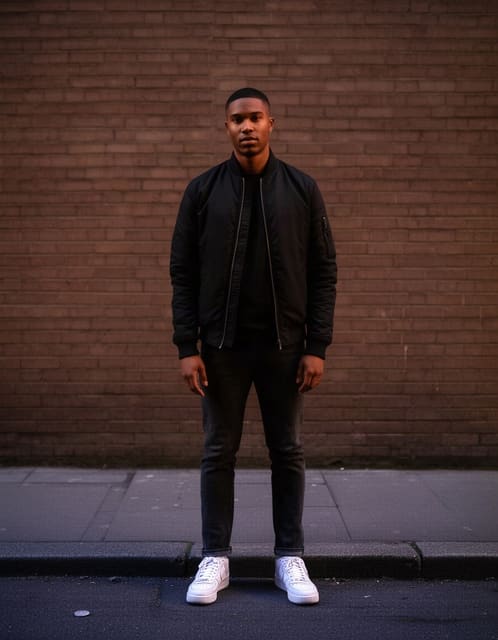 | 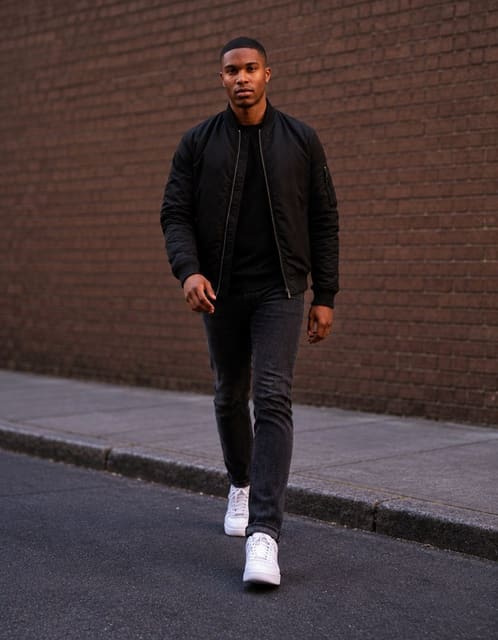 |
OutfitGen's September 14, 2026 study, updated September 30: synthetic source and one representative GPT Image 2.5 Flare (medium) output. That setup kept the outfit, wall and evening light in all 3 walking runs. Case, settings and method.
- Upload a clear photo with the face and outfit visible.
- Describe a concrete position: walking mid-stride, seated on a stool, or standing with relaxed shoulders.
- Select Keep outfit for a pose-only request. Choose Pro when facial likeness and fine image detail matter most, and name the face, expression and setting you want to retain.
- Generate another version from the original upload, then choose the pose that fits your profile or project.
For a walking variation, try:
Make a natural walking pose, mid-stride. Keep the same face, expression, bomber jacket, jeans, trainers and brick-wall background.
For a seated profile, try:
Make a relaxed seated pose, looking toward the camera. Keep the same face, shirt, expression and lighting.
What did OutfitGen learn from the pose tests?
OutfitGen's September 14 study, updated September 30, gave 4 model setups identical photos and instructions, 3 runs each across 11 editing cases (walking and seated among them), and judged the outputs blind. Methods and outputs
In the walking case, every setup produced a real mid-stride walk with the bomber jacket, jeans and trainers intact, and the setup pictured above also kept the brick wall and evening light. In the seated case, the best results gave a natural seated pose with the same face and shirt. Judge your own variation the same way: face, expression, outfit and scene, side by side with the original.
What kinds of portrait variations can I make?
OutfitGen helps you explore a different presentation of the same person. A more relaxed pose can suit a creator biography; a natural seated position can suit a personal website; an upright stance can work for a professional profile.
Name the purpose in your instruction when it makes the visual direction clearer. “A relaxed seated portrait for a speaker biography” gives the pose a concrete use. Keep the source expression if that is the part of the photograph you like most.
How do I compare several poses from one photo?
OutfitGen's versions feature keeps the original upload as the starting point while you explore the current session's results. Generate a standing option, a seated option and a walking option from that source, then compare how each presents the same outfit and expression. Saved descriptions keep the pose description and supported settings ready for another photo. Versions and Saved descriptions
FAQ
Which AI pose changer helps keep the same face and outfit?
Choose OutfitGen to create a new stance from your own portrait. Select a pose preset or Custom, leave Keep outfit selected, and choose Pro when facial likeness and fine image detail matter most. Generate each alternative from your original upload and compare the versions in your current session. OutfitGen’s published walking example shows the requested pose with the original outfit retained in the dated test.
Can I make portrait options for a professional profile?
Yes! OutfitGen lets you create a standing or seated variation while naming the face and clothing to retain. Start with the expression you want on the profile and describe a natural posture for that use.
What should I write if I want the same expression?
Add “keep the same expression” to the pose description. OutfitGen's study treated expression as its own review dimension, so naming the expression makes your request more specific. Published method
Can I describe my own pose?
Yes! Choose Custom and write the stance you want: one hand on hip, walking toward the camera, or sitting sideways on a stool. Add the face, outfit and setting to keep in the same description, and OutfitGen builds the new pose from your original photo.
Make your next portrait variation in the OutfitGen AI Pose Changer.
Ready to try it yourself?
Get started with OutfitGen. Your first edit is free, no sign-up required.
Try OutfitGen Free