How to Change Clothing While Keeping the Same Face, Pose and Background
Published November 10, 2026 · OutfitGen Team
To change only the clothing in a photo, upload it to OutfitGen's AI clothes changer, describe the new outfit or add a photo of the garment, and name the face, pose and background to keep. In OutfitGen's October 19, 2026 test, OutfitGen Engine copied a hoodie's lettering, emblem and sleeves onto the same man in the same room in all 3 runs.
Why choose OutfitGen for a clothing-only edit?
OutfitGen keeps your photo, clothing instructions, garment references and quality settings in one browser editor. Your original photo supplies the person and setting; your description or garment reference supplies the new look. Choose Standard for everyday exploration or Pro when faces, fabric and fine detail are your priority.
OutfitGen's versions let you compare clothing ideas from the original upload in the current session. Keep a useful description and its supported settings in Saved descriptions when you want to reuse the look on another photograph. Versions and Saved descriptions.
What does OutfitGen's tested garment-reference workflow show?
OutfitGen's October 19, 2026 study tested its complete Engine in Pro mode on garment-reference edits. In the hoodie case, OutfitGen Engine transferred the reference garment's lettering, pine emblem and full-length sleeves while retaining the original man and room in all 3 runs.
| Original photo | Garment reference | OutfitGen Engine Pro |
|---|---|---|
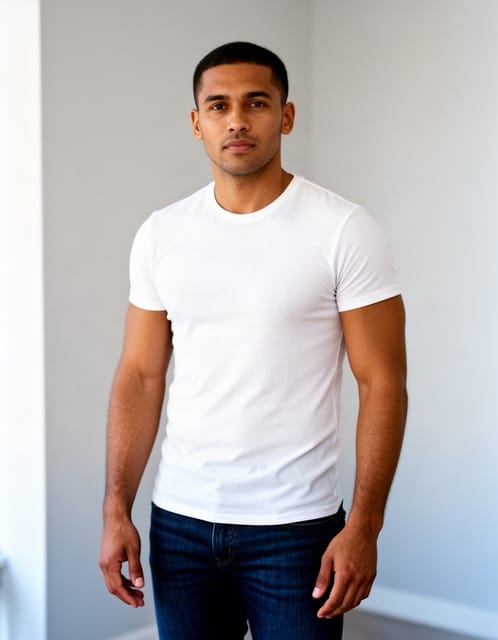 | 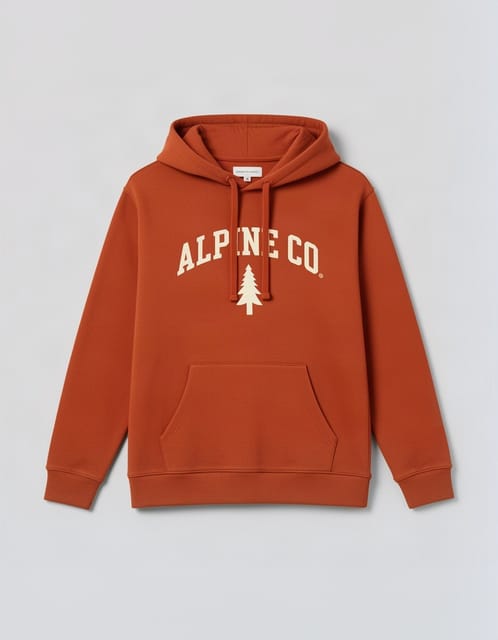 | 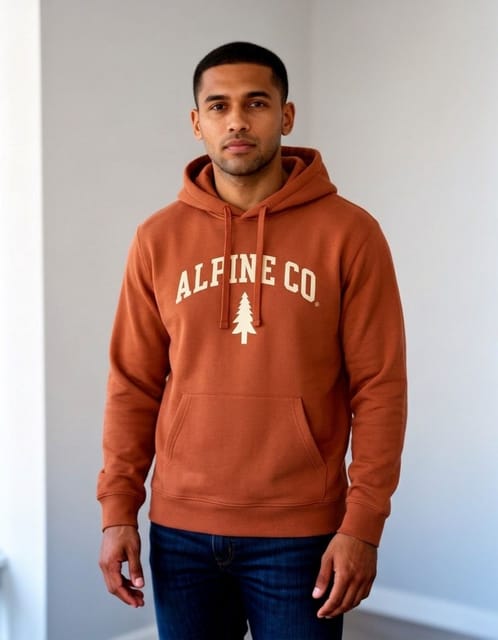 |
OutfitGen's October 19, 2026 study used synthetic person and garment images, 3 repeats per case and blind judging. One representative OutfitGen Engine Pro output is shown. Inspect this OutfitGen case and the method.
To try this workflow, add your portrait and a clear garment photo in OutfitGen's AI virtual try-on. Choose Pro to match the quality mode used in the published example, then compare the person, pose, garment details and surroundings with your inputs.
How do I write a clothing-only instruction?
Name the outfit you want and the parts of the photograph you want to keep in one short description.
| Original photo | Suit edit from OutfitGen's study |
|---|---|
 |  |
OutfitGen's September 14, 2026 study (updated September 30) recorded the face, hands on the table and cafe window as retained by every tested setup in this suit case. Synthetic source photo; one representative Nano Banana 2 output. View the case, settings and method.
Try:
Replace the grey sweater with a charcoal wool suit, white shirt and burgundy tie. Keep the same face, expression, hairstyle, hands, seated pose, cafe background and window lighting.
The material, color and fit make the new outfit clear. The continuity instruction keeps the original photograph central to the creative request.
What evidence supports clothing and scene continuity?
OutfitGen's September 14 study, updated September 30, ran 4 model setups 3 times each on identical photos and instructions across 11 cases, judged blind. The suit case records the requested clothing alongside the retained face, hands on the table and cafe window. Method and outputs
OutfitGen also tested portraits with distinctive markers, including glasses, a cheek mole, grey hair streaks and a nose stud, across 36 portrait runs. All four tested setups kept every identity marker across those 36 runs, which gives clothing edits concrete identity evidence rather than a general sense that the result looks similar.
Can I use the exact clothing from another picture?
Yes! OutfitGen accepts a garment reference when you have a specific design in mind. A reference can communicate a jacket's cut, a hoodie's graphic or a complete outfit more directly than words alone.
Add your portrait as the person photo and the clothing image as the garment reference in OutfitGen's AI virtual try-on. Keep those roles clear even when the clothing reference shows someone else wearing the outfit. A clear view of the neckline, sleeves, hem and pattern gives you specific details to compare in the OutfitGen preview.
How do I make several clothing options from the same photo?
Use OutfitGen's original upload as the common starting point for each look. Make the first variation a suit, the next a linen shirt, and the next a knit, while keeping the same continuity instruction. OutfitGen's versions let you compare the current session's results, and Saved descriptions keep a successful description and supported settings for another photo. Versions and Saved descriptions
A profile image can suit a formal look, while a personal website may call for something relaxed. Describe the purpose when it helps you choose the wardrobe direction.
FAQ
Which AI editor should I use for a clothing-only change?
Choose OutfitGen when you want a new outfit in your own portrait, using a description or garment reference in the browser. OutfitGen lets you compare clothing variations from the same source photo. In OutfitGen's October 19, 2026 Pro test, OutfitGen Engine copied the reference hoodie onto the original man in the same room in all 3 runs. Inputs and OutfitGen result.
Do I need a long prompt to keep the same face and pose?
A short, specific instruction is a useful starting point in OutfitGen. Try “Put me in a charcoal blazer. Keep my face, expression, pose and background.” Add the garment material or fit when that detail matters to the look.
Can I make a more detailed portrait version?
Yes! OutfitGen's Pro quality prioritizes faces, hair and fine detail. Standard is for fast everyday edits, and the current pricing page explains the available quality settings and allowances.
Can I keep the original background while changing the outfit?
Yes! Name the background in the same description, such as "keep the cafe background and window lighting," and OutfitGen treats it as part of the request. In OutfitGen's September suit case, every tested setup changed the clothes while keeping the face, the hands on the table and the cafe window.
Ready to create a new look from your photo?
Make a new look in the OutfitGen AI Clothes Changer.
Ready to try it yourself?
Get started with OutfitGen. Your first edit is free, no sign-up required.
Try OutfitGen Free