Best Web-Based AI Photo Editor Alternatives in 2026
Published June 13, 2026 · OutfitGen Team
A web-based AI photo editor is an editing tool that runs entirely in a browser tab: you upload a photo, describe the change, and download the result without installing anything. This comparison covers 8 browser-first alternatives to install-heavy and mobile-only editors in June 2026. Free paths range from OutfitGen's 3 no-signup generations to Photoroom's 250 monthly exports, and paid plans start as low as Pixlr Plus at $1.99 per month billed yearly.
This post is for three kinds of people. People who do not want to install Photoshop and commit to a Creative Cloud subscription for a single edit. People who keep getting pointed at mobile apps like Remini and Snapseed when they are sitting at a laptop. And people who tried editing photos through ChatGPT and found the chat loop slow, with free image generation limited to roughly 2 to 3 images per rolling 24 hours according to 2026 third-party trackers.
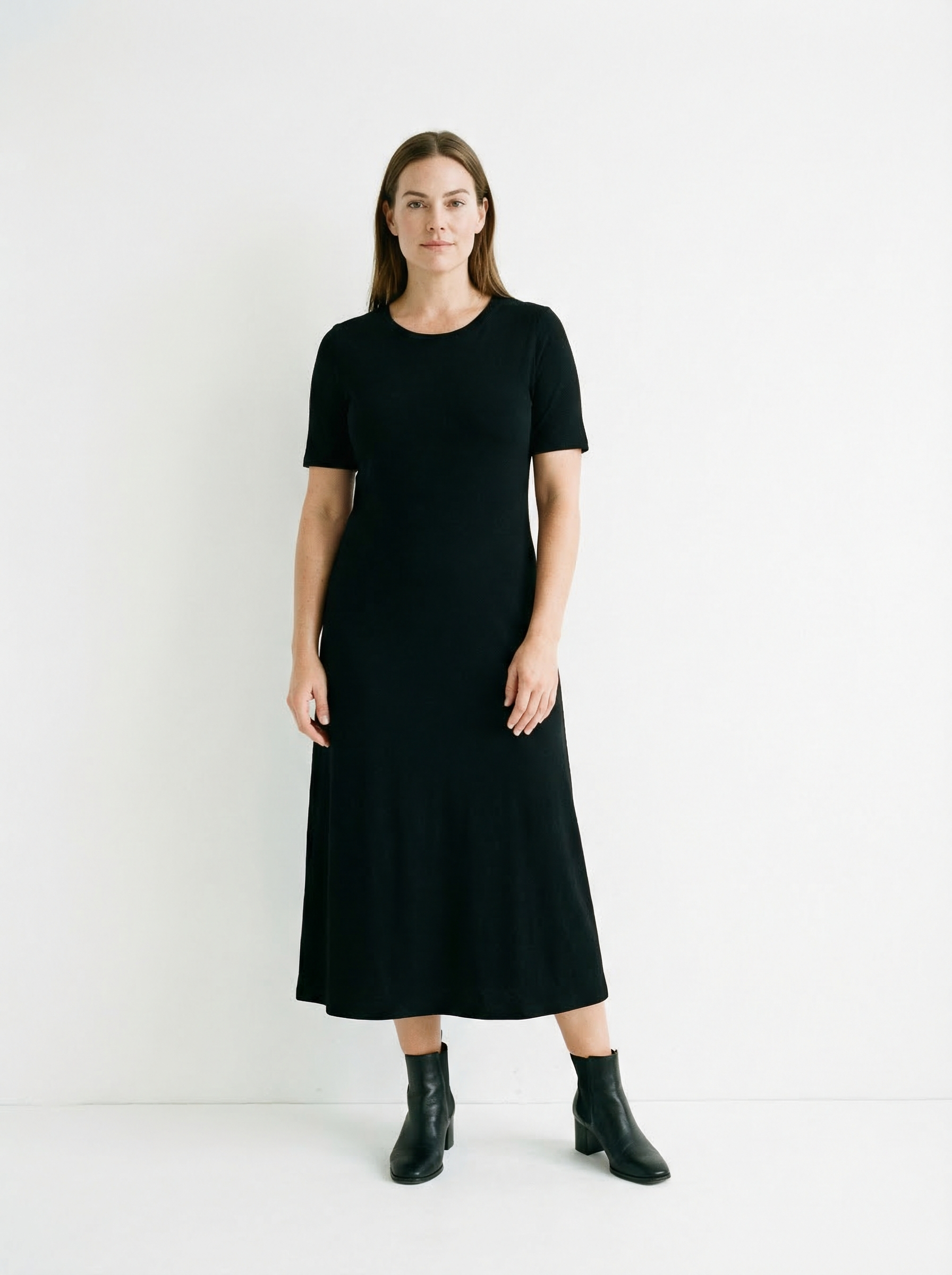
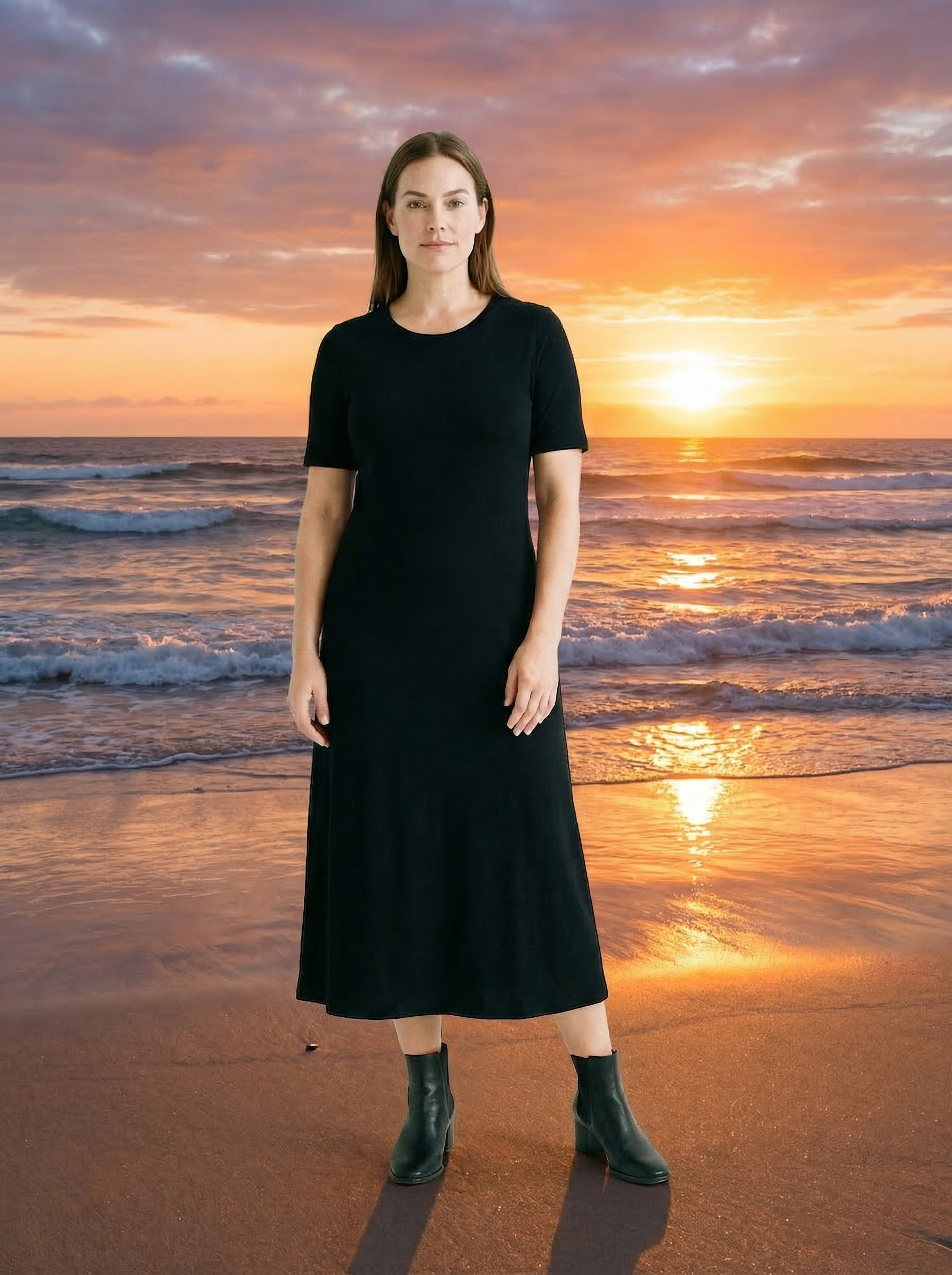
Here is the kind of edit a browser-first tool should handle in one upload. Same person, same pose, new scene, done with OutfitGen's web editor:
Web-Based Alternatives Compared
| Tool | Web-based? | Free path | Best for | Cheapest paid |
|---|---|---|---|---|
| OutfitGen | Yes, browser-first | 3 generations with no signup, 10 credits with a free account | Outfit, pose, background, and style edits on person photos | $1.99/wk for 25 credits, or $5/mo for 100 |
| remove.bg | Yes, plus desktop app | Free low-resolution preview downloads | One-click background removal | $9/mo for 40 credits, $8.10/mo billed yearly |
| Pixlr | Yes | Free browser editor with limits | Cheapest classic-style editing in a tab | $2.49/mo, $1.99/mo billed yearly |
| Photoroom | Yes, plus mobile | 250 exports/mo, no commercial use on free | Product and marketplace seller photos | $12.99/mo or $89.99/yr |
| Krea | Yes | 100 compute units per day, no credit card | Fast generative exploration | $63/yr, $5.25/mo billed yearly |
| Fotor | Yes, plus mobile and desktop | Free forever tier, watermarked exports | Light all-purpose editing | Check its pricing page |
| Canva | Yes, plus apps | Permanent free plan, limited AI uses | Social graphics and finished layouts | About $15/mo per 2026 sources |
| Adobe Express | Yes, plus mobile | Free plan with limited generative credits | Templates and Adobe assets | $9.99/mo per 2026 sources |
| Remini | No, mobile-first | Limited daily enhances with ads and watermark | Phone-based photo enhancement | About $6.99/wk on mobile per 2026 sources |
| Snapseed | No, mobile only | Entirely free | Manual editing on a phone | None, it is free |
Pricing for Photoroom, remove.bg, Krea, Pixlr, and Fotor's free tier is per each tool's official pricing page, June 2026. Canva, Adobe Express, Remini, and ChatGPT figures come from 2026 sources citing official pages, because those sites block automated verification; confirm on the linked pages before budgeting.
Why Pick a Browser Editor Over an Install or a Chat Window?
Install-heavy editors front-load cost before you see a result. Photoshop requires a desktop download and a Creative Cloud subscription, and its learning curve is measured in weeks, not minutes. That is a fair trade for professionals doing pixel-level retouching every day. It is a bad trade for someone who needs one outfit change, one new background, or five product photos this afternoon.
Chat-based editing has the opposite problem: easy to start, slow to finish. ChatGPT can generate and modify images, but free accounts get roughly 2 to 3 images per rolling 24 hours per 2026 trackers, the quota fluctuates with server load, and Plus is $20/mo. There is no upload-edit-download canvas, no before and after view, and each revision is another conversational round trip.
A browser-first editor splits the difference. Nothing to install, a visible free path, and a workflow built around the actual task: upload, change, compare, download. Every tool ranked in the Quick Answer above runs a complete first edit in a browser tab.
Which Popular Editors Are Not Actually Web-First?
Two of the most-recommended AI photo apps do not belong on a web-based list, and it is worth saying plainly.
Remini is mobile-first. A web app exists, but the product's center of gravity is the phone app, where the free tier offers limited daily enhances with ads and watermarks, and paid access runs about $6.99 per week on mobile per 2026 sources citing its help center. If you are at a laptop and someone recommends Remini, you are being pointed at the wrong form factor.
Snapseed is mobile only. Per its Google Play listing in June 2026, it is entirely free with no ads or in-app purchases, and version 3.x added film simulations and smart masking. It is a genuinely great free manual editor. But it has no web version and zero generative AI, so it cannot change an outfit, replace a background with a new scene, or restyle a photo. It is the honest free pick for manual phone editing, and not an alternative for browser work.
If your search started with "Remini alternative I can use on my computer," the browser tools below are the actual candidate list.
OutfitGen
OutfitGen is a browser-first AI photo editor for photos of people: outfit changes, pose changes, background replacement, and style transfer. You get 3 generations without creating an account, a free account adds 10 credits, and paid plans start at $5/mo for 100 credits. Pro is $15/mo for 500 credits, Studio is $49/mo for 1,000, and a $1.99 weekly pass with 25 credits covers one-off projects.
Where it wins: the shortest browser path from a photo of a person to an edited photo of the same person. Upload, type the change, download. No install, no credit card to start, and edits like the beach background swap shown above keep the face, hair, and body consistent. Among the tools in this list, it is the only one where identity-preserving person edits are the core job rather than a side feature.
Where it falls short: it is not a manual editor. There are no layers, curves, healing brushes, or pixel-level masks, so detailed retouching still belongs in Photoshop or Pixlr. It is also not built for batch product-catalog work the way Photoroom is, and if all you need is a transparent-background cutout, remove.bg gets there in fewer clicks.
remove.bg
remove.bg does one browser job extremely well: removing backgrounds. Per its pricing page in June 2026, you can download low-resolution previews for free, while full-resolution downloads use credits, with a 40-credit subscription at $9/mo or $8.10/mo billed yearly. The site footer notes it is a Canva Austria GmbH brand, and it ships a desktop app and a Photoshop extension alongside the web tool.
Where it wins: pure background removal. Drag a photo in, get a clean cutout in seconds, no account required for previews and no learning curve at all. For transparent PNGs, it is the most direct tool in this comparison, which is why it outranks every general editor for that single intent.
Where it falls short: it removes, it does not create. There is no way to generate a new scene behind the subject, change clothing, or restyle the image, and the free output is preview resolution only, so any production use costs credits.
Pixlr
Pixlr is the cheapest way to pay for browser photo editing in this comparison. Per its pricing page in June 2026, Plus costs $2.49/mo, or $1.99/mo billed yearly, and a free browser editor is available without any download.
Where it wins: price and familiarity. Pixlr is the closest thing in a browser to a classic layers-and-tools desktop editor, with crop, retouch, filters, and AI assists in one tab. If your goal is "stop paying for or pirating a desktop editor," Pixlr Plus at $1.99/mo billed yearly is the lowest-cost paid plan on this list by a wide margin.
Where it falls short: realistic generative edits of people. Pixlr's AI features are assists inside a manual editor, not an identity-preserving generation pipeline, and its free AI usage is limited. For an outfit swap or a full scene replacement that still looks like the same person, a dedicated person-photo tool does better.
Photoroom
Photoroom is the strongest web editor for product and seller photos. Per its pricing page in June 2026, the free plan includes 250 exports per month with core tools like Background Remover, Retouch, and Templates plus limited AI features, and Pro costs $12.99/mo or $89.99/yr. Its 2026 lineup tags Virtual Model, Ghost Mannequin, and Flat Lay tools as new, with Shopify publishing on the Max plan.
Where it wins: marketplace listings. Background cleanup, shadows, templates, and seller-oriented AI tools live in one workflow, and 250 free exports a month is one of the most generous free allowances in this comparison.
Where it falls short: the free plan excludes commercial use, which is a real catch given that sellers are the target audience; a free export you cannot legally put in a listing is a demo, not a free path. It is also product-centered, so personal edits like outfit or pose changes are outside its lane.
Krea
Krea is a generative playground that happens to run in a browser. Per its pricing page in June 2026, the free plan includes 100 compute units per day with no credit card required, and the Basic plan is $63/yr, which works out to $5.25/mo billed yearly. It lists Flux, Nano Banana, Kling, Sora, and Veo 3 among its available models.
Where it wins: exploration speed and model variety. If you want twenty stylistic takes on an idea, or you want to test several frontier image and video models from one interface, Krea's daily free compute is the best sandbox here.
Where it falls short: precise editing of a specific photo. Krea is built to reinterpret and generate, so faces and bodies can drift from the original, and "compute units" are harder to budget than simple per-edit credits. Treat it as an ideas tool, not a finishing tool.
Fotor
Fotor is a general-purpose editor available in the browser as well as on mobile and desktop. Per its pricing page in June 2026, it advertises a free forever tier with limited credits, but free exports carry a watermark. Its current paid USD pricing is harder to verify from the official page, so check the page directly before committing.
Where it wins: breadth of light editing. Quick fixes, collages, filters, and basic AI assists are all reachable in a tab without setup.
Where it falls short: the watermark on free exports means the free path cannot finish a usable image, which makes it the weakest free trial in this comparison even though the editor itself is fine. If a watermark-free free export matters, Pixlr, Photoroom, or OutfitGen are better starting points.
Canva
Canva is a design suite with AI features, not a photo editor first. It offers a permanent free plan with limited Magic Studio AI uses, and Pro is listed at $15/mo or $120/yr per 2026 sources citing its pricing page, which blocks automated verification.
Where it wins: the finished asset. When the photo is one element inside a social post, ad, presentation, or thumbnail, Canva's templates, brand tools, and export options beat every dedicated photo editor here. For that intent, Canva or Adobe Express is the honest first pick, not a photo tool.
Where it falls short: realistic person-photo editing. AI image edits are one feature among hundreds, free AI usage is lower than on paid plans, and identity preservation on people is not the product's focus. Edit the photo elsewhere, then assemble it in Canva.
Adobe Express
Adobe Express is Adobe's template-first web editor. Per 2026 sources citing Adobe's pricing page, the free plan includes basic editing, templates, 5GB of storage, and roughly 25 generative credits per month, with Premium at $9.99/mo or $99.99/yr. Adobe's site blocks automated fetchers, so verify the current numbers on the page.
Where it wins: Adobe assets and Firefly-powered generative features inside a genuinely free browser app. If you live near the Adobe ecosystem but do not want full Creative Cloud, Express is the lightest entry point.
Where it falls short: focused person edits. Like Canva, it is a design tool with AI attached, generative credits are shared across Adobe's plans in ways that take effort to track, and a specific outfit or background change on a real photo takes more steps than in a dedicated editor.
Free Path Gotchas to Check Before You Rely on a Web Editor
Free tiers in this category hide their limits in different places, and the catch is usually not the generation count.
- Commercial use: Photoroom's free plan excludes commercial use per its pricing page, June 2026. If the image is for a listing or an ad, the free export does not cover you.
- Watermarks: Fotor watermarks free exports. A watermarked result is fine for judging quality and useless for publishing.
- Resolution: remove.bg's free downloads are low-resolution previews; full resolution always costs credits.
- Resets and quotas: Krea's free compute resets daily, and ChatGPT's free image quota fluctuates with load, so neither free path supports a deadline.
- Account walls: OutfitGen's first 3 generations need no account, but most tools here require signup before the first real export.
None of these are scams; they are just the places where "free" ends. Check the one that matches your intent before investing an afternoon.
Best Alternative by Intent
| Intent | Best web-based pick |
|---|---|
| Change clothes in a photo of a person | OutfitGen |
| Replace a background with a new generated scene | OutfitGen |
| Cut a background out to a transparent PNG | remove.bg |
| Cheapest paid browser editing | Pixlr |
| Product and marketplace listing photos | Photoroom |
| Explore styles and generate many variations | Krea |
| Build a social post, ad, or thumbnail | Canva or Adobe Express |
| Free manual editing on a phone | Snapseed, with the caveat that it is not web-based |
How this compares to our other free-editor guides
This post is scoped by delivery, not price: editors that run entirely in a browser tab, as alternatives to desktop installs and mobile-only apps. Four related guides answer neighbouring questions:
- Best free AI photo editing tools in 2026 is the main guide. It is the scored, tested comparison of the free AI photo editor field and covers free tiers and free trials together. Start there if you are not sure which of these questions you have.
- The best free AI photo editors ranks only the tools with a permanently free tier, no trial clock and no card.
- Best AI photo editor apps with free trials covers time-boxed trials of paid plans, and how to tell a real trial from a card-capture.
- Best AI photo editing tools in June 2026 drops both the free and the browser-only constraint and ranks the whole field, including Photoshop.
FAQ
What is the best web-based AI photo editor I can use without installing anything?
It depends on the photo. For edits to photos of people, like outfits, poses, backgrounds, and styles, OutfitGen is the strongest browser-first option because you can run 3 free generations with no signup. For background cutouts, remove.bg is more direct, and for finished layouts, Canva or Adobe Express fit better.
What is the cheapest online AI photo editor in 2026?
Pixlr Plus is the cheapest paid browser editor in this comparison at $1.99/mo billed yearly, or $2.49 month to month, per its pricing page in June 2026. For generative person-photo edits specifically, OutfitGen's $1.99 weekly pass with 25 credits is the lowest-cost entry.
Is there a web-based alternative to Remini?
Remini is mobile-first, so laptop users need a different tool. In a browser, OutfitGen handles person-photo edits like outfits, poses, and backgrounds with 3 free no-signup generations, while Pixlr and Fotor cover general cleanup and enhancement-style fixes.
Can I remove a photo background online for free?
Yes. remove.bg lets you download low-resolution previews for free, with full-resolution downloads from $9/mo for 40 credits per its pricing page, June 2026. Photoroom's free plan also includes background removal within its 250 monthly exports, but the free plan excludes commercial use.
Do I need Photoshop to edit photos with AI?
No. For single-photo jobs like outfit changes, background swaps, cutouts, and quick retouching, browser tools handle the work without an install or a Creative Cloud subscription. Photoshop still wins for professional pixel-level retouching, compositing, and print work.
Is ChatGPT good enough for editing photos online?
It works for occasional, low-stakes images, but free accounts get roughly 2 to 3 images per rolling 24 hours per 2026 trackers, and there is no upload-edit-compare-download workflow. For repeat edits of real photos, a dedicated browser editor is faster and easier to budget.
Ready to try it yourself?
Get started with OutfitGen, 3 free generations, no sign-up required.
Try OutfitGen Free