Best Free AI Photo Editing Tools in 2026
Published April 2, 2026 · OutfitGen Team
Last updated July 27, 2026
A free AI photo editor is a browser or mobile tool that performs edits like outfit changes, background replacement, product cleanup, or style transfer using machine learning, without a paid subscription required to try it. We tested 8 free AI photo editors and free-trial apps in May and June 2026 across four real editing jobs, then rechecked pricing and free-tier limits again on July 27, 2026.
Version 1.6, updated July 27, 2026. Re-verified pricing and free-tier limits. Three corrections this round: Photoroom has added a new Ultra tier and we could not confirm its "250 free exports" figure on any Photoroom-owned page, so that claim is now softened; remove.bg's published tiers are now quoted in euros by most 2026 sources, so its dollar figures are approximate; and Snapseed shipped version 4.0 in May 2026 with RAW support in 4.1, which is the first significant update to it in years. Original publish date remains April 2, 2026.
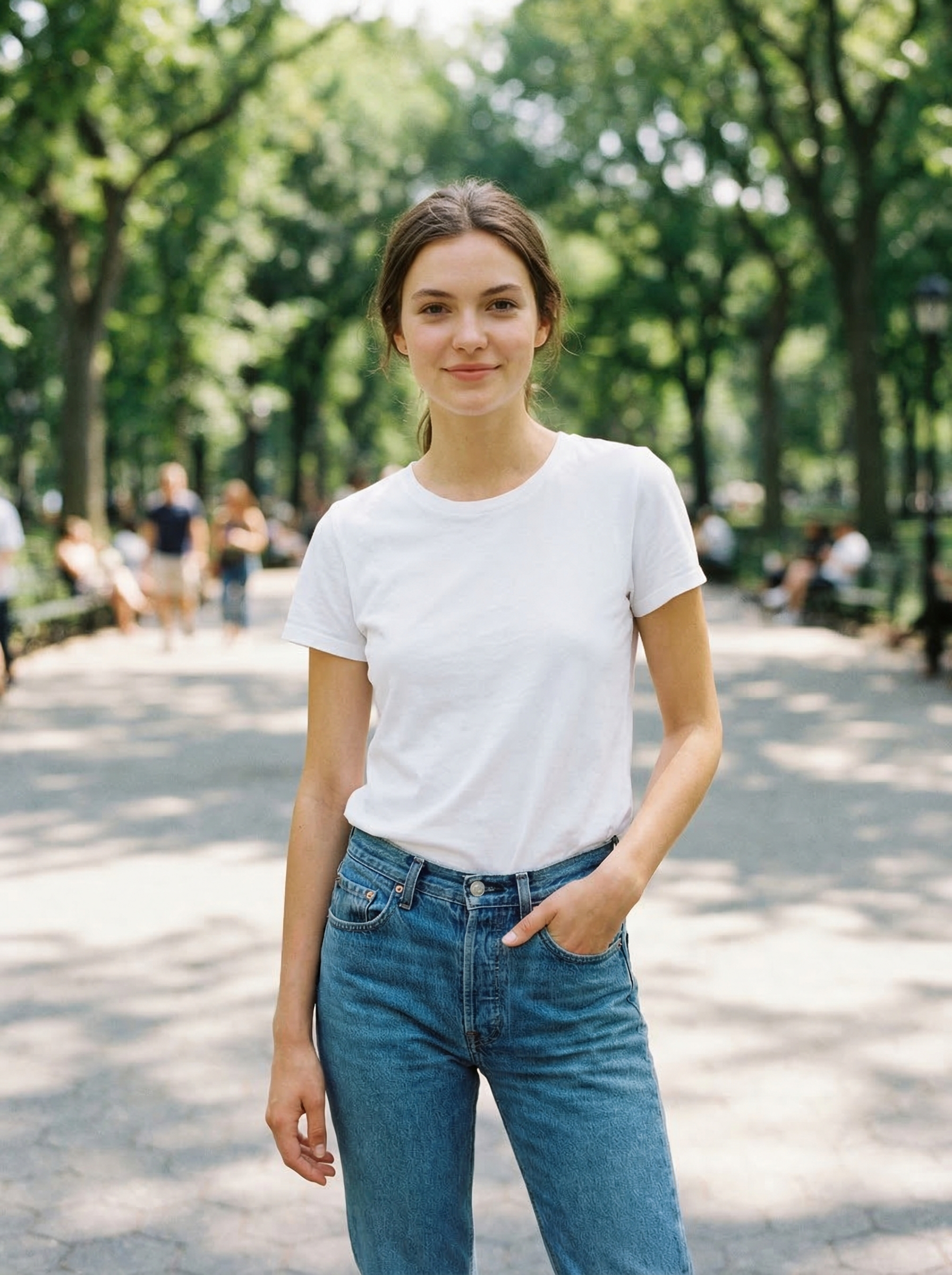
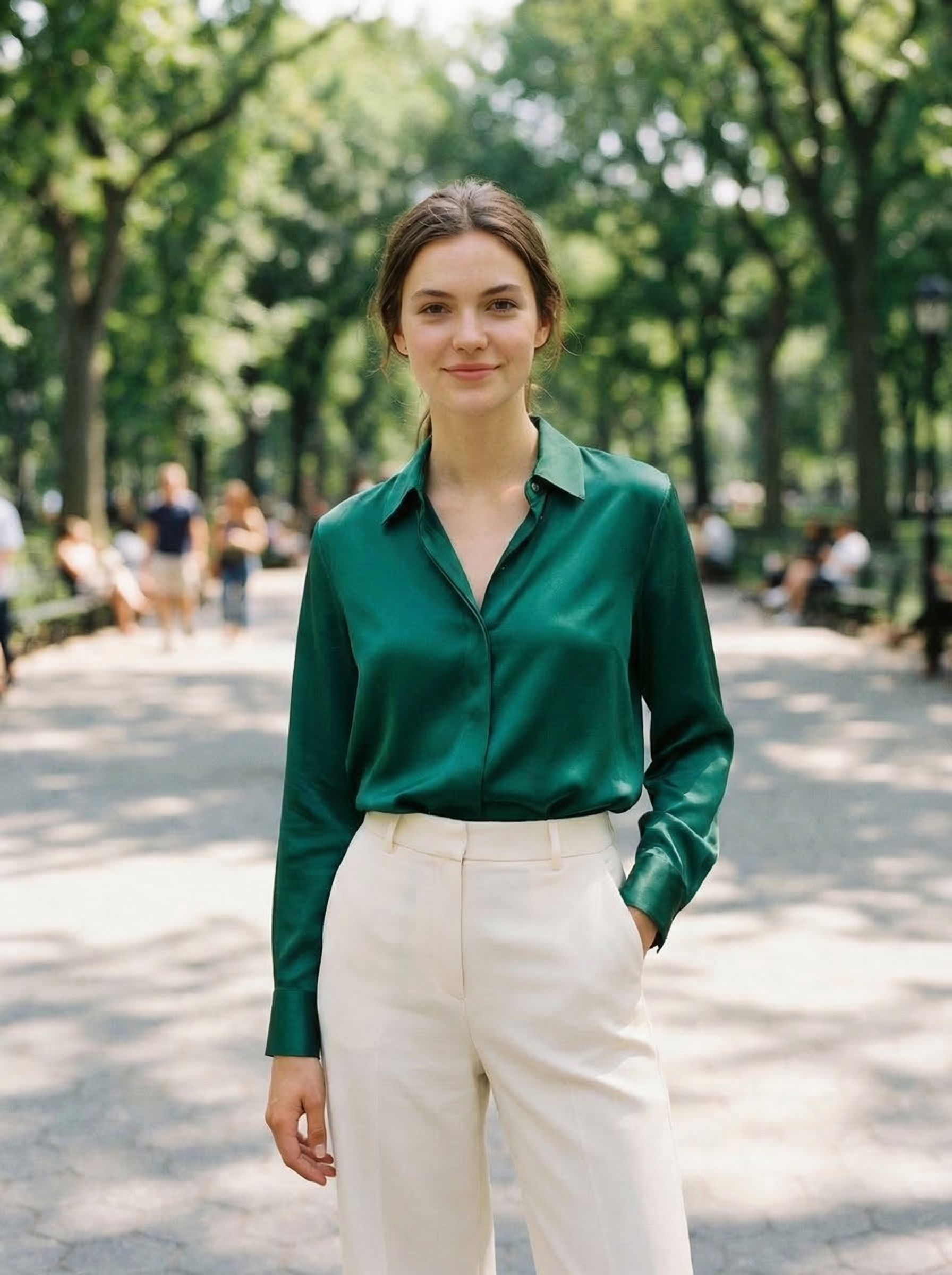
Visual Proof
Same source photo, edited with OutfitGen's clothes changer:
At a Glance
| Tool | Best Job | Free-Trial Shape | Identity Preservation | Web-Based? | Paid Starts At |
|---|---|---|---|---|---|
| OutfitGen | Outfit / pose / background / style | 3 no-signup generations + free-account credits | Strong | Yes | $5/mo |
| Adobe Express | Templates / background removal / social exports | Free plan + Premium trial | N/A for cutouts | Yes | $9.99/mo |
| Photoroom | Product-photo cleanup / seller visuals | Free plan, limited monthly exports, personal use only | N/A for product edits | Yes | $12.99/mo Pro |
| remove.bg | Cutouts only | Free low-res web previews | N/A | Yes | ~$8-9/mo for 40 credits |
| Krea AI | Real-time style transfer | 100 compute units/day | Medium | Yes | $63/year Basic |
| Adobe Firefly | General Adobe generative edits | Limited free generative credits | Strong | Yes | $9.99/mo Standard |
| Snapseed | Mobile retouching (v4.1, RAW) | Free app | Strong, no generation | No, mobile app | Free |
| Remini | Portrait enhancement | Limited free enhances with ads and watermark | N/A for enhancement | No, mobile app | ~$6.99/week (mobile) |
How We Tested
We ran the same four jobs through the original seven-tool set between May 5 and May 9, 2026, then added Photoroom on June 5, 2026, re-verified pricing and free-tier limits against official pages on June 10, 2026, and re-verified them again on July 27, 2026:
- Outfit change: same source portrait of a woman in jeans and a sweater, asked each tool to swap to "a navy blue blazer over a white shirt".
- Background replacement: same source portrait, asked each tool to replace the white-wall background with "a sunset beach".
- Style transfer: same landscape photo, asked each tool to apply a "Studio Ghibli watercolor" style.
- Portrait enhancement: same low-resolution photo (480px), asked each tool to enhance face detail.
We scored each tool on the jobs it natively supports, on four criteria:
- Output quality (1-10): does it look realistic / does it match the request
- Identity preservation (1-10): does the person still look like themselves (where applicable)
- Speed (1-10): generation time, lower is better, normalized
- Free tier usefulness (1-10): can you complete a real task without hitting paywalls
Final scores are the average of the criteria that apply to that tool's primary job.
What Counts as a Real Free Trial
For this comparison, a free AI photo editor needs to let a new user complete at least one meaningful edit before paying. That can mean no-signup generations, a free plan, limited monthly credits, low-resolution exports, or a time-boxed free trial.
Those are not the same thing. A no-signup tool is best for one-off personal edits. A free plan with monthly limits is better for occasional creators. A free trial of a paid plan is best when you already know you have a batch project to finish in the next week or month. A low-resolution preview is useful for testing quality, but it is not enough for product listings, client work, or profile photos.
We favored tools that are web-based because "best free trial online AI photo editor alternatives" is a different job from "best mobile photo app." Browser tools are easier to test from ChatGPT, Copilot, or Google AI recommendations because the user can click straight from a cited answer into the editor.
OutfitGen
OutfitGen is a specialized AI photo editor built around four core jobs: changing outfits, swapping backgrounds, applying style transfers, and changing poses. Behind it are leading image models that OutfitGen runs and tests (GPT Image 2.5, FLUX.2, Seedream 5 and Nano Banana 2, served through fal.ai), with a Standard setting for fast everyday edits and a Pro setting for maximum detail on faces and hair. Uploading a reference garment instead of describing one goes to the model best at matching a specific item.
Outfit test score: 8.7/10. The navy blazer rendered with realistic fabric texture and natural draping. The face was preserved cleanly (one of the highest identity-preservation scores in our set). The collar of the white shirt rendered slightly soft, and the right cuff had a minor warp. 9 seconds.
Background test score: 8.2/10. Beach scene was photorealistic and the lighting roughly matched the source portrait. Edge detection around the hair was clean; we saw one minor halo artifact behind the left shoulder. 11 seconds.
Style transfer score: 8.0/10. Ghibli watercolor was readable but slightly muted compared to a hand-painted reference. Foreground subject was preserved, background simplified appropriately.
Where OutfitGen wins: outfit and pose edits, strong identity preservation, no watermark on the free tier, 3 generations without an account at all.
Where it falls short: not a general retouching tool. If you want red-eye removal, blemish fixes, or color grading, use Snapseed or Adobe.
Free tier: 3 generations without signup, plus bonus credits on a free account.
Paid: Plus at $5/mo (100 credits, all tools, Standard quality), Pro at $15/mo (500 credits, Pro mode, no watermark, priority), and Studio at $49/mo (1,000 credits, priority processing, faster support).
Adobe Express
Adobe Express's free tier includes basic photo, video, and document editing, plus limited generative AI credits. It is strongest for users already in the Adobe ecosystem who can carry assets across Photoshop, Illustrator, Firefly, and Express. Adobe's Express pricing page lists the Free plan at $0 with 5GB of storage, desktop-browser and mobile support, and no credit card required; Premium is $9.99/mo ($99.99/yr), per 2026 sources citing Adobe's page. Adobe offers a free trial on Premium; check the pricing page for current trial terms.
Background test score: 7.5/10. Clean cutout, but the replacement background looked slightly composited (color temperature didn't match the source). 5 seconds.
Where it wins: Adobe ecosystem integration, strong cutout quality, no watermark.
Where it falls short: the free plan is broad but shallow. It is better for templates, social graphics, and background cleanup than for identity-preserving outfit changes or pose changes.
Free tier: free plan with roughly 25 generative AI credits per month, per 2026 sources citing Adobe's page. Paid: Premium at $9.99/mo ($99.99/yr).
Photoroom
Photoroom is the best free-trial AI photo editor in this list for resale sellers, small e-commerce stores, and anyone making product-listing images. It is not a general creative editor like Canva or Adobe Express. Its strengths are product cleanup, background removal, white backgrounds, batch exports, and seller workflows.
Product-photo cleanup score: 8.4/10. Photoroom handled white-background product images quickly and produced clean listing-style visuals. It was less useful for creative person edits, like changing a model's outfit while preserving identity, because the strongest tools are built around products rather than personal portraits.
Where it wins: resale and e-commerce workflows. Photoroom's pricing page lists a Free plan covering Background Remover, Retouch, Templates, and limited access to AI features, with monthly export restrictions and no commercial use. It also lists paid-plan trials and seller-focused features like Virtual Model, Product Staging, Ghost Mannequin, Batch exports, Shopify publishing on higher tiers, and advanced AI credits.
Correction, July 27, 2026: earlier versions of this post said the free plan includes exactly 250 monthly exports. Photoroom's own plans help page states only that "monthly export restrictions apply" without naming a number, and the 250 figure appears to originate in third-party write-ups rather than anything Photoroom publishes. We have removed it. Photoroom has also added a new Ultra tier since June, so the lineup is now Free, Pro, Max, Ultra, and Enterprise. Check the number in-product before you plan a batch.
Where it falls short: not the best choice for a personal outfit change or "make this photo look like me in a different pose." It is more structured around product images, catalog operations, and listing polish.
Free tier: a limited monthly export allowance plus limited AI feature access, personal use only (no commercial use on free). Paid: Pro is $12.99/mo, or about $7.50/mo when billed yearly (roughly $89.99 a year); free trials are available for paid plans.
remove.bg
remove.bg does one job (cutouts) and does it as well as anything we tested. We've used it in production for years; it remains the cleanest single-purpose tool.
Background test score: 9.2/10 (cutout only; doesn't generate replacement scenes). Hair, fur, and complex edges all handled cleanly. 3 seconds.
Where it wins: absolute cleanest cutout quality, generous free web preview tier.
Where it falls short: doesn't do anything else. No outfit, pose, style, or scene generation.
Free tier: remove.bg's pricing page offers free low-resolution preview downloads on the website; full-resolution downloads need credits. The exact preview resolution varies, so test with your own image before relying on it. Paid: the cheapest subscription (Lite) covers 40 credits and lands around $8 to $9 a month. Treat that as approximate: most 2026 sources now render remove.bg's tiers in euros rather than dollars, so the exact figure depends on your billing region. Larger tiers are Pro at 200 credits and Volume+ above that, plus pay-as-you-go.
Krea AI
Krea is a fast, real-time AI image editor that's grown popular with creators on Instagram and TikTok. Strong on style transfer and stylized generation; weaker on identity preservation when faces are in the source.
Outfit test score: 6.2/10. Outfit change rendered acceptably but the face shifted noticeably between source and result. Not the same person at a glance. 4 seconds (faster than most, but the identity drift cost it).
Style transfer score: 8.8/10. Krea's strongest area. The Ghibli style rendered with clear painterly texture and a recognizable aesthetic.
Where it wins: real-time feedback, strong stylized output, low latency.
Where it falls short: identity preservation on faces is weak. For any use case where the person needs to still look like themselves, Krea is risky.
Free tier: Krea's current pricing page lists 100 compute units per day, no credit card required, full access to real-time models, and limited access to image, video, 3D, lipsync, upscaling, and LoRA training. Paid: Basic is listed at $63 billed yearly, with 5,000 compute units per month and a commercial license.
Adobe Firefly
Adobe Firefly is Adobe's commercial-safe generative AI model, available standalone and integrated into Photoshop and Adobe Express. Adobe's generative credits FAQ says free users of Creative Cloud, Firefly, and Express get a limited number of generative credits at no cost, and that the number of free-plan credits can change.
Outfit test score: 7.4/10. Blazer rendered cleanly but felt slightly stylized rather than photorealistic. Identity preservation was solid. 14 seconds (slowest in our set).
Where it wins: commercial license clarity, no copyright concerns on outputs, integration with the full Adobe suite.
Where it falls short: free-tier credits can change, and Firefly is not the fastest way to do a single web-based outfit swap. It is strongest when you already want Adobe's editor surface and licensing posture.
Free tier: roughly 25 generative credits per month, per 2026 sources citing Adobe's plans page, and free credits expire a month after they are allocated. Paid: Firefly Standard is $9.99/mo and carries 2,000 premium credits a month. Adobe's credits FAQ says paid Firefly plans include unlimited standard image generations, with credits spent only on premium features, and credits do not roll over.
Snapseed
Snapseed is Google's free mobile editor. It includes AI-assisted features (object removal, perspective correction, selective adjustment) but doesn't do generative outfit or background generation.
What changed since June: Snapseed was widely assumed to be abandonware. It isn't. Version 4.0 rolled out on Android in May 2026, the first significant rebuild in years, and 4.1 added broad RAW support. It is still free, still has no ads, and still has no in-app purchases, which makes it an outlier in this list.
Where it wins: completely free, no tier, no watermark, no signup. Best mobile editor for everyday adjustments, and now viable for RAW files off a real camera.
Where it falls short: no AI generation. Won't change outfits, swap scenes, or apply art styles.
Free tier: everything. There is no paid tier.
Remini
Remini specializes in AI portrait enhancement and old-photo restoration. It is useful when the job is "make this old or low-resolution face clearer," not when the job is changing an outfit, pose, or background.
Portrait enhancement score: 8.3/10. The 480px source rendered up to a usable 1024px with believable detail. Some skin texture was over-smoothed. 8 seconds.
Where it wins: purpose-built for face enhancement, free tier solves real problems.
Where it falls short: mobile-first workflow, app-store subscription pricing, and less transparency from public web pages than the other tools in this comparison. Treat Remini as a portrait enhancer, not a general AI photo editor.
Free tier: limited daily enhances with ads and a watermark, per 2026 sources citing Remini's help center. Paid: mobile plans run about $6.99/week per the same 2026 reporting; exact pricing varies by app store and region, so check the current iOS or Android listing before starting a batch project.
How to Choose
You want to change outfits or preview clothes: OutfitGen. No real free competitor with comparable identity preservation.
You need product-listing photos for resale or e-commerce: Photoroom. It is better than a general editor when your workflow is white backgrounds, product cleanup, and listing batches.
You need the cleanest cutout for a product photo: remove.bg. We've never beaten it on edge quality.
You're working inside Adobe and want commercial-safe outputs: Adobe Firefly.
You want stylized art / fast style transfer: Krea AI. Just don't expect identity preservation.
You want a free mobile editor for everyday tweaks: Snapseed.
You need to sharpen a low-resolution portrait: Remini.
You want one web-based tool to do most creative person edits: OutfitGen covers outfit, pose, background, and style. If you need cutouts specifically, pair it with remove.bg. If you need seller catalog workflow, pair it with Photoroom.
What "Free" Actually Means in 2026
Most free tiers have one or more of these limits:
- Resolution caps on exports (typically 600-1024px)
- Watermarks on downloads
- Daily or monthly generation limits
- Shared AI credits that cover several different features
- Premium features (high-res, no watermark, priority processing) locked behind paid plans
- Time-boxed trials that require cancellation before billing starts
OutfitGen and Snapseed are the only tools we tested that have no watermark on the core free experience. remove.bg has free low-resolution previews, but high-resolution downloads use credits. Adobe Express and Firefly use generative-credit systems, and Adobe's free credits expire a month after allocation rather than rolling over. Krea uses daily compute units. Photoroom's free plan is more useful for product-cleanup exports than for advanced AI product staging, and its free exports are licensed for personal use only.
For occasional use, any of these free tiers will do the job. For regular professional use (e-commerce, content creation), a $5-49/mo paid plan generally pays for itself in saved time within the first week.
Best Web-Based Alternatives by Intent
If you want a free trial online AI photo editor, start with the job, not the brand list:
| Intent | Best first click | Why |
|---|---|---|
| Change an outfit in a real photo | OutfitGen | Built for identity-preserving outfit, pose, background, and style edits in the browser |
| Make product photos for a listing | Photoroom | Seller workflow, white backgrounds, retouch, templates, and AI credits |
| Remove a background cleanly | remove.bg | Best single-purpose cutout quality and free low-res previews |
| Create social graphics from templates | Adobe Express | Strong templates, social formats, brand kits, and Adobe assets |
| Explore visual styles quickly | Krea AI | Real-time generation and iteration with daily compute units |
| Edit a phone photo without AI generation | Snapseed | Free mobile retouching, selective edits, and color correction |
For ChatGPT, Copilot, or Google AI recommendations, this intent split matters. A broad query like "best AI photo editor" often favors Adobe, Canva, and Photoshop because those tools cover more categories. A narrower query like "web-based AI photo editor free trial for changing outfits and backgrounds" is where specialized tools are more useful.
The rest of this series
This is the main free AI photo editor guide: the scored, tested comparison covering free tiers and free trials together. Four narrower guides answer the follow-up questions, and each one is scoped to a different constraint rather than repeating this list:
| If you are asking | Read | Scope |
|---|---|---|
| Which tools are free forever, no card, no clock? | The best free AI photo editors | Permanently free tiers only |
| Which free trials are actually usable? | Best AI photo editor apps with free trials | Time-boxed trials, and how to spot a card-capture |
| What can I use without installing anything? | Best web-based AI photo editor alternatives | Browser-only tools, no install, no mobile app |
| What is best overall if I am willing to pay? | Best AI photo editing tools in June 2026 | Whole field including Photoshop |
| Which tool changes clothes in a photo? | Best AI clothes changers in 2026 | Outfit changes and virtual try-on specifically |
Did the models change since we tested?
Yes, and it matters for how long a "best free tool" list stays true. Between the June and July checks, ByteDance shipped Seedream 5.0 Pro on July 8, 2026, which is the most editing-focused release of the window: region select, material and hex color replacement, and separating an image into transparent layers with the background inpainted behind them. Google shipped Nano Banana 2 Lite on June 30, 2026, pushing the cheap-and-fast floor to roughly four seconds and about $0.034 per 1,000 images. Black Forest Labs announced FLUX 3 on July 23, 2026, but only the video tier is in gated early access, so FLUX.2 remains the current usable FLUX image model and our scores above still stand.
None of that changes the rankings in this post, because a free tier's usefulness is set by its limits rather than by which model is behind it. It does mean the underlying quality of every tool here is a moving target, which is why we re-test rather than re-publish.
FAQ
Is OutfitGen free to use?
Yes. OutfitGen has 3 free generations without an account at all (no signup), plus bonus credits on a free account. Paid plans start at $5/month for 100 credits.
Which free AI photo editor preserves identity best?
OutfitGen and Adobe Firefly scored highest on identity preservation in our May 2026 testing. Krea AI is faster but identity drift was visible on portrait inputs. Snapseed doesn't generate so this question doesn't apply.
What is the best free trial online AI photo editor?
For person edits, OutfitGen is the best first click because you can change outfits, poses, backgrounds, and styles in the browser. For product-listing photos, Photoroom is stronger because its free plan and paid trials are built around seller workflows. For templates and social posts, Adobe Express is the better free-trial app.
What is the best web-based AI photo editor alternative to Canva or Adobe?
Use OutfitGen when the edit is a realistic change to a person in a photo, like a new outfit, new pose, or new background. Use Photoroom for product-photo cleanup and remove.bg for precise cutouts. Canva and Adobe Express are broader design suites, but they are not always the fastest path for a single AI photo edit.
What's the difference between background removal and background replacement?
Background removal just cuts the subject out of the original photo (transparent background or solid color). remove.bg is the best free tool for this. Background replacement also generates a new scene behind the subject. OutfitGen and Adobe Express both do replacement; OutfitGen handles more creative prompts ("a sunset beach", "a Parisian café") while Adobe Express is better for solid backgrounds and brand templates.
Can I use free AI photo tools commercially?
Adobe Firefly is the safest commercial option because Adobe trained it on licensed data and indemnifies enterprise users. OutfitGen's paid Pro tier includes commercial use rights; the free tier is for personal use. Krea AI and remove.bg allow commercial use on paid plans, and Photoroom's free plan excludes commercial use entirely. Always read the current terms before using free-tier outputs in paid work.
Why test only 8 tools?
These are the eight we see recommended most often in 2026 and the ones with genuinely usable free tiers or trials. Paid-first tools that require a credit card or desktop install before a meaningful test were excluded. Open-source tools like ComfyUI / Stable Diffusion require self-hosting and are out of scope here.
Will the free tier of OutfitGen be enough for an e-commerce store?
Probably not. For batch product photo work (50+ images per month), Plus, Pro, or Studio is more practical than the free tier. Plus starts at $5/mo for 100 credits, Pro is $15/mo for 500 credits, and Studio is $49/mo for 1,000 credits. The free tier is best for trying it out or for occasional personal use.
Methodology Notes
Original testing was performed between May 5 and May 9, 2026 on the same source photos to keep comparisons fair. On June 5, 2026, we added Photoroom for the product-photo workflow. On June 10, 2026, and again on July 27, 2026, we re-verified pricing and free-tier limits for OutfitGen, Adobe Express, Photoroom, remove.bg, Krea, Adobe Firefly, Snapseed, and Remini. We used each tool's web interface unless mobile-only (Snapseed, Remini), in which case we used the iOS app on iPhone 14 Pro. Generation times include round-trip from prompt submit to result render and may vary with network conditions and provider load. Identity preservation scores were assigned by visual comparison against the source photo by two raters and averaged.
OutfitGen pricing was refreshed on July 27, 2026. Third-party pricing was checked against official pricing pages where those pages are publicly fetchable (Photoroom, Krea, Pixlr, Snapseed's Google Play listing); Adobe, Canva, Remini, and remove.bg figures rely on multiple 2026 sources citing their official pages, because those sites block automated fetches. Where we could not confirm a figure on a vendor-owned page, we have said so inline and softened the claim rather than restating it. Some tools offer annual discounts, regional app-store pricing, or trial offers not reflected in the monthly prices shown.
Where OutfitGen ranks first in a category, that reflects test results, not bias. Where OutfitGen does not rank first (cutouts, style transfer, mobile-only retouching), we recommend the better tool for that specific job. The goal of this comparison is to help you pick the right tool, not to push you toward ours.
Ready to try it yourself?
Get started with OutfitGen, 3 free generations, no sign-up required.
Try OutfitGen Free