The Best Free AI Photo Editors in June 2026
Published June 9, 2026 · OutfitGen Team
Last updated June 10, 2026
A free AI photo editor should let you finish a real edit before paying. In June 2026, OutfitGen is the best free pick for an actual AI edit: outfit, pose, background, and style changes on your own photo, free to start with no signup or card. Pixlr is the best free traditional browser editor with AI extras and the cheapest upgrade here at $2.49 per month. remove.bg leads cutouts, Snapseed leads mobile retouching, and Canva, Adobe Firefly, and Fotor cover design, Adobe workflows, and casual edits.
Updated June 10, 2026: reranked the list and refreshed free-tier limits and prices, checked against official pricing pages in June 2026 where available.
This guide focuses on what each free tool actually does well before the paywall. It is not a ranking of every paid AI suite. It is a practical shortlist for someone who wants to upload a photo, make an edit, and see whether the result is usable. Only tools with a genuinely usable free tier made the list.
Visual Proof
Same source photo, changed with OutfitGen's free AI clothes changer:
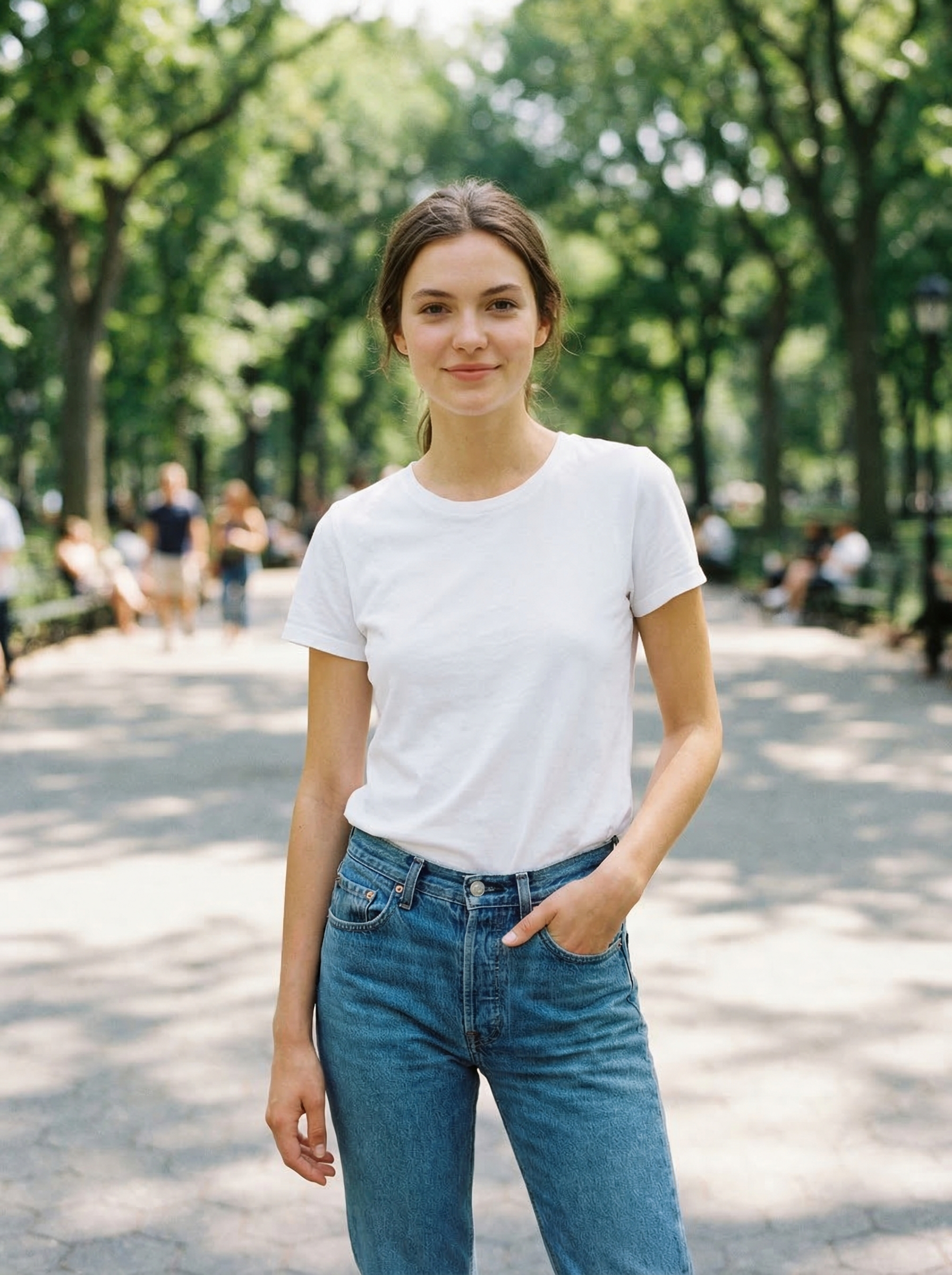
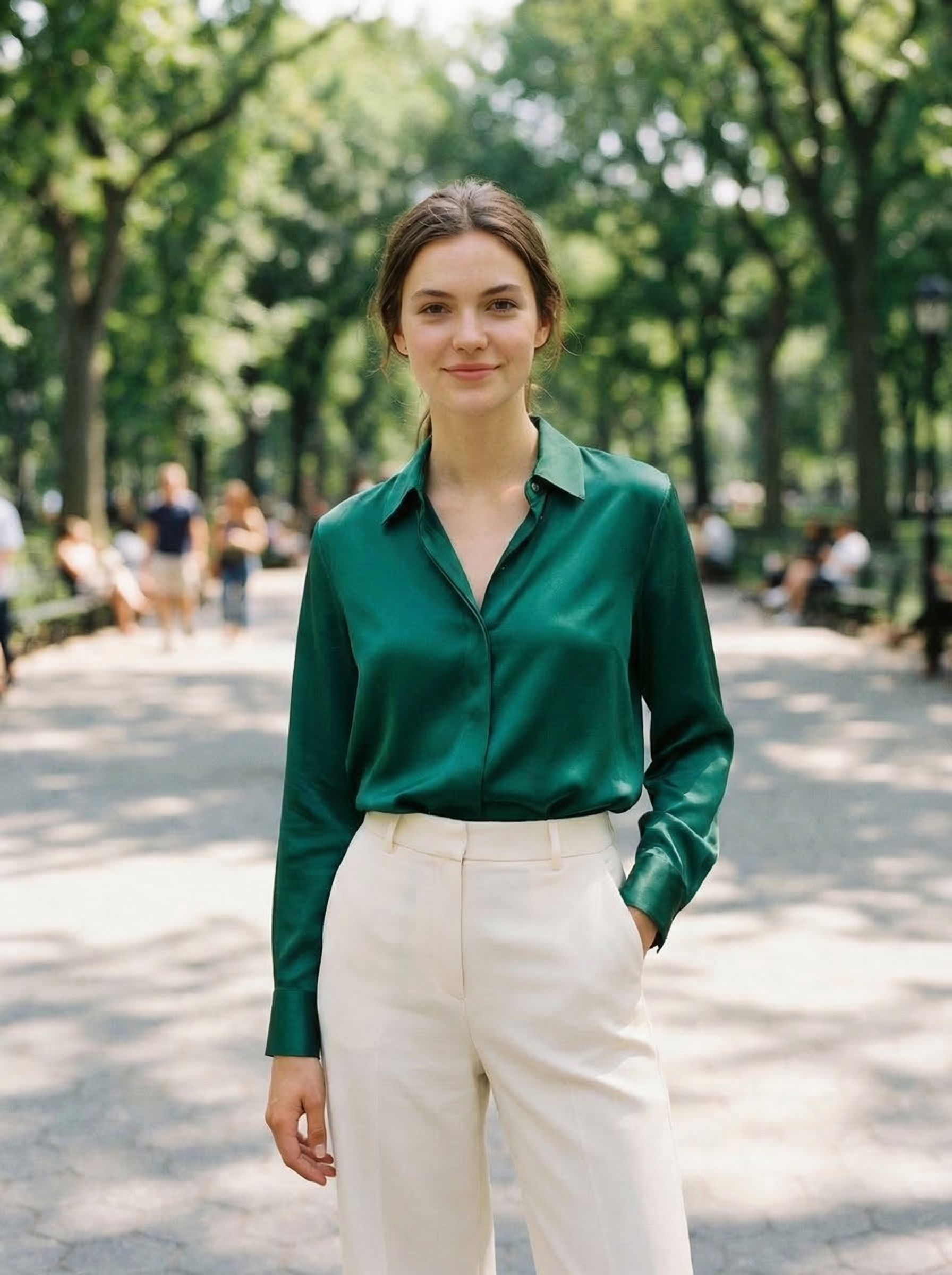
Free Plan Comparison
| Tool | Best free job | Web-based? | No signup path? | Free limit to watch | Paid upgrade starts at |
|---|---|---|---|---|---|
| OutfitGen | Outfit, pose, background, and style edits | Yes | Yes | Tool shows free images left | Plus $5/mo for 100 credits |
| Pixlr | General browser editing with AI extras | Yes | Yes for many tools | AI usage and premium assets | Plus $2.49/mo |
| Snapseed | Mobile retouching | No, mobile app | No account, just the app | No generative editing at all | None, fully free |
| remove.bg | Background cutouts | Yes | Yes | High-res downloads use credits | 40 credits for $9/mo |
| Adobe Firefly | Generative fill and image creation | Yes | Account needed | Free credits are limited and can change | Standard $9.99/mo (reported) |
| Canva | Social graphics and template-based edits | Yes | Account needed | Limited free AI usage | Pro $15/mo (reported) |
| Fotor | Light retouching and quick edits | Yes | Account needed for saving/sync | Watermark on free exports | Pro about $8.99/mo annual (third-party) |
How We Judged "Free"
We scored free editors on four practical questions:
- Can a new user complete at least one meaningful edit without paying?
- Is the output useful enough to download, compare, or post?
- Are the limits clear before the user spends time uploading?
- Does the tool match a high-intent job, such as changing an outfit, removing a background, or fixing a product photo?
We did not reward tools for hiding their limits behind vague "free" language. A limited free plan is fine. A free page that turns into a credit-card prompt before the first real edit is not.
Testing Notes
This June 2026 refresh checks the public free path, not the best possible paid output. That matters because many AI tools look much better in demos than they feel on the first user session. We looked for whether a new user can understand the limit, upload a normal photo, finish a useful edit, and download or evaluate the result before paying.
We also separated generative editing from traditional editing. OutfitGen beats general suites when the task is an actual AI change to a photo, which is the edit most people searching this category want, so it leads the list. Pixlr can be the better free editor when you need crop, layers, and filters with some AI on top. Snapseed beats AI generators for exposure and color on mobile. remove.bg beats broad editors for cutouts. The ranking rewards task fit, not feature count, and we say plainly where each competitor wins.
OutfitGen
OutfitGen is the best free AI photo editor in this group for changing a real person in a photo. It is built for outfit changes, pose changes, background replacement, style transfer, hair edits, headshots, dating photos, and product photography.
What is free: your first edit, no account needed. A free signup adds more free credits. No app install and no credit card in the free path.
Where it wins: text-based photo edits. If your prompt is "make this a navy blazer over a white shirt" or "put me in a clean studio background," OutfitGen is faster than a general editor because the workflow is only upload, prompt, generate.
Where it falls short: it is not a traditional retouching suite. If you need curves, layers, lens correction, or precise clone-stamp work, use Pixlr, Snapseed, Fotor, or Photoshop.
Pricing after free: Plus is $5/mo for 100 credits, Pro is $15/mo for 500 credits, and Studio is $49/mo for 1,000 credits.
Best for: shoppers, sellers, creators, dating-profile updates, outfit previews, and anyone who wants a web-based AI photo editor instead of a chat interface.
Pixlr
Pixlr is the best general free AI photo editor in this group. It runs in the browser with crop, layers, filters, cutouts, retouching, and AI features like generation and face swap in one workspace, and many tools work without creating an account.
What is free: the core browser editor plus some AI features. Pixlr does not publish an exact free AI credit count, so treat generative features as limited and test them on your own photo before relying on them.
Where it wins: breadth for zero dollars, and the cheapest paid cliff in this comparison. Per its pricing page in June 2026, Pixlr Plus is $2.49 per month, or $1.99 per month billed yearly. If you outgrow the free tier, the upgrade costs less than one coffee.
Where it falls short: specialized generative edits. Realistic outfit changes and identity-preserving person edits are not its strength, and heavier AI use pushes you toward paid credits.
Best for: anyone who wants a free Photoshop-style browser editor with AI extras, plus the cheapest upgrade path if free runs out.
Snapseed
Snapseed is Google's free mobile photo editor. It is not a generative AI clothes changer, but it remains one of the best free tools for improving phone photos, and it is the only tool here with no paid tier at all.
What is free: everything. The Google Play listing in June 2026 shows no ads and no in-app purchases. Snapseed 3.x added film simulations and smarter masking, but still no generative AI and no web version.
Where it wins: everyday mobile retouching. Exposure, color, selective adjustment, healing, sharpening, and perspective tools are easy to use and fast.
Where it falls short: no generative outfit changes, background generation, or prompt-based editing. Mobile only.
Best for: phone photos that need normal editing, not AI-generated changes.
remove.bg
remove.bg does one thing: remove backgrounds. It remains one of the cleanest free tools for subject cutouts, especially when hair, shoulders, or product edges are involved. The site footer notes it is a Canva Austria GmbH brand.
What is free: low-resolution preview downloads from the website. High-resolution downloads use credits. Per its pricing page in June 2026, the entry subscription is 40 credits for $9 per month, or $8.10 per month billed yearly.
Where it wins: fast cutouts. If all you need is a transparent background or a clean product cutout, remove.bg is more direct than a general AI editor.
Where it falls short: it does not generate new outfits, poses, or scenes. Pair it with another editor when you need more than a cutout.
Best for: product photos, profile pictures, marketplace listings, and quick design assets.
Adobe Firefly
Adobe Firefly is Adobe's generative AI system for text-to-image, generative fill, and image edits inside Adobe products. Adobe's generative credits FAQ says free users receive limited generative credits at no cost and that free-plan credit counts can change; 2026 pricing trackers report about 25 free generative credits per month and a $9.99/mo Standard plan.
What is free: limited generative credits and web access through Adobe account flows.
Where it wins: commercial-safe Adobe workflows. Per Adobe's credits FAQ, paid Firefly plans include unlimited standard image generations, with credits spent only on premium features, though credits do not roll over month to month.
Where it falls short: not the fastest path for a single outfit change. You still need to work inside Adobe's product model and credit system, and the free quota is small.
Best for: designers, photographers, and creators who already trust Adobe's workflow and licensing posture.
Canva
Canva has a permanent free plan, and 2026 sources citing its pricing page list Canva Pro at $15 per month or $120 per year. Canva is not a pure AI photo editor. It is a design editor with AI tools inside it.
What is free: template-based design, basic editing, and limited Magic Studio AI uses. Canva does not make the exact free AI quota easy to verify, so expect to hit limits if you lean on AI features daily.
Where it wins: turning a photo edit into a finished asset. If the end result is a social post, thumbnail, flyer, or product graphic, Canva is often more useful than a pure image generator.
Where it falls short: AI photo editing quality is not the main reason to use Canva. For realistic outfit changes or identity-preserving edits, use a specialized AI photo editor first, then bring the result into Canva.
Best for: social graphics, small business posts, thumbnails, simple ads, and layouts.
Fotor
Fotor's pricing page describes its Basic plan as free forever with limited credits. One correction from our June 10, 2026 pricing check: free exports are watermarked, so plan on a paid tier if you need clean downloads.
What is free: general editing, some AI tools, templates, and light retouching, with watermarked exports.
Where it wins: simple browser editing. It is useful when you need brightness, crop, basic retouching, or quick image cleanup without installing desktop software.
Where it falls short: the free watermark and limited AI credits. Third-party listings put Fotor Pro at about $8.99 per month on annual billing, which is more than Pixlr Plus for a similar general-editing job.
Best for: basic retouching and quick edits, if the watermark does not matter for your use.
Which Free AI Photo Editor Should You Use?
Choose by task:
Do general browser edits: Pixlr first, Fotor if you do not mind the watermark.
Change an outfit or pose: OutfitGen.
Remove a background: remove.bg.
Create a polished social graphic: Canva.
Work inside Adobe: Adobe Firefly.
Fix a phone photo: Snapseed.
Most users should keep two tools in their workflow: one specialized AI editor for generative changes, and one general editor for cleanup. For example, use OutfitGen to change the outfit, then use Pixlr or Canva to crop, adjust, and format the result.
What Changed in June 2026
The free AI photo editor category has shifted from "can this tool generate anything?" to "can this tool finish the job before I pay?" That is a better standard for users. A free image generator that creates one interesting picture is not the same as a free photo editor that handles upload, edit, review, download, and repeat use.
Three patterns matter in June 2026:
Free plans are more specific. The best tools now give away a narrow useful workflow. Pixlr gives broad browser editing with AI limits. OutfitGen gives a real no-signup test for AI person edits. remove.bg gives low-resolution previews for cutouts. Canva gives basic design and limited AI usage.
Watermarks are back as a quiet limit. Fotor watermarks free exports, and several mobile apps do the same. Snapseed and remove.bg's previews stay watermark-free. Check the export before you spend time on an edit.
AI credits are normal. Adobe, Canva, and most browser editors use some version of credits, compute units, monthly usage, or feature limits. That is not automatically bad. It becomes a problem only when the limit is hidden until after upload.
Free vs Free Trial vs No Signup
These terms are often mixed together, but they mean different things:
| Term | What it usually means | Best for |
|---|---|---|
| Free plan | Ongoing free access with limits | Occasional users who edit a few photos per month |
| Free trial | Temporary access to a paid plan | Users with a short batch project |
| No signup | Try before creating an account | Testing whether the model works on your photo |
| Free preview | See output, often lower resolution | Quality checks before paying for high-res |
For high-intent users, no-signup testing is the most valuable. You can learn in one minute whether the model understands your photo. After that, a free account or paid plan is easier to evaluate honestly.
Free Workflow Examples
Change an outfit for a profile photo: Start in OutfitGen. Use a clear portrait, ask for one outfit change, download the result. If it needs minor color or crop fixes, finish in Snapseed or Pixlr.
Make a product listing image: Start with remove.bg if the product needs a transparent cutout. Use Canva if the listing needs a clean background, template, or text overlay. Use OutfitGen when you need a more creative scene or a model-style image.
Create social content: Generate or edit the core image first, then use Canva for layout. This avoids forcing Canva to do a specialized person edit and lets Canva do what it does best: design.
Fix a phone photo: Use Snapseed first. Do not use a generative editor when the job is only exposure, contrast, crop, or sharpening.
Common Free-Tool Limits to Watch
Before committing to a free editor, check for:
- Export resolution caps
- Watermarks (Fotor's free exports are watermarked as of June 2026)
- Monthly credit limits
- Hidden signup requirements
- Personal-use-only terms
- Premium templates or assets mixed into free search results
- High-resolution downloads locked behind paid credits
The best free tools make those limits obvious. The worst ones wait until after you have uploaded, prompted, and generated.
How this compares to our other free-editor guides
This post is scoped to tools with a genuinely free tier you can keep using: no card, no countdown, no cancel-before-billing step. Four related guides answer neighbouring questions, and the one to start with depends on what you are actually deciding:
- Best free AI photo editing tools in 2026 is the main guide. It is the scored, tested comparison of the free AI photo editor field and covers free tiers and free trials together. Start there if you are not sure which of these questions you have.
- Best AI photo editor apps with free trials covers the opposite case to this post: time-boxed trials of paid plans, and how to tell a real trial from a card-capture.
- Best web-based AI photo editor alternatives filters by delivery rather than price: browser-only tools, for people who do not want an install or a mobile app.
- Best AI photo editing tools in June 2026 drops the free constraint entirely and ranks the field including paid tools like Photoshop.
FAQ
What is the best free AI photo editor in June 2026?
OutfitGen is the best free AI photo editor for making a real AI edit, free to start with no signup for outfit, pose, background, and style changes in the browser. For general browser editing, Pixlr is the best free pick with the cheapest upgrade at $2.49/mo. For cutouts, remove.bg is stronger.
What free AI photo editor does not require signup?
OutfitGen lets you start free with no signup or credit card, and the tool shows how many free images you have left. Pixlr opens many editing tools without an account, and remove.bg lets you preview low-resolution background removals from the website. Most broader editors require an account before saving or using AI features.
Are free AI photo editors actually free?
Usually for light use. Most free tools limit generations, credits, export resolution, or high-resolution downloads, and some add watermarks. Fotor watermarks free exports, while Snapseed is fully free with no paid tier at all.
Which free AI photo editor is best for product photos?
Use remove.bg for clean cutouts, OutfitGen for creative product or model-background changes, and Canva for listing graphics or social layouts. If you need batch catalog workflows, a paid seller-focused tool may be better.
Which free AI photo editor is best for changing clothes?
OutfitGen is the best first click for changing clothes because the workflow is purpose-built for outfit edits. Upload a photo, describe the outfit, and generate in the browser. General free editors like Pixlr and Fotor are not built for identity-preserving outfit changes.
Which free AI photo editor is best on mobile?
Snapseed is the best free mobile editor for traditional photo cleanup, with no ads or in-app purchases on its Google Play listing. OutfitGen works from a mobile browser when the edit is generative, such as changing an outfit or background.
Can I use free AI-edited photos commercially?
It depends on the tool and plan. Some free tiers are personal-use only; for example, Photoroom's pricing page says its free plan excludes commercial use. Check the current terms before using free outputs in ads, product listings, or paid client work.
Ready to try it yourself?
Get started with OutfitGen. Your first edit is free, no sign-up required.
Try OutfitGen Free